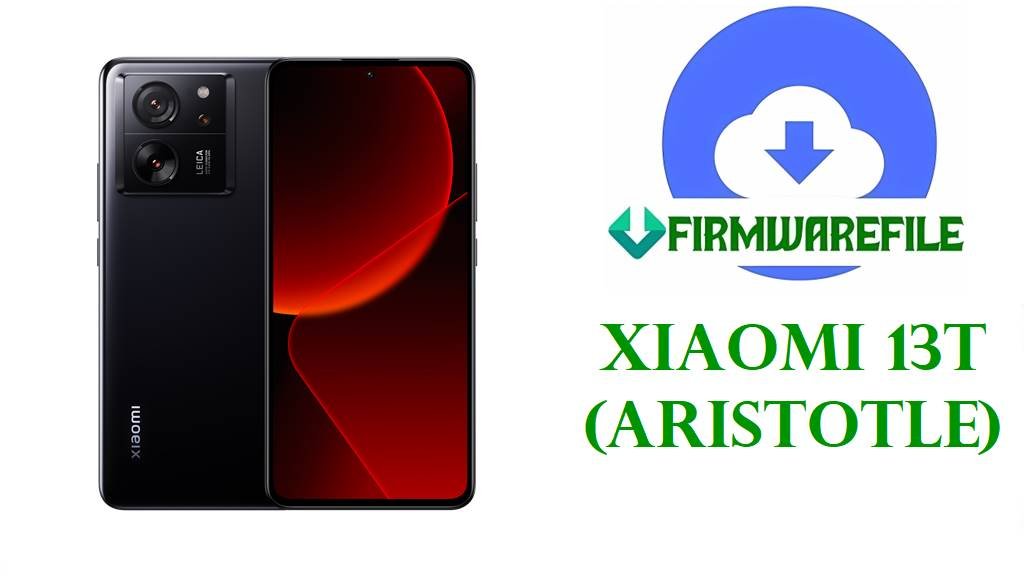
Download Xiaomi 13T (aristotle) Official HyperOS 2 Fastboot Firmware Files
Xiaomi 13T (codename aristotle) is a performance-focused mid-flagship with a 6.67-inch 144Hz AMOLED display, MediaTek Dimensity 8200 Ultra chipset, and a 5000mAh battery with 67W wired charging. Based on real user discussions, some owners report HyperOS-era slowdowns/lag (including camera-related lag) and overheating concerns during use. The official HyperOS 2 fastboot firmware packages you provided (Android 15) are designed for clean reinstallation/repair and, for OS2.0.211.0.VMFMIXM specifically, the published changelog confirms a November 2025 security patch update that increases system security.
File Selection Guide.
- Match your region code: VMFMIXM (Global), VMFEUXM (EEA/Europe), VMFRUXM (Russia), VMFIDXM (Indonesia), VMFTWXM (Taiwan), VMFTRXM (Turkey). (These region tags are part of the filenames/build strings.)
- Choose Fastboot ROM (.tgz) when: You need a clean reinstall, you’re fixing severe software issues (bootloop/failed update), or you want the most thorough “stock reset” using a PC-based flashing method.
- Do not cross-flash regions: Flashing a ROM from a different region branch than your phone’s installed branch is a common cause of update failures and network/service quirks, so stick to your exact branch (MIXM ↔ MIXM, EUXM ↔ EUXM, etc.).
- Prefer the newest build in your branch: In your list, the newest Global file is OS2.0.211.0.VMFMIXM (build date 2025-11-18 in filename).
Download Official Firmware for Xiaomi 13T (aristotle)
Global HyperOS 2 Fastboot ROM – OS2.0.211.0.VMFMIXM (Android 15)
- Filename: aristotle_global_images_OS2.0.211.0.VMFMIXM_20251118.0000.00_15.0_global_b796ec3628.tgz
- Region: Global (MIXM)
- File Size: 7.21GB
- Build Date: 2025-11-18
- Build Version: OS2.0.211.0.VMFMIXM (Global)
- Android Version: 15
- Flashing Type: Fastboot ROM
- Verified Changelog (this build): Updated the security patch to November 2025; increased system security.
- Download Link: Download OS2.0.211.0 Global Fastboot ROM (Xiaomi OTA)
Russia HyperOS 2 Fastboot ROM – OS2.0.207.0.VMFRUXM (Android 15)
- Filename: aristotle_ru_global_images_OS2.0.207.0.VMFRUXM_20251122.0000.00_15.0_ru_902d818401.tgz
- Region: Russia (RUXM)
- File Size: 7.49GB
- Build Date: 2025-11-22
- Build Version: OS2.0.207.0.VMFRUXM (Russia)
- Android Version: 15
- Flashing Type: Fastboot ROM
- Download Link: Download OS2.0.207.0 Russia Fastboot ROM (Xiaomi OTA)
Indonesia HyperOS 2 Fastboot ROM – OS2.0.207.0.VMFIDXM (Android 15)
- Filename: aristotle_id_global_images_OS2.0.207.0.VMFIDXM_20251122.0000.00_15.0_id_5900a5b4c6.tgz
- Region: Indonesia (IDXM)
- File Size: 6.84GB
- Build Date: 2025-11-22
- Build Version: OS2.0.207.0.VMFIDXM (Indonesia)
- Android Version: 15
- Flashing Type: Fastboot ROM
- Download Link: Download OS2.0.207.0 Indonesia Fastboot ROM (Xiaomi OTA)
EEA HyperOS 2 Fastboot ROM – OS2.0.212.0.VMFEUXM (Android 15)
- Filename: aristotle_eea_global_images_OS2.0.212.0.VMFEUXM_20251119.0000.00_15.0_eea_0313d1bf24.tgz
- Region: EEA (EUXM)
- File Size: 6.77GB
- Build Date: 2025-11-19
- Build Version: OS2.0.212.0.VMFEUXM (EEA)
- Android Version: 15
- Flashing Type: Fastboot ROM
- Download Link: Download OS2.0.212.0 EEA Fastboot ROM (Xiaomi OTA)
Taiwan HyperOS 2 Fastboot ROM – OS2.0.207.0.VMFTWXM (Android 15)
- Filename: aristotle_tw_global_images_OS2.0.207.0.VMFTWXM_20251117.0000.00_15.0_tw_e4351ed8f5.tgz
- Region: Taiwan (TWXM)
- File Size: 6.45GB
- Build Date: 2025-11-17
- Build Version: OS2.0.207.0.VMFTWXM (Taiwan)
- Android Version: 15
- Flashing Type: Fastboot ROM
- Download Link: Download OS2.0.207.0 Taiwan Fastboot ROM (Xiaomi OTA)
Turkey HyperOS 2 Fastboot ROM – OS2.0.207.0.VMFTRXM (Android 15)
- Filename: aristotle_tr_global_images_OS2.0.207.0.VMFTRXM_20251119.0000.00_15.0_tr_d7568b246b.tgz
- Region: Turkey (TRXM)
- File Size: 6.91GB
- Build Date: 2025-11-19
- Build Version: OS2.0.207.0.VMFTRXM (Turkey)
- Android Version: 15
- Flashing Type: Fastboot ROM
- Download Link: Download OS2.0.207.0 Turkey Fastboot ROM (Xiaomi OTA)
Xiaomi 13T Device + Firmware Details
| Device Name | Xiaomi 13T |
|---|---|
| Codename | aristotle (Xiaomi 13T Global listing) |
| Chipset | MediaTek Dimensity 8200 Ultra (4 nm) |
| Display | 6.67-inch AMOLED, 144Hz |
| Battery | 5000 mAh, 67W wired charging |
| Software | HyperOS builds listed here are Android 15 (from filenames and tracker pages) |
| Latest Global file in this post | OS2.0.211.0.VMFMIXM (Fastboot, filename dated 2025-11-18) |
| File Type | Fastboot ROM (.tgz) |
| Flashing Tool Required | Xiaomi Mi Flash Tool (Fastboot flashing) |
| Main Issues Reported (user reports) | Lag/sluggish performance after HyperOS update (including camera-related lag), and overheating concerns in normal use scenarios. |
| Verified Fixes in OS2.0.211.0.VMFMIXM | November 2025 security patch update (system security increase) as stated in the OS2.0.211.0.VMFMIXM changelog. |
Flashing Requirements
Flashing fastboot firmware can wipe your device. Back up photos, chats, and documents before proceeding.
Use a Windows PC, a stable USB cable, and charge the phone to at least 50% before flashing.
Only flash firmware that matches your exact branch (MIXM/EUXM/RUXM/IDXM/TWXM/TRXM) to avoid update and connectivity issues.
📱How to Flash the Firmware
Method 1: Fastboot Flashing (Mi Flash Tool)
- Download + extract: Extract
aristotle_global_images_OS2.0.211.0.VMFMIXM_20251118.0000.00_15.0_global_b796ec3628.tgz(or the matching region TGZ) to a folder on your PC. - Install tools: Install Xiaomi USB drivers and Xiaomi Mi Flash Tool on Windows.
- Enter Fastboot: Power off the phone, then boot into Fastboot mode and connect it via USB.
- Flash: In Mi Flash Tool, select the extracted ROM folder and start flashing with the appropriate wipe option.
- First boot: Reboot and wait patiently—first boot after a clean flash can take longer than usual.
For a full step-by-step tutorial (screenshots, tool downloads, and common errors), follow the guides below that match your provided Fastboot .tgz files:
- Full Tutorial: Xiaomi MI Flash Tool (Fastboot ROM)
- Full Tutorial: flash_all.bat / Flash.bat script method
Frequently Asked Questions (FAQs)
What phone model is “aristotle” in these firmware filenames?
XM Firmware Updater lists “aristotle” as the codename for Xiaomi 13T (including Xiaomi 13T Global).
Is OS2.0.211.0.VMFMIXM an Android 15 firmware for Xiaomi 13T Global?
Yes—XM Firmware Updater shows OS2.0.211.0.VMFMIXM for Xiaomi 13T Global (aristotle) as a HyperOS Stable build with “user-15.0” in the package naming.
What is the confirmed changelog for Xiaomi 13T OS2.0.211.0.VMFMIXM?
The published changelog line for OS2.0.211.0.VMFMIXM states the security patch was updated to November 2025, increasing system security.
Which Xiaomi 13T firmware branch should I use: MIXM or EUXM?
Use MIXM if your phone is on Global, and EUXM if your phone is on EEA/Europe; the branch identifier appears in your current build number and in the firmware filename.
Can flashing official fastboot firmware help Xiaomi 13T lag after HyperOS?
Some users report Xiaomi 13T became laggier after HyperOS updates (including camera-related lag), and a clean flash can help if the issue is caused by corrupted system data—but this is not an official “fixed” item unless stated in a changelog.
Can this firmware fix overheating on Xiaomi 13T?
Overheating reports exist in user discussions, but no overheating fix is explicitly stated for these specific builds in the cited official changelog line, so it cannot be claimed as a confirmed fix here.