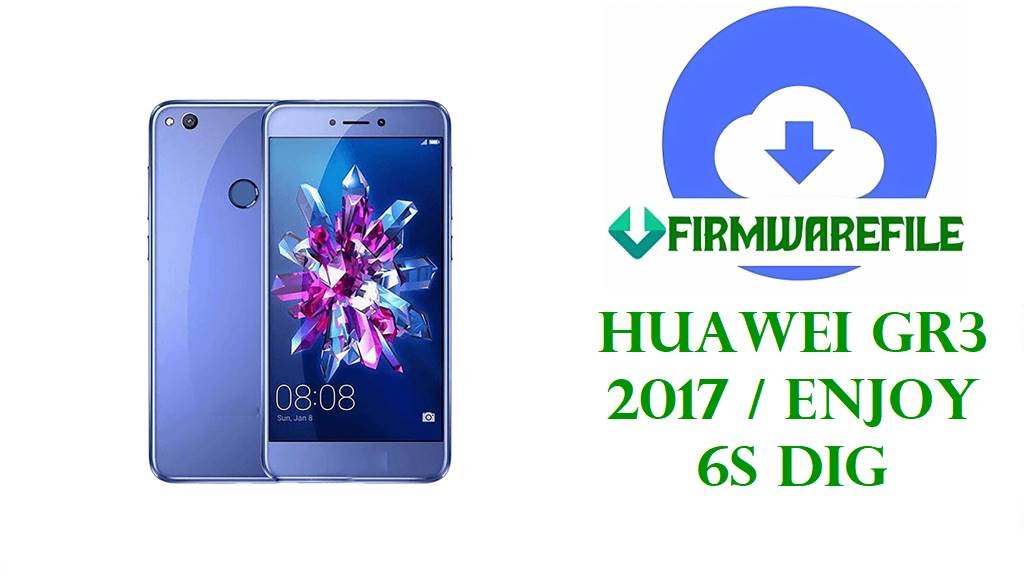
Huawei GR3 2017 / Enjoy 6S DIG Firmware Download Files
If your Huawei GR3 2017 or Enjoy 6S is stuck on the logo, looping after an update, or refusing to finish boot after a bad flash, the files here give you a proper starting point instead of the usual trial-and-error mess. This DIG family is one of those Huawei ranges where the phone name stays familiar but the actual firmware target changes fast once you get into L21, L01, L23, AL00, or TL10 territory.
Some of these packages look like normal stock firmware archives. One of them is very obviously a rescue-style line-flash file for a dead DIG-AL00. That is not the same job.
Included Models
- DIG-L21
- DIG-L21HN
- DIG-TL10
- DIG-L23
- DIG-L01
- DIG-AL00
Firmware by Model navigation
DIG-L21
The Russian hw_ru build at C10B123 is one of the cleaner filenames in this set. You already get region, branch, Android 6.0, EMUI 4.1, and the Diego platform tag in one shot, which makes it easier to decide whether the package even belongs near the phone on your bench.
It is packed as a RAR, so open it before assuming the flash method. If it unpacks into a normal Huawei update structure, fine. If not, do not improvise.
DIG-L21HN
The L21HN file is a different branch from the standard L21 package, and that extra HN is not decoration. C432B127 puts it on a Europe-style path, which is already enough reason not to mix it with the hw_ru file just because both say L21.
Short version: match the sticker, not your memory.
DIG-TL10
There is one TL10 package here, listed twice with a tiny size difference. Same B131 branch, same China Mobile labeling, same Android 6.0 and EMUI 4.1 base. That usually means mirrored copies, not two different builds.
No need to overcomplicate this one.
DIG-L23
L23 shows up with the C469B101 branch and a telecom branding string in the filename. That matters because these Latin America Huawei builds can be annoyingly specific about region and customization, especially after a failed OTA or an interrupted restore.
There are two copies again, basically the same package with a slight size difference in the listing. Pick the cleaner mirror and keep moving.
DIG-L01
The L01 package is large, European-looking, and straightforward enough on paper: C55B123, Android 6.0, EMUI 4.1. That makes it the kind of archive I would inspect first when the phone still behaves like a normal software brick and not like a board-level problem.
DIG-AL00
AL00 is where the repair logic changes. You have regular China builds like B153 and B165, then a B201 package explicitly described as a rescue line-flash file for no power, freeze, endless reboot, and brick recovery. That wording is not subtle.
If a DIG-AL00 still has a normal update path, I would rather start from the ordinary stock branch that matches the device. The B201 rescue package is for the uglier cases, the phones that already ignored the polite options.
Firmware Table
| Model | Filename | Version | Region | Android Base | ROM Type | Size | Notes | Target User | Download Link |
|---|---|---|---|---|---|---|---|---|---|
| DIG-L21 | Huawei+GR3+2017+DIG-L21+hw+ru+Diego-L21C10B123+Firmware+6.0.0+r1+EMUI4.1+05014MKG.rar | B123 | hw_ru / C10 | Android 6.0 | Factory stock package | 1.7GB | Russian branch; Diego platform naming is explicit | User restoring a DIG-L21 on the hw_ru line after bootloop or failed update | Download |
| DIG-TL10 | Diego-TL10_C01B131_Firmware_China_中国移动通信集团公司_Android 6.0_EMUI 4.1_05014AVN.zip | B131 | China / C01 | Android 6.0 | Full firmware zip | 2.56GB | China Mobile branch | User fixing a DIG-TL10 that still matches the China Mobile software path | Download |
| DIG-L23 | Diego-L23_C469B101_Firmware_Nonspecific_Corporacion Nacional de Telecomunicaciones_Android 6.0_EMUI 4.1.zip | B101 | C469 | Android 6.0 | Full firmware zip | 2.56GB | Carrier-customized Latin America branch | User needing the exact L23 regional build back on the device | Download |
| DIG-L01 | Huawei_GR3_2017_DIG-L01_Diego-L01C55B123_Firmware_6.0.0_r1_EMUI4.1_05014LMD.rar | B123 | C55 | Android 6.0 | Factory stock package | 4.5GB | Large L01 archive with clear branch naming | User repairing a DIG-L01 soft brick or rebuilding stock software cleanly | Download |
| DIG-AL00 | A_华为畅享6S_DIG-AL00线刷包B201救砖原厂固件不开机定屛反复重启变砖修复教程方法.zip | B201 | China | Rescue line-flash package | 2.13GB | Clearly labeled unbrick and no-boot rescue file | Technician handling a dead or repeatedly rebooting DIG-AL00 | Download | |
| DIG-AL00 | Huawei_DIG-AL00_DIG-AL00_C00B165_6.0.zip.rar | B165 | C00 | Android 6.0 | Factory stock package | 1.4GB | Plain China stock branch | User returning a DIG-AL00 to stock without jumping straight to rescue firmware | Download |
| DIG-AL00 | Diego-AL00_C00B153_Firmware_China_Nonspecific_Android 6.0_EMUI 4.1_05014AVM.zip | B153 | China / C00 | Android 6.0 | Full firmware zip | 2.55GB | Earlier AL00 stock branch than B165 | User who needs a lower DIG-AL00 build for rollback-style recovery | Download |
| DIG-TL10 | Diego-TL10_C01B131_Firmware_China_中国移动通信集团公司_Android 6.0_EMUI 4.1_05014AVN.zip | B131 | China / C01 | Android 6.0 | Full firmware zip | 2.6GB | Mirror of the same TL10 B131 package | User who needs an alternate source for the same DIG-TL10 build | Download |
| DIG-L21HN | DIG-L21HN-Diego-L21HNC432B127-Firmware-6.0.0-r1-EMUI4.1-05014LML.rar | B127 | C432 | Android 6.0 | Factory stock package | 3.83GB | European L21HN branch, not the same target as hw_ru L21 | User repairing a DIG-L21HN and needing the C432 line specifically | Download |
| DIG-L23 | Diego-L23_C469B101_Firmware_Nonspecific_Corporacion Nacional de Telecomunicaciones_Android 6.0_EMUI 4.1.zip | B101 | C469 | Android 6.0 | Full firmware zip | 2.55GB | Second mirror of the same L23 regional package | User who needs a backup source for the DIG-L23 C469 build | Download |
Device & Firmware Overview
The DIG family uses Huawei’s Diego codename across models such as DIG-TL10 and DIG-L21, and public device listings also place DIG-L01, DIG-L03, DIG-L21, DIG-L23, and DIG-AL00 in the same broader hardware line.
These phones sit on Qualcomm’s Snapdragon 435 platform, which is why some repair packages for this family show up as more service-oriented archives instead of simple consumer update files.
Huawei marketed parts of this range as GR3 2017 in some regions and Enjoy 6S in others, so the commercial name on the back of the box does not always tell you enough to choose firmware safely.
Compatibility Warning
- Do not cross-flash DIG-L21, DIG-L21HN, DIG-L23, DIG-L01, DIG-TL10, and DIG-AL00 just because they share the Diego platform name.
- C432, C469, C55, C10, C00, and C01 are not filler text. On old Huawei firmware, that region line decides whether the flash is routine or a mistake.
- The DIG-AL00 B201 rescue package should be treated as an escalation file, not your first move on a phone that still has normal recovery behavior.
- Mirrored files with slightly different listed sizes are common in old firmware collections. Compare filenames and extracted contents, not just the size number.
Preparation Before Flashing
- Read the exact model from the phone label, fastboot screen, or tray sticker before you download anything else.
- Extract the archive first. If you see a Huawei dload structure with UPDATE.APP, use the standard Huawei route. If you instead find Qualcomm service files like programmer or rawprogram content, treat it as a tool-based flash job.
- Back up anything still readable. These are full stock and recovery packages, not harmless patches.
- Charge the battery properly and use a known-good cable. A weak cable during a rebuild wastes more time than most software errors.
- On DIG-AL00, start with the normal stock branch when the phone still responds normally. The rescue file is for the devices that already fell off that cliff.
Quick Flash Instructions
- For archives that unpack into a normal Huawei update layout, use the Huawei dload/eRecovery guide here: Download and flash with Huawei dload method.
- If the extracted package contains Qualcomm emergency-flash files instead of Huawei’s usual update structure, use a Qualcomm service workflow such as QFIL here: Flash with QFIL.
- The DIG-AL00 B201 rescue archive belongs in that second category only if the extracted contents confirm a Qualcomm line-flash layout.
- Do not switch to a different region branch just because the first file fails to flash. That usually means the package is wrong for the handset, not that the phone needs a more random choice.
FAQ
Which file should I try first for a normal bootloop?
Use the stock package that matches the exact model and region already on the phone. For example, a DIG-L21 hw_ru phone belongs near the C10B123 file, not the C432 L21HN package.
When should I use the DIG-AL00 B201 rescue file?
When the device is already in bad shape and the ordinary stock path is gone, especially on no-boot or endless-restart cases. It is not the polite first step.
Are the two DIG-TL10 downloads different?
They look like the same B131 China Mobile package listed twice with a slightly different size value. Treat them as mirrors until the extracted contents prove otherwise.
Can I flash DIG-L23 firmware on DIG-L21 because both are Diego?
No. Same platform family, wrong target.