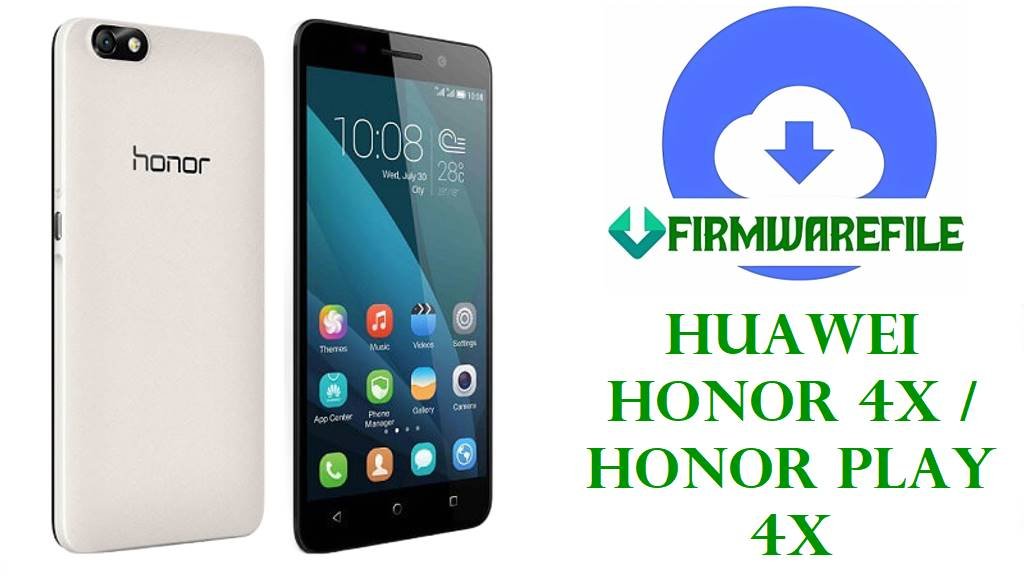
Huawei Honor 4X / Honor Play 4X Stock ROM Firmware Download
If your Honor 4X is stuck on the logo, failed an OTA, or came back from a bad flash half-dead, these packages are the kind of files you reach for when normal updating is already off the table. Some are straightforward dload builds, some are board-level recovery packages, and they are not interchangeable just because the phones look the same.
This page covers the CHE-series Honor 4X and Play 4X firmware files listed below, with enough repair methods to help you choose the right one instead of guessing. Do not guess here.
The file names already tell most of the story. You have a mix of normal update archives, dload packages for recovery-based flashing, and deeper service files marked Board, HMT, or QFIL for units that no longer have a usable update path.
That matters because bootloop repair and failed OTA recovery usually start with the least invasive package that still matches the model and region code. Once recovery is gone or the phone will not take a package at all, that is when the heavier stuff starts making sense.
Included Models
- CHE2-UL00
- CHE2-L11
- CHE1-L04
- CHE1-CL10
- CHE1-CL20
- CHE-TL00
- CHE2-TL00 (mixed-name package also references CHE2-UL00)
The Honor 4X family includes CHE2-L11, CHE1-L04, CHE2-UL00, and CHE1-CL20 variants, while CHE-TL00 belongs to the Glory Play 4X naming branch.
Firmware by Model
CHE2-UL00
The cleanest file here for this variant is the B396 package. It looks like a normal full update archive, so it makes more sense on a phone that still responds properly and is not fully wrecked.
The other file with CHE2-TL00 in front and CHE2-UL00 buried inside the name is the one that needs a cooler head. Mixed naming like that can be real, but it is also exactly the sort of thing people flash in a hurry and regret later.
CHE2-L11
You have two dload options for this model, and they are not equally useful. The plain dload zip is the kind of file I keep around when I just need a stock package and I am not chasing a specific build.
The B160 package is more specific, tagged with C185 in the name, so it is the better fit when the phone already belongs to that software branch and you want to pull it back from a soft brick or an update failure without changing lanes mid-repair.
CHE1-L04
This one is easier to read because the filename gives away more than usual: C900B341, cust block C151D003, EMUI 3.1, Android 5.1, and dload packaging. For repair work, that is useful. You know it is not some vague archive with half the identity missing.
If the handset still reaches the Huawei force-update route, this is the type of package worth trying before you drag the device onto a PC bench setup. Not every job needs to become a full resurrection.
CHE1-CL10
Both files here are service-side material, not casual update zips. One is a Board QFIL package on B282, and the other is B289 with China/Myanmar tags, EMUI 3.0, Android 4.4, and QFIL clearly spelled out.
That usually points to the jobs where recovery is gone, the system partition is trashed, or the phone no longer behaves like a phone at all. If somebody already cross-flashed nonsense onto it, these are the kinds of packages that sometimes pull it back.
Also, CHE1-CL10 is recognized as an Honor 4X variant, while CHE2-UL00 sits in the same wider Honor 4X line and is commonly tied to Android 4.4.2 / EMUI 3.0-era software naming, which fits the older package style seen across this set.
CHE1-CL20
There are two very different-looking files for CHE1-CL20. The B280 Board HMT package is the more obvious repair file. The short C00B440 zip is harder to read from the filename alone, so I would treat it like a branch-specific full package and verify the device label twice before touching it.
CHE-TL00
This archive is small compared to the rest, marked Board Software, China, Android 4.4.2, EMUI 3.0, and HMT. That combination usually means a narrower service package rather than a broad consumer update.
CHE2-TL00
There are two files in this group, and they feel like they came from different drawers. One carries a long mixed identifier with CHE2-UL00 in the same name and build B384; the other is a short MC01B580 package with almost no extra context.
I would not put those in the same bucket just because both say CHE2-TL00 somewhere. One is descriptive enough to inspect. The other is the kind of file that depends heavily on already knowing what is on the sticker and what branch the phone came from.
Firmware Table
| Model | Filename | Version | Region | Android Base | ROM Type | Size | Notes | Target User | Download Link |
|---|---|---|---|---|---|---|---|---|---|
| CHE2-UL00 | Che2-UL00 V100R001CHNC17B396.zip | V100R001CHNC17B396 | CHNC17 | Not stated | Full update package | 1.10GB | Clear model/build naming, no dload tag in filename | Users fixing a bootloop on a matching CHE2-UL00 that still accepts a normal package path | Download |
| CHE2-L11 | Honor_4X_Che2-L11_Dload.zip | Not stated | Not stated | Not stated | Dload | 1007MB | Generic dload archive, build number not shown in filename | Owners who still have stock-style update access and need a plain recovery package | Download |
| CHE2-L11 | Honor_4X_Che2-L11_V100R001C185B160_Dload.zip | V100R001C185B160 | C185 | Not stated | Dload | 1.05GB | Specific C185 build, easier to match to an existing region branch | Repair users dealing with failed OTA or soft brick on a C185 CHE2-L11 | Download |
| CHE1-L04 | Honor_4X_Che1-L04_C900B341CUSTC151D003_EMUI3.1_05021WND_5.1_Dload.zip | C900B341 / CUSTC151D003 | C900 / C151 | Android 5.1 | Dload | 1.15GB | Detailed filename includes EMUI 3.1 and cust block | CHE1-L04 users restoring stock software after update failure or unstable system | Download |
| CHE1-CL10 | Huawei_Glory_Play_4X_CHE1-CL10_V100R001CHNC92B282_Board_QFIL.zip | V100R001CHNC92B282 | CHNC92 | Not stated | Board / QFIL | 1.18GB | Service-style board package for deeper recovery work | Technicians handling hard brick, dead recovery, or broken boot chain on CHE1-CL10 | Download |
| CHE1-CL10 | Huawei_Play_4X_CHE1-CL10_V100R001CHNC92B289_China_Myanmar_EMUI3.0_05021PWE_05021SRH_4.4_QFIL.zip | V100R001CHNC92B289 | CHNC92 / China / Myanmar | Android 4.4 | QFIL | 1.18GB | QFIL archive with region tags and EMUI 3.0 naming | Users repairing a CHE1-CL10 on the same branch when dload is no longer an option | Download |
| CHE1-CL20 | Huawei_Honor_4X_Che1-CL20_V100R001CHNC00B280_Board_HMT.zip | V100R001CHNC00B280 | CHNC00 | Not stated | Board / HMT | 1.01GB | Board-level HMT package, not a routine update zip | Repair work on CHE1-CL20 units with deeper software damage | Download |
| CHE1-CL20 | CHE1-CL20C00B440.zip | C00B440 | C00 | Not stated | Full update package | 1.10GB | Short filename, package identity is less descriptive than the board file above | Users who already know they need the C00B440 branch for CHE1-CL20 | Download |
| CHE-TL00 | Huawei_Glory_Play_4X_CHE-TL00_MH002066_Board_Software_China_Android_4.4.2_EMUI_3.0_05021VQW_HMT.zip | MH002066 | China | Android 4.4.2 | Board Software / HMT | 485MB | Smaller service package, clearly marked board software | Bench repair on CHE-TL00 where system recovery is already gone | Download |
| CHE2-TL00 / CHE2-UL00 | Che2-TL00_201140_Che2-UL00_Android_EMUI3.0_V100R001CHNC17B384_4.4.2_20151101214803.zip | V100R001CHNC17B384 | CHNC17 | Android 4.4.2 | Full update package | 862MB | Mixed model naming in one file, needs careful verification before use | Experienced users checking a very specific CHE2 branch after failed update or software corruption | Download |
| CHE2-TL00 | Che2-TL00MC01B580.zip | MC01B580 | MC01 | Not stated | Full update package | 975MB | Later build code with very little extra naming context | CHE2-TL00 owners already chasing the MC01B580 branch specifically | Download |
Device & Firmware Overview
These files revolve around the Honor 4X and Play 4X family, with CHE2-UL00, CHE1-CL10, and CHE-TL00 sitting across overlapping commercial names depending on market and branch.
CHE2-UL00 is commonly tied to Android 4.4.2 and EMUI 3.0-era software, which lines up with the older naming style visible in several archives here.
From a repair angle, the important split is simple: dload packages are for phones that can still take a local or force update, while Board, HMT, and QFIL files belong to deeper service work where the normal path is already broken.
Compatibility Warning
Match the phone by exact model code first, then region/build branch second. CHE1, CHE2, and CHE-TL00 are not safe to treat as the same device just because they are all called Honor 4X or Play 4X somewhere.
Do not mix C185, C900, CHNC00, CHNC17, CHNC92, and C00 packages casually. If the filename carries a board tag, HMT tag, or QFIL tag, treat it as a service file, not a regular upgrade.
The mixed-name CHE2-TL00 / CHE2-UL00 archive needs extra caution. If your sticker, current software branch, or board identity does not line up cleanly, skip it.
Preparation Before Flashing
- Read the label under the battery tray area or on the rear sticker and confirm the exact CHE model before you do anything else.
- Check the build code in the filename and keep region jumps to a minimum, especially on the dload packages.
- Charge the battery well past 50 percent. Old Huawei devices hate low-voltage flashing attempts.
- Back up anything still readable, because some of these recovery routes are not polite.
- For dload archives, extract first and confirm the expected update content is actually inside before copying to storage.
- For QFIL, Board, or HMT packages, use a stable cable and a Windows setup that already has the proper drivers working.
Quick Flash Instructions
- Pick the package by exact model and nearest region/build match, not by the marketing name on the front glass.
- If the filename says dload, unpack it, place the required update content in the expected dload path, and run the stock force-update method on the phone.
- If the handset no longer reaches a workable recovery state, move to the package marked QFIL, Board, or HMT that matches the device branch.
- After flashing, leave the first boot alone for a while. These old builds can sit on the logo longer than people expect.
That is the clean version. Real benches are messier.
FAQ
Can I flash a CHE1 package on a CHE2 phone?
No. Same family, different branch. That is how perfectly repairable phones turn into harder jobs.
Which file should I try first for a failed OTA?
The matching dload package is the safer first step when the phone still enters update or recovery mode. Save the service-side packages for the phones that refuse the normal route.
Why is the CHE-TL00 file much smaller than the others?
Because it looks like a narrower board software package rather than a broad full consumer update. Smaller does not mean safer.
What does QFIL, Board, or HMT usually mean here?
It usually means the file belongs to a deeper repair path meant for service work, not routine local updating from a healthy phone.
What about the file that names both CHE2-TL00 and CHE2-UL00?
Only touch that one when the device identity is already verified from the label and your current branch lines up with the build naming. If there is any doubt, leave it alone and use a cleaner match.