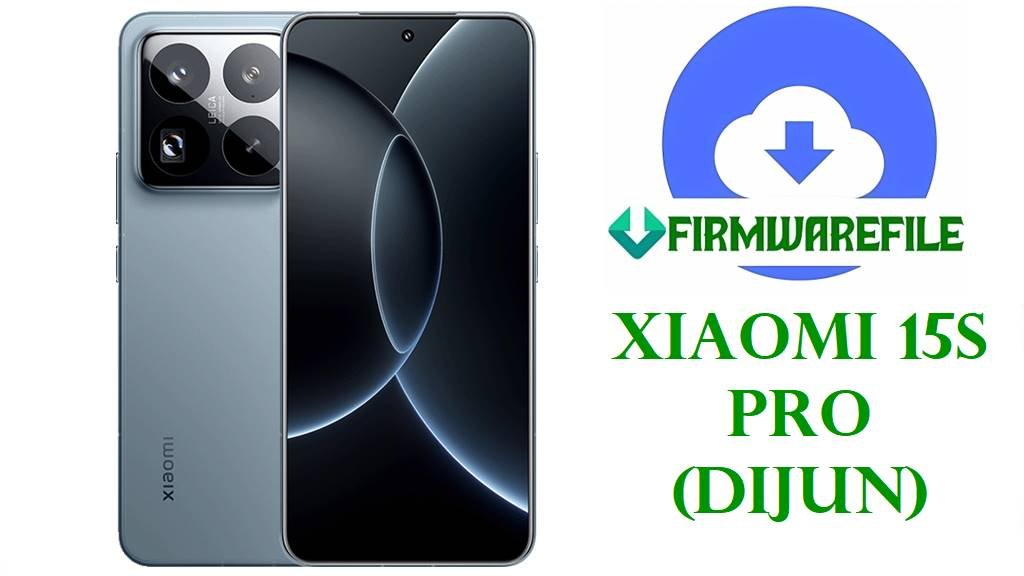
Official Xiaomi 15S Pro (dijun) HyperOS 2.0.208.0 China Fastboot ROM
The Xiaomi 15S Pro is a premium flagship smartphone featuring a 6.73‑inch 2K‑class LTPO AMOLED display at 120 Hz, Xiaomi’s in‑house XRing O1 3 nm chipset, up to 16 GB LPDDR5T RAM, and fast UFS 4.x storage for top‑tier speed and responsiveness. It also packs a large 6,100 mAh battery with high‑power wired and fast wireless charging plus a Leica‑tuned camera system, making it attractive to power users, photographers, and gamers. At the same time, owners often report heavy heating during camera or gaming use, faster battery drain than expected, and occasional UI micro‑stutters and app glitches that are largely software‑related rather than hardware faults.
The official China HyperOS 2.0.208.0.VODCNXM Android 15 fastboot ROM for codename dijun targets these issues with updated animations, camera and HDR tuning, GPS improvements, bug fixes, and newer security patches to deliver a smoother, more efficient system on the Xiaomi 15S Pro.
Xiaomi 15S Pro Firmware Details
| Device Name | Xiaomi 15S Pro (China) |
|---|---|
| Codename | dijun – internal codename for Xiaomi 15S Pro China. |
| Region / Branch | China region, HyperOS China stable branch (VODCNXM suffix). |
| Chipset | Xiaomi XRing O1 3 nm SoC with 10‑core CPU up to around 3.9 GHz, delivering performance comparable to Snapdragon 8 Elite‑class chips and strong GPU capability via a high‑core Immortalis graphics unit. |
| Display | 6.73‑inch LTPO AMOLED, ~1440p (2K‑class) resolution, 120 Hz variable refresh, up to around 3,200 nits peak brightness, and high‑frequency PWM dimming for smoother visuals. |
| Battery & Charging | Approx. 6,100 mAh battery with very fast wired charging and high‑speed wireless charging, giving long runtime but also making thermals and power tuning crucial. |
| Camera | Leica‑branded multi‑camera setup with a large main sensor (around 1/1.31″ class) and advanced Pro mode options aimed at enthusiasts and content creators. |
| Software Families | Ships with HyperOS 2.x on Android 15; this build is part of HyperOS 2.2 line for China devices. |
| Firmware Version in This File | HyperOS 2.0.208.0.VODCNXM (HyperOS 2.2), Android 15.0 China stable fastboot ROM. |
| Build / Package Name | dijun-images-OS2.0.208.0.VODCNXM-user-20250731.0000.00-15.0-cn-1680209434.tgz fastboot image package. |
| Release / Build Date | Internal build date 2025‑07‑31, with stable release and mirrors appearing around mid‑August 2025 for Xiaomi 15S Pro China users. |
| File Size | ≈8.6–8.7 GB compressed fastboot package (listed about 8.63–8.64 GB depending on mirror). |
| Main Issues Reported on Xiaomi 15S Pro | Users commonly report noticeable heating and rapid battery drain during camera use, 4K recording, or extended gaming sessions, plus some idle drain and UI judder that appear tied to software and tuning. |
| What OS2.0.208.0.VODCNXM Improves | Update trackers and pilot‑program notes highlight refined system animations, camera Pro mode UI/layout tweaks, better HDR video behavior, GPS optimizations in difficult environments, and fixes for occasional black‑screen and legacy‑app issues, all of which contribute to smoother, more stable daily use. |
| Security & Stability | HyperOS 2.0.208.0 sits in a 2025 mid‑year rollout wave where Xiaomi pushes newer Android 15 security patches and general stability improvements to flagship devices like the 15S Pro. |
| Flash Method | Fastboot images intended for Xiaomi Mi Flash Tool on Windows or for manual fastboot‑script flashing (flash_all.bat type) with an unlocked bootloader. |
| Bootloader Status | Manual fastboot flashing generally requires an officially unlocked bootloader; locked stock devices should use OTA/Recovery packages instead. |
| Use Cases for This ROM | Clean upgrade from earlier HyperOS 2 builds, fixing serious software issues like bootloops after failed OTA, persistent lag or animation bugs, abnormal heating from software glitches, or restoring a heavily modified system back to stock on Xiaomi 15S Pro China. |
Download Official Firmware for Xiaomi 15S Pro (dijun)
Below is the official China fastboot ROM you provided for Xiaomi 15S Pro (dijun), with build details and usage notes so you can confirm exact compatibility before downloading and flashing.
| Filename | Region / Device | Android / HyperOS | Build Version | Type | Size | Build Date | Notes | Download |
|---|---|---|---|---|---|---|---|---|
| dijun-images-OS2.0.208.0.VODCNXM-user-20250731.0000.00-15.0-cn-1680209434.tgz | China Xiaomi 15S Pro only (codename dijun, VODCNXM branch). | Android 15 / HyperOS 2.0.208.0 (HyperOS 2.2). | OS2.0.208.0.VODCNXM (China stable fastboot). | Official fastboot ROM (.tgz) for Mi Flash / fastboot script flashing. | ≈8.63–8.64 GB compressed package. | Internal build 2025‑07‑31; rollout and mirrors published mid‑August 2025. | Recommended for Xiaomi 15S Pro China users needing a clean HyperOS 2.2 Android 15 base to fix lag, animation glitches, camera bugs, heating caused by software, or post‑OTA boot issues. | Download OS2.0.208.0.VODCNXM (Xiaomi BigOTA) |
Flashing Requirements
- Backup your data: Fastboot flashing almost always wipes apps, accounts, and internal storage, so back up photos, chats, and documents to a PC or cloud before you start.
- Charge the phone: Ensure your Xiaomi 15S Pro battery is at least 50–60 % to avoid shutdown during the flash process.
- Windows PC & drivers: Use a stable Windows computer, install Xiaomi/Qualcomm‑class USB drivers, and connect via a good USB‑C cable for reliable transfer.
- Confirm codename & region: In Settings → About phone or using fastboot getvar product, verify that the device is Xiaomi 15S Pro with codename dijun on the China branch (VODCNXM) before flashing this ROM.
- Unlock the bootloader (for fastboot): Manual fastboot or Mi Flash installs require an officially unlocked bootloader; if your bootloader is locked, update using official OTA/Recovery packages instead.
How to Flash the Firmware
Method 1: Xiaomi Mi Flash Tool (Fastboot ROM)
- Prepare tools & ROM: On your Windows PC, install Xiaomi USB drivers and Xiaomi Mi Flash Tool, then download and extract dijun-images-OS2.0.208.0.VODCNXM… so the folder contains all fastboot image files.
- Load firmware into Mi Flash: Open Mi Flash, click the option to select firmware, and point it to the extracted dijun-images-OS2.0.208.0.VODCNXM directory so all partitions are mapped automatically.
- Enter fastboot mode: Power off the Xiaomi 15S Pro, then hold Volume‑Down + Power to enter fastboot mode and connect the phone to the PC with your USB‑C cable.
- Start flashing: Confirm that Mi Flash detects your device, choose a safe option such as “clean all”, then start the flash and wait patiently until a success message appears without disconnecting the cable.
- First boot: Reboot the phone; the first start on HyperOS 2.0.208.0 may take several minutes while the system optimizes apps and services.
For a more detailed Mi Flash walkthrough with screenshots, driver links, and common error fixes, follow this dedicated tutorial: Full Guide: Flash Xiaomi Smartphone Firmware with Mi Flash Tool.
Method 2: Fastboot Script (flash_all.bat)
- Install platform tools: Set up Android platform‑tools on your PC, then extract the fastboot ROM so that flash_all.bat (or similar scripts) and the image files reside in the same folder.
- Connect in fastboot: Boot the Xiaomi 15S Pro into fastboot mode, connect it via USB, and verify detection with a quick fastboot devices command.
- Run the script: Execute flash_all.bat to automatically flash all key partitions; avoid unplugging the cable or closing the window until the script completes.
- Wait for reboot: After flashing, the phone should reboot into HyperOS; if it does not, long‑press the Power button once to trigger a manual restart and wait for the system to load fully.
- Restore & test: Complete setup, restore your backups, then monitor heat, battery life, camera stability, and overall smoothness for a few days to confirm previous issues are resolved or reduced.
For more details on script‑based flashing and best practices, including how to read console output and handle errors, check this in‑depth guide: How to Flash Stock Firmware Using a Fastboot Script (flash_all.bat).
Frequently Asked Questions (FAQs)
What Xiaomi 15S Pro problems can OS2.0.208.0.VODCNXM help fix?
This official HyperOS 2.0.208.0 China build can resolve many software‑side issues such as random freezes, UI animation glitches, occasional black screens with older apps, and some bootloops after failed OTA updates by reinstalling a clean, optimized system. It also improves camera Pro mode behavior, HDR video handling, and GPS reliability in complex environments, which helps reduce crashes and inconsistent imaging performance.
Does this update improve heating and battery drain?
Heating and faster battery drain during camera use, social apps, or gaming are common complaints on the Xiaomi 15 and 15S family, especially on early HyperOS 2 builds. OS2.0.208.0.VODCNXM refines animations and system behavior and is part of Xiaomi’s ongoing HyperOS 2.2 tuning, which aims to smooth workload distribution and reduce unnecessary background usage, helping thermals and endurance when combined with sensible settings.
How do I know if this firmware is compatible with my phone?
You must confirm that your device is the Xiaomi 15S Pro China variant, that its codename is dijun, and that it is on the China VODCNXM firmware branch before flashing this ROM. Global or other regional Xiaomi 15‑series models require their own specific builds, and flashing this China firmware on the wrong device can cause serious network, camera, or boot issues.
Can this ROM unbrick a soft‑bricked Xiaomi 15S Pro?
If the phone still enters fastboot mode and the bootloader is unlocked, flashing the correct dijun fastboot ROM can often recover from soft bricks such as bootloops, stuck HyperOS logo, or crashes after a bad update. Devices that cannot reach fastboot or show no signs of life usually need professional repair or EDL‑level tools rather than user‑level flashing alone.
Is OS2.0.208.0 a big upgrade over earlier HyperOS 2 builds?
Compared with early HyperOS 2 releases for the Xiaomi 15S Pro, OS2.0.208.0.VODCNXM includes newer Android 15 security patches, refined animations, better camera and HDR tuning, and targeted bug fixes collected during Mi Pilot testing. For long‑term stability, security, and camera performance, updating to this stable build is advisable as long as you follow safe flashing procedures and back up your data.