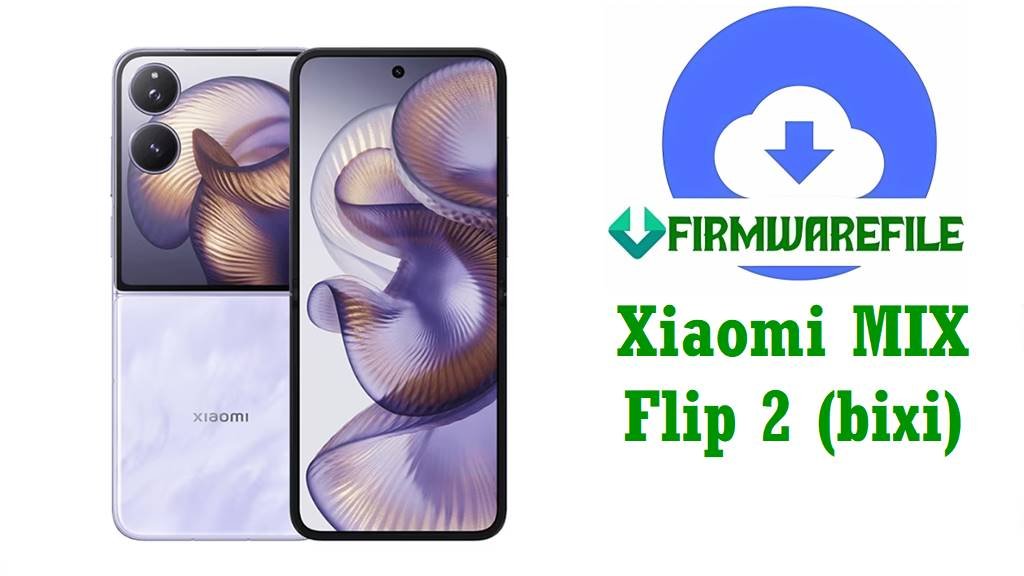
Official Xiaomi MIX Flip 2 (bixi) HyperOS 3.0.3.0 China Fastboot ROM
The Xiaomi MIX Flip 2 is a premium flip-style foldable with a Snapdragon 8 Elite processor, up to 16 GB LPDDR5X RAM, UFS 4.x storage, and a 5,165 mAh battery supporting 67 W wired and 50 W wireless charging, making it one of Xiaomi’s most powerful compact flagships. Its large inner AMOLED panel, outer cover display, and Leica-branded dual-camera setup deliver a flagship experience but also expose users to issues like fast battery drain, random freezes, heating under load, and occasional hinge- or outer-display-related glitches reported by early adopters.
The official HyperOS 3 China fastboot firmware OS3.0.3.0.WOHCNXM (Android 16) for codename bixi is designed to bring smoother performance, better power efficiency, updated security patches, and stability fixes that help address many of these software-side problems.
Xiaomi MIX Flip 2 Firmware Details
| Device Name | Xiaomi MIX Flip 2 (China edition) |
|---|---|
| Model Identifiers | Likely variants such as 2505APX7BC / 2505APX7BG for Chinese/customized editions (check phone box and Settings → About phone to confirm). |
| Codename | bixi (MIX Flip 2) |
| Region / Branch | China, HyperOS China Stable branch (CNXM suffix). |
| Chipset | Qualcomm Snapdragon 8 Elite (flagship 3 nm SoC) with Adreno-class GPU. |
| Display | Inner ~6.8–6.9″ high‑refresh AMOLED main screen plus ~4.0″ external AMOLED cover display, both up to around 1.5K resolution and 120 Hz refresh rate. |
| Battery & Charging | ≈5,165 mAh battery with 67 W wired and 50 W wireless fast charging support. |
| Software Families | Shipped with HyperOS 2.x on Android 15 and updated to HyperOS 3.0.x on Android 16 for China (bixi). |
| Firmware Version in This File | HyperOS 3.0.3.0.WOHCNXM, Android 16.0, China stable fastboot ROM. |
| Build / Package Name | bixi_images_OS3.0.3.0.WOHCNXM_20251024.0000.00_16.0_cn_c01a7ec86a.tgz (fastboot images). |
| Release / Build Date | Internal build date 2025‑10‑24, public fastboot release around late October–early November 2025 for China users. |
| File Size | ≈10.9–11 GB compressed fastboot package (listed around 10.98 GB/11 GB on firmware mirrors). |
| Main Issues Reported on MIX Flip 2 | Community feedback highlights strong performance but notes fast battery drain under heavy use, device heating and thermal throttling in games, random freezes, sporadic touch or screen-response problems, hinge stiffness/angle quirks, and limited outer-screen functionality in early firmware versions. |
| What OS3.0.3.0.WOHCNXM Improves | Changelog mentions smoother and more stable basic experience, refined compiler optimizations, better memory management, improved CPU frequency scheduling, and lower power usage especially in short video playback, which together help reduce lag, crashes, and overheating. |
| Security & Stability | HyperOS 3 batch rollouts for MIX Flip 2 include updated Android 16 base and newer security patches aimed at increasing OS security and reliability. |
| Outer Screen & Smart Cover Features | HyperOS updates for MIX Flip 2 expand external-screen capabilities with richer widgets, better task management, and smarter cover interactions, enhancing usability when the phone is closed. |
| Flash Method for This File | Fastboot images for use with Xiaomi Mi Flash Tool or fastboot-based flash_all.bat-style scripts on a Windows PC. |
| Bootloader Status | Manual fastboot flashing typically requires an unlocked bootloader; standard OTA/Recovery updates do not. |
| Use Cases for This ROM | Clean update from older HyperOS 2.x/3.0.x China builds, fixing serious software issues such as bootloops after failed OTAs, heavy lag, app crashes, or persistent battery/performance bugs, and restoring a stock system for the MIX Flip 2 (bixi). |
Download Official Firmware for Xiaomi MIX Flip 2 (bixi)
This section lists the official China fastboot firmware file you provided for the Xiaomi MIX Flip 2 (bixi), including version, region, and flashing type so you can confirm compatibility before downloading.
| Filename | Region / Device | Android / HyperOS | Build Version | Type | Size | Build Date | Notes | Download |
|---|---|---|---|---|---|---|---|---|
| bixi_images_OS3.0.3.0.WOHCNXM_20251024.0000.00_16.0_cn_c01a7ec86a.tgz | China Xiaomi MIX Flip 2 (bixi) only | Android 16.0 / HyperOS 3.0.3.0 | OS3.0.3.0.WOHCNXM (CN stable) | Fastboot images (tgz) for Mi Flash / fastboot script flashing | ≈10.9–11 GB (compressed package) | 2025‑10‑24 internal build; public release late Oct 2025 | Recommended for users needing a clean HyperOS 3 Android 16 base to fix lag, heating, crashes, or to recover from software corruption on MIX Flip 2 China. | Download OS3.0.3.0.WOHCNXM (Xiaomi OTA server) |
Flashing Requirements & Quick Guides
Because this is a large fastboot package for a foldable flagship, proper preparation is critical to avoid soft or hard brick situations during flashing.
- Backup everything: Fastboot flashing usually wipes apps, internal storage, and settings, so back up photos, chats, and documents to cloud or PC first.
- Charge your MIX Flip 2: Keep the battery at at least 50–60 % to prevent shutdown mid‑flash.
- Use a reliable Windows PC: Install the latest Xiaomi/Qualcomm USB drivers and use the original or high‑quality USB‑C cable for stable data transfer.
- Verify device and codename: In Settings → About phone, confirm the device is Xiaomi MIX Flip 2 China with codename
bixiand that the region/branch matches this China ROM. - Unlock bootloader if needed: For manual fastboot flashing using Mi Flash Tool or scripts, ensure the bootloader is unlocked through Xiaomi’s official unlock process.
Method 1: Xiaomi Mi Flash Tool (Fastboot ROM)
- Prepare your tools: On your Windows PC, install Xiaomi USB drivers, download and extract the
bixi_images_OS3.0.3.0.WOHCNXM_20251024....tgzfile, and install the Xiaomi Mi Flash Tool. - Load the fastboot package: Open Mi Flash Tool, click the option to select firmware, and point it to the extracted
bixi_images_OS3.0.3.0.WOHCNXMfolder so all partitions are mapped. - Enter fastboot mode: Power off the MIX Flip 2 completely, then hold the correct key combination (usually Volume‑Down + Power) to enter fastboot, and connect it to the PC via USB.
- Start flashing: In Mi Flash Tool, choose the desired mode (clean all is safest), confirm that the device is detected, and start the flash; wait patiently until the tool reports success.
- First boot: Disconnect the phone and reboot; the first startup on HyperOS 3.0.3.0 may take several minutes while the system optimizes apps and resources.
For an illustrated, step‑by‑step Mi Flash walkthrough with driver downloads and troubleshooting, follow this dedicated tutorial: Full Guide: Flash Xiaomi Firmware with Mi Flash Tool.
Method 2: Fastboot Script (flash_all.bat)
- Set up platform tools: Install Android platform‑tools on your PC, extract the fastboot ROM, and ensure the
.batscripts and images are in the same directory. - Connect in fastboot: Boot the MIX Flip 2 into fastboot mode and connect via USB, then verify connection with a quick
fastboot devicescommand. - Run the script: Use the appropriate script (
flash_all.bator local equivalent) to automate partition flashing; confirm the window shows commands running without errors. - Do not interrupt: Avoid touching the cable, closing the terminal, or powering off the PC until the script finishes and the device reboots.
- Complete setup: After reboot, go through HyperOS setup, restore your backup, and allow a few days for the system to re‑optimize battery and performance on Android 16.
For more details on script‑based fastboot flashing and best practices, you can reference this deep-dive guide: How to Flash Stock Firmware Using a Fastboot Script (flash_all.bat).
Frequently Asked Questions (FAQs)
What MIX Flip 2 problems can OS3.0.3.0.WOHCNXM help fix?
Installing this clean HyperOS 3 Android 16 China stable build can reduce random freezes, UI lag, and app crashes caused by older or buggy firmware, thanks to improved compiler optimizations and memory handling. Many users also see better thermals and battery life in day‑to‑day and short‑video usage because the update refines CPU scheduling and graphics rendering load.
Does this ROM improve battery drain and heating?
Common complaints about the MIX Flip 2 include heavy battery drain and heating during gaming or camera use, often tied to aggressive performance tuning and early software versions. HyperOS 3.0.3.0.WOHCNXM specifically focuses on reducing power consumption and optimizing performance, which can meaningfully lower heat output and extend screen‑on time when combined with good usage habits.
Will flashing this fastboot ROM erase my data?
Using Mi Flash Tool or a flash_all.bat‑style script with a full fastboot package usually performs a clean flash, wiping apps, internal storage, and settings in the process. To avoid permanent data loss, create offline and/or cloud backups before flashing and treat any manual fastboot operation as potentially destructive.
How do I know if this firmware is compatible with my MIX Flip 2?
First, confirm that your device is the Xiaomi MIX Flip 2 with codename bixi and that it is running the China firmware branch (CNXM) rather than a global/other regional variant. Only if both model/codename and region match should you flash OS3.0.3.0.WOHCNXM; global or other regional units must use their own specific HyperOS builds.
Can this firmware unbrick a soft‑bricked MIX Flip 2?
If the phone can still enter fastboot mode and the bootloader is unlocked, a full fastboot flash with this official ROM can often recover devices stuck in bootloops, on the HyperOS logo, or after failed OTA updates. Hard‑bricked devices that cannot access fastboot or show no sign of life usually require professional EDL/service‑center repair rather than user‑level flashing tools.
Does OS3.0.3.0.WOHCNXM change the outer screen or smart cover features?
HyperOS 3 is part of Xiaomi’s broader push to expand the MIX Flip 2’s outer‑screen capabilities with more powerful widgets, AI-driven interactions, and productivity tools, improving the closed‑phone experience. While individual features can vary by build, this HyperOS 3 China stable line focuses on smoother animations and better external display responsiveness to make the smart cover more useful in daily use.
Is it safe to stay on HyperOS 2 if my phone seems fine?
Remaining on an older HyperOS 2 build may be acceptable in the short term, but you miss out on Android 16’s newer APIs, Xiaomi’s latest security patches, and important performance and stability improvements delivered with HyperOS 3 for MIX Flip 2. For long‑term reliability and app compatibility, updating to an official stable build like OS3.0.3.0.WOHCNXM is strongly recommended—provided you follow safe flashing practices.