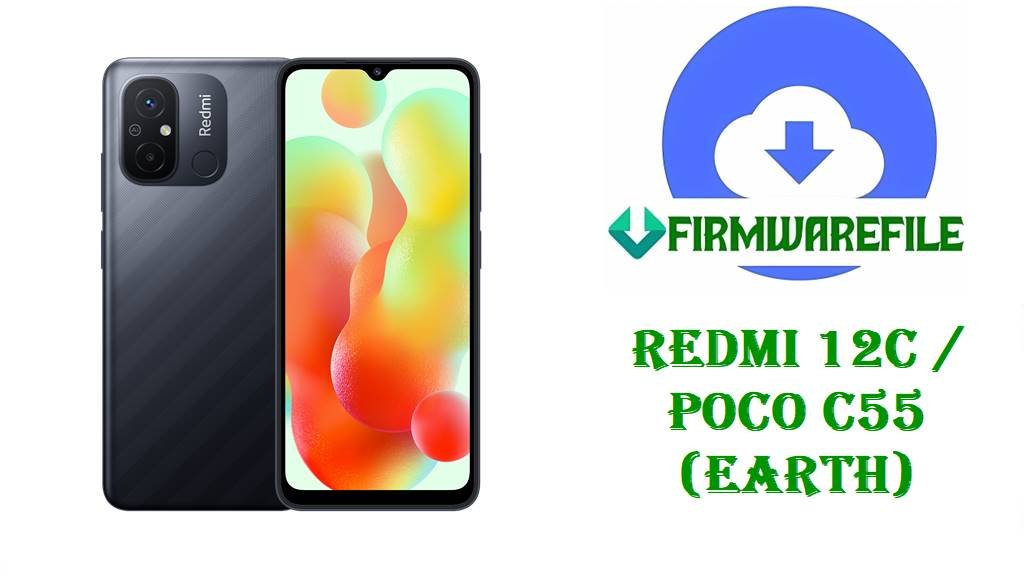
Redmi 12C / POCO C55 Official HyperOS Fastboot Firmware
Redmi 12C and POCO C55 are budget Xiaomi smartphones built around the MediaTek Helio G85 platform, aimed at entry-level users who still need a large display and all‑day battery for everyday apps and light gaming. These models use the codename earth for HyperOS and MIUI builds, and receive full Fastboot ROMs for service recovery as well as standard OTA and Recovery updates. Reliable access to untouched Fastboot packages is particularly important on this device family because many users experiment with region switching and bootloader unlocking to access additional features or faster update cycles.
For earth-based variants, common software issues include bootloops after unsuccessful updates, instability when mixing different regional ROMs, and soft bricks caused by incorrect Magisk or custom recovery procedures on the A/B partition layout. Widespread hardware defects are not broadly reported, so most recoverable failures are software‑level and can often be addressed by a clean flash of the correct HyperOS Fastboot build.
The HyperOS 1.x Fastboot firmware files below are official Xiaomi Fastboot ROMs for Redmi 12C / POCO C55 in China, Global, EEA, India, Indonesia, Turkey, Taiwan, and Russia regions. Each package serves as a complete restore image suitable for Mi Flash or fastboot script flashing, providing a clean reinstall path, a base for returning from custom ROMs, or a way to align CSC and region configuration with the intended market firmware.
File Selection Guide
Choosing the correct earth Fastboot firmware is essential because each build is tied to a specific region code (CNXM, MIXM, EUXM, INXM, IDXM, TRXM, TWXM, RUXM) and bootloader revision. Flashing a mismatched region or a lower bootloader level can lead to failed flashes, loss of OTA updates, or in some cases a soft brick that requires further recovery steps.
- Supported device names and codename
All listed packages are for devices using the earth codename, which corresponds to Redmi 12C and POCO C55 families (including NFC/market variants where Xiaomi maps them to earth). No other Xiaomi models should be flashed with these builds, even if they share a similar marketing name. - Region / carrier compatibility
The suffixes CNXM, MIXM, EUXM, INXM, IDXM, TRXM, TWXM, and RUXM denote China, Global, EEA, India, Indonesia, Turkey, Taiwan, and Russia configurations respectively. Cross‑region flashing on Helio G85 Xiaomi devices is sometimes possible for experienced users, but can affect LTE bands, VoLTE configuration, and OTA behavior, and is not officially documented as supported. - Android base and skin
Each file name includes14.0, indicating an Android 14 base with Xiaomi HyperOS 1.x on top. These Fastboot ROMs contain full system, boot, vendor, product, and other partitions required to completely reinstall HyperOS on earth devices. - Anti‑rollback / downgrade behavior
The UCx prefix in versions like OS1.0.14.0.UCVMIXM indicates an Android 14 HyperOS branch with an associated bootloader index. Xiaomi’s exact anti‑rollback configuration for Redmi 12C / POCO C55 on HyperOS is not fully documented, so downgrading to a lower UCx or from a later bootloader revision cannot be guaranteed safe; Mi Flash or fastboot will usually block unsupported downgrades. - Typical use cases
These Fastboot packages are typically used for recovering from bootloops, reverting from custom ROMs to stock HyperOS, fixing devices stuck in Fastboot mode after a failed flash, and performing a clean regional reinstall before resale. They also serve as a base image when switching from MIUI 14 to HyperOS using Mi Flash in “clean all” mode for users who want a completely fresh system.
Download Official Firmware for Redmi 12C / POCO C55 (earth)
China HyperOS Fastboot ROM – OS1.0.8.0.UCVCNXM
- Filename:
earth_images_OS1.0.8.0.UCVCNXM_20250820.0000.00_14.0_cn_177386999a.tgz - Region: China (CNXM), intended for Chinese Redmi 12C / POCO C55 equivalents with local services and no Google apps pre‑installed by default.
- File size: 4.62 GB (Fastboot archive containing multiple partition images).
- Build date: Encoded as 2025‑08‑20 in the filename; this is the internal build compilation date for this HyperOS release.
- Build version: OS1.0.8.0.UCVCNXM, HyperOS 1.0 stable branch for China on Android 14.
- Android version: Android 14, as indicated by
14.0in the filename. - Firmware type: Full HyperOS Fastboot ROM for earth.
- Flashing type / package format:
.tgzarchive that extracts to images and scripts for Mi Flash or fastboot/flash_all.bat usage. - Verified improvements: Specific changelog for OS1.0.8.0.UCVCNXM is not referenced here; typical China HyperOS point releases at this stage primarily deliver security patch updates and minor stability refinements, but exact changes cannot be confirmed without the official notes.
- Download link: Download China earth HyperOS Fastboot ROM OS1.0.8.0.UCVCNXM
Global HyperOS Fastboot ROM – OS1.0.14.0.UCVMIXM
- Filename:
earth_global_images_OS1.0.14.0.UCVMIXM_20251027.0000.00_14.0_global_2567c8a97b.tgz - Region: Global (MIXM) for Redmi 12C / POCO C55 Global market units.
- File size: 6.20 GB, reflecting a large Fastboot set with full partition images and possibly multiple language and region packages.
- Build date: Encoded as 2025‑10‑27, confirmed on firmware tracking as the Fastboot release date for this build.
- Build version: OS1.0.14.0.UCVMIXM, HyperOS 1.0 stable on Android 14 with October 2025 security patch.
- Android version: Android 14.
- Firmware type: Full Global HyperOS Fastboot ROM for earth.
- Flashing type / package format:
.tgzFastboot archive for Mi Flash or fastboot scripts. - Verified improvements: This update is documented to include the October 2025 Android security patch and general system security enhancements; no specific feature additions are highlighted beyond routine HyperOS bug fixes.
- Download link: Download Global earth HyperOS Fastboot ROM OS1.0.14.0.UCVMIXM
EEA HyperOS Fastboot ROM – OS1.0.13.0.UCVEUXM
- Filename:
earth_eea_global_images_OS1.0.13.0.UCVEUXM_20251027.0000.00_14.0_eea_ca2745a4ab.tgz - Region: EEA (EUXM) for European Union Redmi 12C / POCO C55 units, aligned with EU regulations and region‑specific apps.
- File size: 5.73 GB.
- Build date: Encoded as 2025‑10‑27 in the filename.
- Build version: OS1.0.13.0.UCVEUXM, HyperOS 1.0 stable EEA branch on Android 14.
- Android version: Android 14.
- Firmware type: EEA HyperOS Fastboot ROM for earth.
- Flashing type / package format:
.tgzFastboot package. - Verified improvements: Specific EEA changelog text is not listed here; at this stage, EEA HyperOS builds usually track global security patches and minor compliance‑related adjustments, but this cannot be confirmed without Xiaomi’s official notes.
- Download link: Download EEA earth HyperOS Fastboot ROM OS1.0.13.0.UCVEUXM
India HyperOS Fastboot ROM – OS1.0.11.0.UCVINXM
- Filename:
earth_in_global_images_OS1.0.11.0.UCVINXM_20250624.0000.00_14.0_in_7415d0374a.tgz - Region: India (INXM) for Redmi 12C / POCO C55 Indian variants.
- File size: 5.07 GB.
- Build date: Encoded as 2025‑06‑24 in the filename.
- Build version: OS1.0.11.0.UCVINXM, HyperOS 1.0 India stable branch.
- Android version: Android 14.
- Firmware type: India HyperOS Fastboot ROM for earth.
- Flashing type / package format:
.tgzFastboot archive. - Verified improvements: The exact India‑specific changelog is not cited; this build likely includes security and stability updates aligned with mid‑2025 HyperOS patches, but concrete feature changes are not confirmed.
- Download link: Download India earth HyperOS Fastboot ROM OS1.0.11.0.UCVINXM
Indonesia HyperOS Fastboot ROM – OS1.0.9.0.UCVIDXM
- Filename:
earth_id_global_images_OS1.0.9.0.UCVIDXM_20250624.0000.00_14.0_id_4588d3cc2f.tgz - Region: Indonesia (IDXM) HyperOS build for earth.
- File size: 5.76 GB.
- Build date: Encoded as 2025‑06‑24.
- Build version: OS1.0.9.0.UCVIDXM, Android 14 HyperOS Indonesia stable.
- Android version: Android 14.
- Firmware type: Indonesia HyperOS Fastboot ROM.
- Flashing type / package format:
.tgzFastboot package. - Verified improvements: Official changelog text is not included here; only that this is a mid‑2025 HyperOS maintenance update for Indonesia can be inferred from versioning.
- Download link: Download Indonesia earth HyperOS Fastboot ROM OS1.0.9.0.UCVIDXM
Turkey HyperOS Fastboot ROM – OS1.0.9.0.UCVTRXM
- Filename:
earth_tr_global_images_OS1.0.9.0.UCVTRXM_20250624.0000.00_14.0_tr_c0717e7204.tgz - Region: Turkey (TRXM) firmware for earth devices.
- File size: 5.48 GB.
- Build date: Encoded as 2025‑06‑24.
- Build version: OS1.0.9.0.UCVTRXM, HyperOS 1.0 TR stable.
- Android version: Android 14.
- Firmware type: Turkey HyperOS Fastboot ROM.
- Flashing type / package format:
.tgzFastboot package. - Verified improvements: No official changelog is provided here; it can be assumed this build follows the same security‑update cadence as other mid‑2025 HyperOS releases for earth, but that is not explicitly documented.
- Download link: Download Turkey earth HyperOS Fastboot ROM OS1.0.9.0.UCVTRXM
Taiwan HyperOS Fastboot ROM – OS1.0.9.0.UCVTWXM
- Filename:
earth_tw_global_images_OS1.0.9.0.UCVTWXM_20250624.0000.00_14.0_tw_051ff6f1fe.tgz - Region: Taiwan (TWXM) HyperOS firmware.
- File size: 5.19 GB.
- Build date: Encoded as 2025‑06‑24.
- Build version: OS1.0.9.0.UCVTWXM, HyperOS 1.0 TW stable.
- Android version: Android 14.
- Firmware type: Taiwan HyperOS Fastboot ROM.
- Flashing type / package format:
.tgzFastboot archive. - Verified improvements: Specific Taiwan changelog is not referenced; only general security and stability maintenance can be assumed from the versioning.
- Download link: Download Taiwan earth HyperOS Fastboot ROM OS1.0.9.0.UCVTWXM
Russia HyperOS Fastboot ROM – OS1.0.10.0.UCVRUXM
- Filename:
earth_ru_global_images_OS1.0.10.0.UCVRUXM_20250902.0000.00_14.0_ru_59b8b117d0.tgz - Region: Russia (RUXM) HyperOS build for earth devices.
- File size: 6.07 GB.
- Build date: Encoded as 2025‑09‑02.
- Build version: OS1.0.10.0.UCVRUXM, HyperOS 1.0 RU stable.
- Android version: Android 14.
- Firmware type: Russia HyperOS Fastboot ROM.
- Flashing type / package format:
.tgzFastboot archive. - Verified improvements: No detailed changelog is shown here; typical RU builds follow the same security patch schedule as Global counterparts for this device, but this cannot be fully confirmed without Xiaomi’s release notes.
- Download link: Download Russia earth HyperOS Fastboot ROM OS1.0.10.0.UCVRUXM
Redmi 12C / POCO C55 Device + Firmware Details
| Device name | Redmi 12C / POCO C55 |
| Model identifiers | Multiple variants including Chinese and Global SKUs mapped to codename earth (for example, Redmi 12C top edition and NFC/global editions). |
| Codename | earth, as used in HyperOS and MIUI firmware naming for these devices. |
| Chipset / CPU | MediaTek Helio G85, octa‑core design with Cortex‑A75 and Cortex‑A55 clusters, typical for budget gaming‑capable Redmi models. |
| Display | Approximately 6.71‑inch LCD panel with HD+ resolution, which makes GPU load modest but can reveal stutters if firmware or background services are misconfigured. |
| Battery capacity | 5000 mAh class battery, a common value across this Redmi generation and central to its endurance‑focused positioning. |
| Base software at launch | Shipped originally with Android 12 / MIUI 13 or MIUI 14 depending on market, later updated to Android 14 with HyperOS 1.x via OTA and Fastboot. |
| Firmware versions covered | HyperOS 1.0 earth Fastboot builds including OS1.0.8.0.UCVCNXM, OS1.0.14.0.UCVMIXM, OS1.0.13.0.UCVEUXM, OS1.0.11.0.UCVINXM, OS1.0.9.0.UCVIDXM, OS1.0.9.0.UCVTRXM, OS1.0.9.0.UCVTWXM, and OS1.0.10.0.UCVRUXM. |
| File type / extension | Fastboot ROMs distributed as .tgz archives that unpack to partition images and flashing scripts. |
| Flashing tool required | Mi Flash Tool on Windows or manual fastboot execution using the included flash_all scripts for MediaTek‑based Xiaomi devices. |
| Bootloader requirement | Bootloader must be unlocked to flash Fastboot ROMs with Mi Flash in most user scenarios; earth devices follow Xiaomi’s standard unlock policy via Mi Unlock and can usually be relocked after flashing a matching region firmware. |
| Common issues for this model | Reported problems include bootloops after experimental Magisk modules, sluggish performance due to heavy MIUI/HyperOS background services on low RAM variants, and soft bricks from flashing a mismatched earth region ROM. |
| Typical use of these ROMs | Unbricking devices stuck in Fastboot mode, moving from MIUI 14 to HyperOS with a clean slate, or switching between China and Global‑family regions where supported. |
| Anti‑rollback / ARB | HyperOS bootloader / ARB index is encoded in the UCx portion of the version string; going to a lower index or older branch may be blocked by Mi Flash or fastboot, but exact ARB values are not fully documented for earth. |
| Data‑wipe behavior | Fastboot scripts such as flash_all.bat typically wipe user data, while variants like flash_all_except_storage try to preserve some partitions; using “clean all and lock” will both wipe data and relock the bootloader. |
Flashing Requirements
- Back up all important data, because Mi Flash Fastboot operations on earth HyperOS ROMs almost always erase user data when using standard
flash_allor “clean all” modes. - Charge the phone to at least 60% to avoid any shutdown during flashing on the Helio G85 platform, which can be sensitive to sudden power loss when partitions are being rewritten.
- Use a Windows PC with latest Xiaomi USB and MediaTek drivers installed; Mi Flash is only available for Windows environments.
- Confirm that the bootloader is unlocked via Fastboot mode status, and that the selected Fastboot ROM’s region and version match the intended market and bootloader level.
- Use a reliable USB‑A to USB‑C cable connected directly to the motherboard port, avoiding front‑panel ports or unstable hubs, because repeated disconnects can leave earth devices stuck in a half‑flashed state.
- Disable other phone management tools (Mi Assistant, third‑party flashing utilities) during the process to prevent port conflicts with Mi Flash.
How to Flash the Firmware
- Download the correct earth Fastboot ROM (for example,
earth_global_images_OS1.0.14.0.UCVMIXM_20251027.0000.00_14.0_global_2567c8a97b.tgz) for the exact region and extract it until the images and flash scripts are visible in a single folder. - Install Xiaomi/MediaTek USB drivers, power off the Redmi 12C / POCO C55, then boot it into Fastboot mode (usually by holding Volume Down + Power) and connect it to the PC.
- Open Mi Flash Tool, select the extracted firmware folder, and ensure the device is detected in the device list without errors.
- Choose the desired flashing mode (typically “clean all” for a full reinstall; avoid “clean all and lock” unless using the correct stock region firmware and you are sure about relocking behavior).
- Click “Flash” and wait for Mi Flash to complete the process; once the tool reports success, the device will reboot to HyperOS, with the first boot taking several minutes as the system optimizes apps.
Users who need a more detailed walkthrough for Fastboot‑style flashing on Android can follow a dedicated step‑by‑step guide with screenshots here: How to flash Android firmware using fastboot script.
Frequently Asked Questions (FAQs)
Can these earth Fastboot ROMs unbrick a Redmi 12C or POCO C55 stuck in Fastboot mode?
In many cases, a correctly matched HyperOS Fastboot ROM for earth can recover a device stuck in Fastboot mode or bootloop, as long as the bootloader is unlocked and there is no underlying hardware damage.
Is it safe to relock the bootloader after flashing a different region ROM on earth?
Relocking is typically only considered safe when flashing the official region firmware intended for the device; relocking after cross‑region flashes can lead to boot verification failures, and Xiaomi does not officially document all safe combinations for earth.
Will flashing these HyperOS ROMs on Redmi 12C / POCO C55 update the Android version?
All listed builds are based on Android 14, so devices coming from MIUI 13 or MIUI 14 on Android 12/13 will be upgraded as part of the Fastboot flash, but they cannot be downgraded back to older Android branches if bootloader/ARB rules block it.
Can a Global earth ROM be used on a China Redmi 12C to get Google services?
Cross‑flashing Global onto a China unit is technically possible for some Xiaomi devices, but it is not officially supported, may affect LTE bands and OTA updates, and carries a higher risk of boot issues on earth; this scenario should be approached only by advanced users.
Do these HyperOS builds fix known performance lag on low‑RAM Redmi 12C variants?
HyperOS updates can deliver optimizations and security improvements, but there is no official confirmation that these specific versions resolve all lag on low‑RAM earth models; perceived performance will still depend on installed apps and usage patterns.