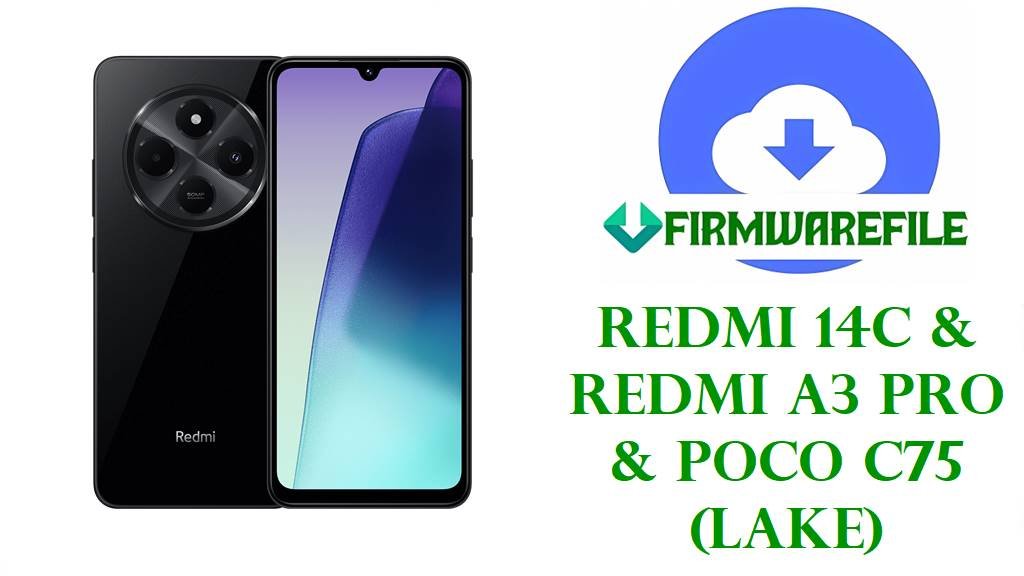
Redmi 14C / POCO C75 / Redmi A3 Pro (lake) HyperOS 2 Android 15 Fastboot ROM Download
The Redmi 14C, POCO C75 and Redmi A3 Pro share the internal codename lake and target budget users who want a big display, solid battery life and NFC at a low price. The Redmi 14C 4G NFC variant, for example, packs a 6.9‑inch 120 Hz IPS screen, MediaTek Helio G81 octa‑core chipset, 4–8 GB LPDDR4X RAM, 128–256 GB eMMC 5.1 storage and a 50 MP main camera powered by a 5160 mAh battery with 18 W fast charging.
Across Xiaomi’s HyperOS 2 lineup, owners frequently complain that after updating to Android 15‑based builds, their phones run hotter, drain faster in standby and sometimes lag more than on earlier versions, particularly in the days right after installing an OTA. These issues are usually linked to background optimization, early firmware bugs and power‑management changes rather than pure hardware faults, so installing a clean, region‑correct Fastboot ROM is one of the most reliable ways to stabilize a Redmi 14C / POCO C75 / A3 Pro.
The HyperOS 2 Android 15 ROMs below cover China (VGTCNXM), Global (VGTMIXM), EEA (VGTEUXM), Indonesia (VGTIDXM), Russia (VGTRUXM), Taiwan (VGTTWXM) and Turkey (VGTTRXM) devices under the lake codename. These full Fastboot packages are designed to fix bootloops, recover from failed OTAs or mods, and give lake users a clean, up‑to‑date Android 15 base with the latest stable HyperOS 2 branch for their region.
Download Official Firmware for Redmi 14C / POCO C75 / Redmi A3 Pro (lake)
These Android 15 HyperOS 2.0.x ROMs are official, untouched Fastboot packages hosted on Xiaomi’s bigota/hugeota servers for the lake platform. Each file targets a specific region and should be flashed with Xiaomi Mi Flash Tool or fastboot scripts on an unlocked bootloader to restore stock firmware, fix deep software issues or perform a clean upgrade.
| Filename | Region / Target Variant | Android / HyperOS | Build Date | File Size | Flashing Type | Notes | Download Link |
|---|---|---|---|---|---|---|---|
| lake_images_OS2.0.201.0.VGTCNXM_20250912.0000.00_15.0_cn_b4a18d2076.tgz | China – Redmi 14C / Redmi A3 Pro China (VGTCNXM) | Android 15, HyperOS 2.0.201.0.VGTCNXM | 2025‑09‑12 | 5.74 GB | Official Fastboot ROM | Part of the Chinese Android 15 HyperOS 2 stable line for lake; used to unbrick and clean‑flash CN units while preserving the correct China region. | Download OS2.0.201.0.VGTCNXM (Xiaomi servers) |
| lake_global_images_OS2.0.203.0.VGTMIXM_20251017.0000.00_15.0_global_c86ba1b6d6.tgz | Global – Redmi 14C / POCO C75 / Redmi A3 Pro Global (VGTMIXM) | Android 15, HyperOS 2.0.203.0.VGTMIXM | 2025‑10‑17 | 7.17 GB | Official Fastboot ROM | Android 15 HyperOS 2 global Fastboot build for lake; firmware archives show it as a mature stable branch for worldwide models. | Download OS2.0.203.0.VGTMIXM (Xiaomi servers) |
| lake_tw_global_images_OS2.0.201.0.VGTTWXM_20251022.0000.00_15.0_tw_95ea94efa1.tgz | Taiwan – Redmi 14C / POCO C75 / Redmi A3 Pro TW (VGTTWXM) | Android 15, HyperOS 2.0.201.0.VGTTWXM | 2025‑10‑22 | 5.12 GB | Official Fastboot ROM | Region‑tuned Taiwan ROM with appropriate bands and regulatory settings; best choice to fix software issues on TWXM units. | Download OS2.0.201.0.VGTTWXM (Xiaomi servers) |
| lake_eea_global_images_OS2.0.204.0.VGTEUXM_20251011.0000.00_15.0_eea_ef33fae41a.tgz | EEA – Redmi 14C / POCO C75 / Redmi A3 Pro Europe (VGTEUXM) | Android 15, HyperOS 2.0.204.0.VGTEUXM | 2025‑10‑11 | 6.21 GB | Official Fastboot ROM | European EEA firmware aligned with EU privacy and security rules; listed by firmware trackers as a newer Android 15 HyperOS 2 stable EU build. | Download OS2.0.204.0.VGTEUXM (Xiaomi servers) |
| lake_id_global_images_OS2.0.201.0.VGTIDXM_20251022.0000.00_15.0_id_74da382fec.tgz | Indonesia – Redmi 14C / POCO C75 / Redmi A3 Pro ID (VGTIDXM) | Android 15, HyperOS 2.0.201.0.VGTIDXM | 2025‑10‑22 | 6.61 GB | Official Fastboot ROM | Indonesian stable build suited for local carriers; use to recover from OTA failures and restore stock on IDXM variants. | Download OS2.0.201.0.VGTIDXM (Xiaomi servers) |
| lake_ru_global_images_OS2.0.201.0.VGTRUXM_20251022.0000.00_15.0_ru_1a9bc7e526.tgz | Russia – Redmi 14C / POCO C75 / Redmi A3 Pro RU (VGTRUXM) | Android 15, HyperOS 2.0.201.0.VGTRUXM | 2025‑10‑22 | 6.97 GB | Official Fastboot ROM | Russian HyperOS 2 stable branch; keeps RU units on the correct update path with localized features and services. | Download OS2.0.201.0.VGTRUXM (Xiaomi servers) |
| lake_tr_global_images_OS2.0.201.0.VGTTRXM_20251022.0000.00_15.0_tr_6d1c96abe1.tgz | Turkey – Redmi 14C / POCO C75 / Redmi A3 Pro TR (VGTTRXM) | Android 15, HyperOS 2.0.201.0.VGTTRXM | 2025‑10‑22 | 6.10 GB | Official Fastboot ROM | Turkey ROM for lake, used to unbrick and clean‑flash TRXM devices while retaining the correct region for future OTAs. | Download OS2.0.201.0.VGTTRXM (Xiaomi servers) |
Redmi 14C / POCO C75 / Redmi A3 Pro (lake) Firmware Details
| Device Names | Redmi 14C (4G), POCO C75 (4G), Redmi A3 Pro (4G) – all lake platform variants. |
|---|---|
| Codename | lake – internal codename for all listed devices and firmware. |
| Model Identifiers | Examples include 2409BRN2CY and 2411DRN47C/47I plus related SKUs for Redmi 14C 4G NFC and POCO C75 4G. |
| Chipset | MediaTek Helio G81 MT6769, 12 nm octa‑core CPU at 2.0 GHz with Mali‑G52 2EEMC2 GPU. |
| Display | 6.9‑inch IPS LCD, 720 × 1640 resolution, 120 Hz refresh rate, ~260 ppi with scratch‑resistant glass. |
| Memory & Storage | LPDDR4X RAM from 4 GB upwards and 128–256 GB eMMC 5.1 storage, plus microSD expansion. |
| Battery & Charging | 5160 mAh Li‑Po battery rated for about 42 hours talk time with 18 W wired charging via USB‑C and USB‑PD. |
| Software Families | Launched on Android 14 HyperOS 1 and updated to Android 15 HyperOS 2.0.x in VGTCNXM/VGTMIXM/VGTEUXM/VGTIDXM/VGTRUXM/VGTTWXM/VGTTRXM branches. |
| Main Issues Reported | Users on HyperOS 2 complain about heavier battery drain, overheating even under light use and inconsistent performance after certain updates. |
| Benefits of These ROMs | Provide a clean Android 15 HyperOS 2 base per region, allow recovery from bootloops or failed OTAs and include the latest stable security patches tracked for lake devices. |
| File Type | Full Xiaomi Fastboot ROM archives (.tgz) with complete partition images and flashing scripts. |
| Required Tools | Mi Flash Tool on Windows or fastboot commands / flash_all.bat scripts from the ROM package. |
| Bootloader Status | Bootloader unlock is required for Fastboot flashing; OTA recovery packages generally require a locked, unmodified system. |
| Use Cases | Unbrick soft‑bricked lake phones, repair corrupted system partitions, fix severe OS bugs and move to a stable Android 15 build for your region. |
Flashing Requirements
- 💾 Backup data: Fastboot flashing will usually erase apps and internal storage, so copy photos and important files first.
- 🔋 Battery above 50 %: Ensure enough charge to avoid shutdowns that can corrupt partitions and hard‑brick the device.
- 💻 Windows PC & USB‑C cable: You need a Windows computer, Xiaomi USB drivers and a reliable cable for Mi Flash or fastboot.
- 🔓 Unlocked bootloader: Use Xiaomi’s official unlock tool before flashing any lake_*_images_*.tgz ROM.
How to Flash the Firmware
Method 1: Xiaomi Mi Flash Tool (Fastboot ROMs)
- Install tools & extract ROM: Install Xiaomi USB drivers and Mi Flash Tool on your PC, then extract the desired Fastboot ROM (for example, lake_global_images_OS2.0.203.0.VGTMIXM_…) to a simple folder path.
- Enter fastboot on your lake device: With the bootloader unlocked, power off the phone, hold Volume Down + Power to enter fastboot, and connect it via USB‑C.
- Load the firmware: Open Mi Flash Tool, click Select and point it to the extracted ROM folder containing the images and scripts.
- Choose “clean all” and flash: Select a mode like “clean all” (avoid relock), click Flash, and wait while the tool writes all partitions.
- Reboot and let it settle: After Mi Flash finishes, let the phone reboot; the first Android 15 HyperOS 2 boot can take several minutes while apps are optimized.
For a complete, step‑by‑step Mi Flash guide with screenshots and troubleshooting, see: Full Tutorial: Flash Xiaomi Firmware with Mi Flash Tool.
Method 2: Fastboot Script (flash_all.bat Style)
- Install Android platform‑tools: Download Google’s platform‑tools and confirm the fastboot command works in your terminal.
- Unpack the ROM completely: Extract the .tgz file until you see partition images and scripts such as flash_all.bat.
- Connect in fastboot mode: Boot the lake device into fastboot and connect it; run fastboot devices to ensure it is recognized.
- Run the appropriate script: Execute the “flash all” script that does not relock the bootloader and wait for all partitions to be flashed.
- Finish setup and monitor: After reboot, complete setup and monitor heat and battery life over a few days as HyperOS 2 finishes background optimization.
For more detail on fastboot scripts and safety tips, use this guide: How to Flash Stock Firmware Using a Fastboot Script (flash_all.bat).
Frequently Asked Questions (FAQs)
What lake problems can these ROMs fix?
Flashing the correct regional ROM can resolve bootloops, random reboots, severe lag, failed OTAs and many HyperOS 2 software issues like abnormal battery drain and overheating on Redmi 14C / POCO C75 / Redmi A3 Pro.
How do I confirm my phone uses the lake firmware?
Check Settings → About phone → Version and verify that the codename is lake or that online firmware tools list your exact model (Redmi 14C, POCO C75 or A3 Pro) under lake before flashing.
Which file should EEA or Global users pick?
EEA users should choose ROMs ending in VGTEUXM, while worldwide non‑EEA models generally use VGTMIXM; flashing any other region can cause network or OTA issues.
Do these updates fix HyperOS 2 battery drain on Redmi 14C?
Clean‑flashing a stable Android 15 build often improves extreme drain and heat reported right after OTAs, but overall endurance still depends on usage, signal and app behaviour.
Can I cross‑flash China VGTCNXM on a Global VGTMIXM phone?
Cross‑flashing between regions is technically possible with an unlocked bootloader but risks broken OTA updates, band issues and potential bricks if the bootloader is later relocked, so it is not recommended.