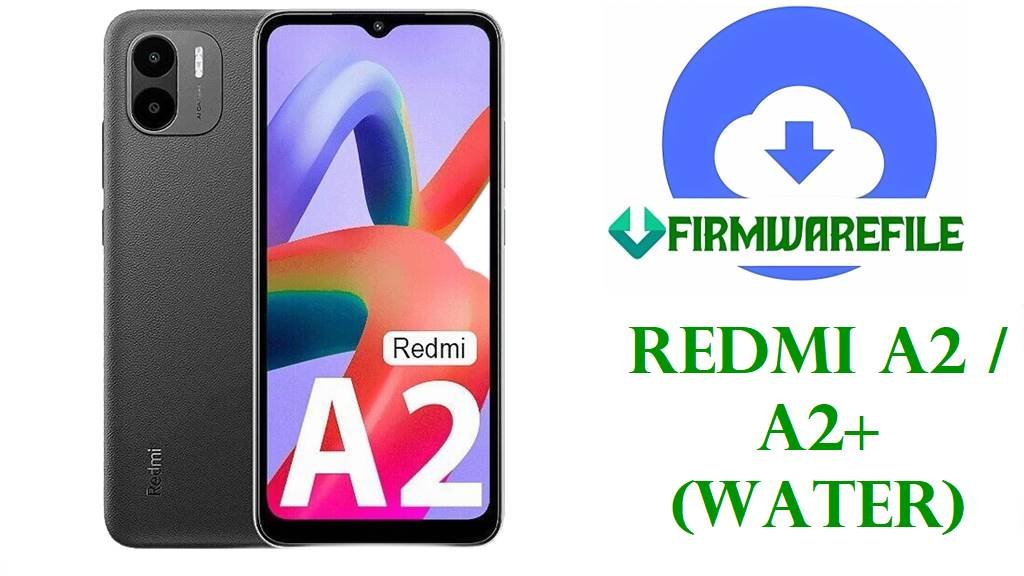
Redmi A2 / A2+ (water) Official MIUI 14 Fastboot Firmware
The Redmi A2 and Redmi A2+ are entry‑level Xiaomi phones sharing the codename water, built around the MediaTek Helio G36, a 6.52‑inch HD+ display, and a 5000 mAh battery aimed at basic smartphone tasks. These models run Android Go‑based MIUI 14 with modest RAM and storage, so they are sensitive to software stability and background load, making clean stock firmware especially important when something goes wrong.
Owners usually flash the official water fastboot ROM when the device is stuck on the Redmi logo, after a failed OTA, or when experimenting with bootloader unlock and system modifications has caused boot issues. Service technicians also rely on fastboot images to restore low‑cost units like the Redmi A2/A2+ quickly, as the smaller ROM size and simpler partition layout are easier to handle than on flagship devices.
File Selection Guide
Start by confirming that your handset is indeed a Redmi A2, Redmi A2+, or POCO C51 and that its codename is water; this codename appears in fastboot filenames and in many firmware tools, and flashing water ROMs on any other Xiaomi model can brick the unit. You can check variant and RAM/storage configuration under Settings or on the box, but codename is what really matters for firmware compatibility on this platform.
The region code embedded in the build ID indicates where the ROM is intended to be used: TGOMIXM is the standard Global build, TGOEUXM is for EEA, TGOINXM targets India, TGORUXM is for Russia, TGOIDXM is Indonesia, and TGOTWXM is Taiwan. Using a ROM that does not match the original region may still boot, but can alter preloaded apps, regulatory defaults, and even network tuning, so staying with the original code is best unless you know exactly why you are switching.
All the packages listed here are MIUI V14 fastboot ROMs with Android 13 as the base (13.0 in the filename), designed for use with Mi Flash Tool or fastboot scripts on the water device family. Because Android 13 is newer than the Android 12 (Go edition) version these phones originally launched with, you should avoid downgrading across Android generations, as anti‑rollback and partition changes can cause unbootable states on low‑end MediaTek hardware.
Device Firmware Download
The table below covers the MIUI 14 Android 13 fastboot ROMs for the Redmi A2/A2+ (water) by region, plus their intended users and flashing considerations. Each entry focuses on realistic use cases for this budget model, such as recovering from bootloops, fixing sluggishness on a low‑RAM setup, or restoring a country‑specific variant.
| Device Model | Codename | Region | Carrier | Build | Android Version | OEM UI Version | Release Date | Notes | Filename | Size | File Format | Checksum | Mirror | Flashing Method | Tool | Bootloader Required | Data Wipe | Downgrade Allowed | Tested | Known Issues | Download Label |
|---|---|---|---|---|---|---|---|---|---|---|---|---|---|---|---|---|---|---|---|---|---|
| Redmi A2 / A2+ / POCO C51 | water | Global | Unlocked | V14.0.41.0.TGOMIXM | Android 13 | MIUI 14 Global (Go‑oriented) | 2025‑10‑24 | Latest Global fastboot ROM for general international units; ideal to restore a sluggish or bootlooping A2/A2+ used outside specific regional markets. | water_global_images_V14.0.41.0.TGOMIXM_20251024.0000.00_13.0_9dfd1a9bab.tgz | ≈ 2.08 GB | .tgz (fastboot) | Compare with hash from MIUI ROM index or community listing when available. | Official Xiaomi CDN | Full fastboot ROM to be flashed through Mi Flash or fastboot scripts. | Mi Flash Tool / fastboot | Unlocked bootloader recommended for cross‑flashing or deep restore; locked devices should only use region‑matching ROMs. | Yes, “clean all” flashing will erase user data; plan backups for contacts and media. | Do not downgrade to earlier Android versions or pre‑13 builds to avoid anti‑rollback issues on water. | Commonly used by technicians for generic global A2/A2+ units. | First boot may feel slow due to low RAM while apps optimize; allow extra time. | Download Global Fastboot |
| Redmi A2 / A2+ / POCO C51 | water | EEA | EU region | V14.0.30.0.TGOEUXM | Android 13 | MIUI 14 EEA | 2025‑11‑13 | EEA‑optimized firmware for phones sold in the European Economic Area, with EU‑focused defaults and compliance tweaks for this budget segment. | water_eea_global_images_V14.0.30.0.TGOEUXM_20251113.0000.00_13.0_6cfcf99b69.tgz | ≈ 2.10 GB | .tgz (fastboot) | Checksum should be verified against trusted firmware catalogs. | Official Xiaomi CDN | Flashed via Mi Flash as a full fastboot package, especially after failed OTAs on EEA units. | Mi Flash Tool / fastboot | Bootloader unlock advised if changing from non‑EEA firmware; EEA‑to‑EEA restores may work on locked units via official tools. | Expect a factory reset effect when using clean all or similar options. | Avoid downgrading to older EEA builds or pre‑Android‑13 firmware lines. | Useful for ensuring low‑end EU devices remain within local compliance and OTA tracks. | EEA track may receive updates on a slightly different schedule than Global. | Download EEA Fastboot |
| Redmi A2 / A2+ / POCO C51 | water | India | IN region | V14.0.24.0.TGOINXM | Android 13 | MIUI 14 India | 2025‑08‑19 | India‑specific firmware tuned for local services, languages, and network expectations on entry‑level hardware. | water_in_global_images_V14.0.24.0.TGOINXM_20250819.0000.00_13.0_ab63a5a9f8.tgz | ≈ 1.96 GB | .tgz (fastboot) | Validate integrity using MD5/SHA values if provided in MIUI ROM lists. | Official Xiaomi CDN | Standard fastboot ROM; commonly used after bootloops caused by app overload on 2 GB RAM variants. | Mi Flash Tool / fastboot | Unlocked bootloader helps when cross‑flashing from Global to Indian firmware or vice versa. | Full restore will wipe apps and user data; important on low‑storage devices that fill quickly. | Down‑flashing older Indian ROMs carries anti‑rollback risk; prefer equal or newer builds. | Appropriate baseline if you rely on Indian‑market content and payment apps. | Switching out of IN firmware may alter some region‑tuned defaults. | Download India Fastboot |
| Redmi A2 / A2+ / POCO C51 | water | Russia | RU region | V14.0.29.0.TGORUXM | Android 13 | MIUI 14 Russia | 2025‑09‑10 | RU‑optimized firmware with regional defaults; used for devices originally sold in Russia or CIS markets. | water_ru_global_images_V14.0.29.0.TGORUXM_20250910.0000.00_13.0_6146ea332a.tgz | ≈ 2.07 GB | .tgz (fastboot) | Checksum comparison recommended against ROM catalogs such as XiaomiROM/miuiROM. | Official Xiaomi CDN | Flashed as full fastboot ROM to recover from failed local updates or experimental changes. | Mi Flash Tool / fastboot | Unlocked bootloader recommended for region changes; keeping original RU firmware is safer on locked units. | Will reset user space during “clean all” operations. | Rolling back across major patch levels is discouraged; check anti‑rollback notes first. | Commonly used by repair shops dealing with low‑cost RU handsets. | May include regional apps not present in Global builds. | Download RU Fastboot |
| Redmi A2 / A2+ / POCO C51 | water | Indonesia | ID region | V14.0.21.0.TGOIDXM | Android 13 | MIUI 14 Indonesia | 2025‑08‑29 | Indonesia‑focused ROM; suited for budget Redmi A2/A2+ units tied to Indonesian networks and local content. | water_id_global_images_V14.0.21.0.TGOIDXM_20250829.0000.00_13.0_e4f7c2d156.tgz | ≈ 2.04 GB | .tgz (fastboot) | Confirm hash from ROM index if available, especially on slower connections. | Official Xiaomi CDN | Standard fastboot restore for water devices in Indonesia, especially after storage corruption. | Mi Flash Tool / fastboot | Unlocked bootloader useful for cross‑flashing; same‑region flashes may work locked if done through authorized tools. | A full flash will clear installed apps and internal storage. | Stick to Android 13 line; older MIUI/Android combinations are not recommended as targets. | Helps maintain stability on low‑spec phones used in challenging network conditions. | Region‑specific apps may differ from Global/EEA cuts. | Download Indonesia Fastboot |
| Redmi A2 / A2+ / POCO C51 | water | Taiwan | TW region | V14.0.9.0.TGOTWXM | Android 13 | MIUI 14 Taiwan | 2025‑08‑19 | Taiwan‑targeted firmware; useful for TW retail units or imported devices that came with TW ROM originally. | water_tw_global_images_V14.0.9.0.TGOTWXM_20250819.0000.00_13.0_817118a4cd.tgz | ≈ 1.96 GB | .tgz (fastboot) | Checksum verification is advised to avoid flashing corrupted images on low‑margin storage. | Official Xiaomi CDN | Flashed via Mi Flash for clean restores or after manual experimentation on TW devices. | Mi Flash Tool / fastboot | Unlocked bootloader generally required for cross‑region moves; TW‑only maintenance may stay locked. | Fastboot clean all will perform a full device reset. | Should not be used as a downgrade path to previous Android versions. | Appropriate for users needing a stable, official TW base rather than custom ROMs. | TW update channel pacing may differ from other regional tracks. | Download TW Fastboot |
Device + Firmware Summary
This summary table connects the Redmi A2/A2+ hardware profile with the fastboot ROMs above, highlighting the low‑end nature of the platform and its implications for flashing. Paying attention to RAM, storage, and region can prevent performance disappointments and avoid soft‑bricks on this entry‑level series.
| Parameter | Redmi A2 / A2+ (water) Details |
|---|---|
| Model names | Redmi A2, Redmi A2+, and POCO C51, sharing the water codename and broadly identical firmware base. |
| Codename | water – required for matching fastboot ROMs and verifying compatibility in tools and ROM catalogs. |
| Chipset | MediaTek Helio G36, octa‑core Cortex‑A53 with PowerVR GE8320 GPU, optimised for light tasks rather than heavy gaming. |
| Memory options | Typically 2 GB or 3 GB RAM with 32 GB or 64 GB eMMC; low RAM makes a clean OS state important for responsiveness. |
| Display and battery | 6.52‑inch HD+ IPS panel and 5000 mAh battery, making the device a basic daily driver for calls, chats, and light apps. |
| Firmware base | MIUI 14 on Android 13 in all ROMs listed here, upgrading over the original Android 12 (Go) launch software. |
| Regions supported | Global, EEA, India, Russia, Indonesia, and Taiwan variants, all tied to water but with regional tuning. |
| ROM format | .tgz fastboot factory images, intended for Mi Flash or direct fastboot command flashing. |
| Bootloader / locking | Bootloader unlock is typically required for cross‑region flashing; same‑region restores may be possible on locked devices through official routes only. |
| Data impact | Fastboot “clean all” operations wipe apps and internal files, which matters more on low storage variants. |
| Target users | Budget‑focused owners, first‑time Android users, and service shops that need reliable stock images for quick recovery rather than modding. |
Flashing Requirements & Risks
Flashing water fastboot ROMs safely requires a Windows PC, Xiaomi/MediaTek drivers, a reliable USB cable, and at least half battery charge, as low‑end phones like the Redmi A2/A2+ cannot afford sudden power loss during partition writes. Given the limited RAM and eMMC throughput, the flashing process and first boot may take slightly longer than on midrange devices, so patience is important to avoid interrupting critical steps.
Main risks include trying to downgrade from Android 13 to older bases, which can trigger anti‑rollback or mismatch system and vendor partitions, leaving the device unable to boot. Because this handset is commonly used by non‑technical owners, loss of data during a “clean all” flash can be more painful, so backing up photos and contacts before starting is essential whenever the phone is still bootable.
How to Flash (High‑Level Only)
On the Redmi A2 / A2+, the practical flashing paths are Mi Flash with the official fastboot ROMs and generic fastboot commands if you prefer a manual approach. Recovery‑based sideloading is less common for water fastboot packages, but OTA and local updates can still be used when the phone boots normally.
Method 1: Flash water Fastboot ROM with Mi Flash
- Install Xiaomi USB drivers and Mi Flash Tool on a Windows PC, then fully extract the chosen water
.tgzfastboot ROM into a short folder path. - Power off the Redmi A2/A2+, then hold Volume Down + Power to enter fastboot mode and connect the phone to the PC via USB.
- Open Mi Flash, click Select and browse to the extracted ROM directory, then use Refresh to confirm that the device is detected.
- At the bottom, choose the desired mode (usually “clean all” for a full restore on budget devices) and press Flash, waiting until Mi Flash reports completion.
- Disconnect the phone and let it boot into MIUI 14; first startup can be slow on 2 GB RAM variants, so avoid force restarting during initialization.
For a detailed Xiaomi Mi Flash procedure that applies to water as well, see the Xiaomi‑specific tutorial at this Mi Flash guide, which covers requirements, driver tips, and screenshots.
Frequently Asked Questions
Is MIUI 14 Android 13 too heavy for the Redmi A2 / A2+ hardware?
MIUI 14 on Android 13 for water is tuned as a Go‑style configuration, but with 2 GB RAM you should still expect modest multitasking and occasional reloads when many apps are open. A clean fastboot flash can restore baseline performance, yet it cannot turn this budget platform into a midrange gaming phone.
Can I convert a Global Redmi A2 to EEA or Indian firmware using these ROMs?
In many cases, cross‑region conversion between Global, EEA, and Indian water ROMs is technically possible, but it typically requires an unlocked bootloader and will wipe data. Because this device targets non‑technical users, sticking to the original region is usually safer unless you have a clear reason and understand potential OTA and regulatory side effects.
Will flashing these fastboot ROMs fix app crashes and storage warnings on low‑RAM variants?
A fresh install can remove accumulated cache and misconfigured apps, which often helps on 2 GB water units that are overloaded with software. However, you still need to keep installed apps light and avoid heavy games, since the Helio G36 and limited memory will otherwise reach their limits again quickly.
What happens if I try to downgrade from Android 13 to the launch firmware on my Redmi A2?
Downgrading from MIUI 14 Android 13 fastboot ROMs back to earlier bases can conflict with anti‑rollback and updated partition layouts, potentially leaving the phone stuck at boot or requiring service‑level intervention. On low‑cost water devices, that kind of mistake is often not worth the risk compared with staying on the latest supported branch.
Is it worth installing custom ROMs on Redmi A2 / A2+ instead of stock MIUI 14?
While some lightweight custom ROMs exist for Helio G36 devices, the combination of locked‑down bootloaders, limited RAM, and lack of official recovery support means that stock MIUI 14 fastboot ROMs are usually the more reliable option for daily use. Custom firmware may reduce bloat but often requires more frequent manual maintenance, which can be challenging for the typical budget‑phone owner.