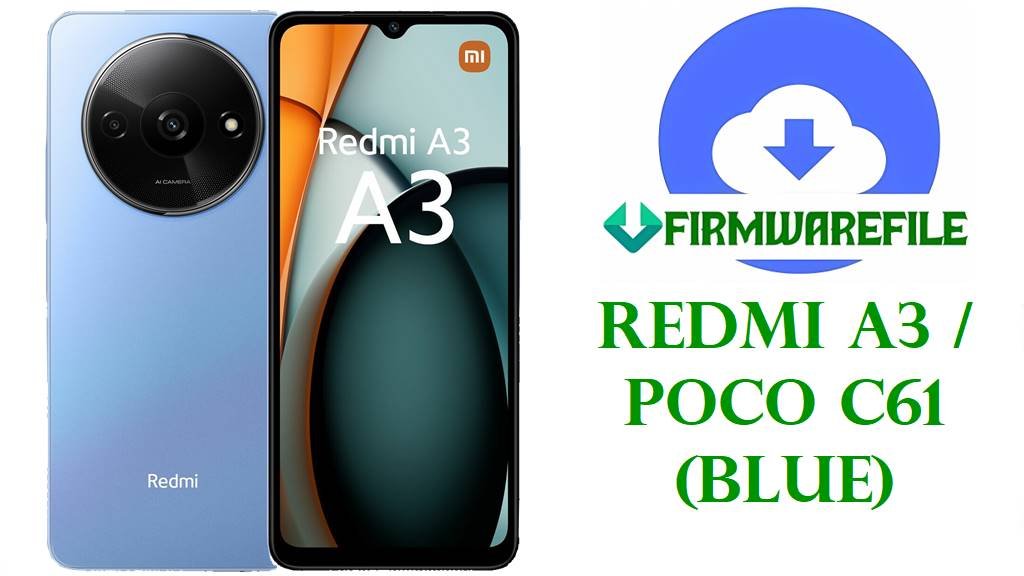
Redmi A3 / POCO C61 (blue) Android 14 V816 Fastboot ROM Download
The Redmi A3 and POCO C61 are entry-level Xiaomi phones built around a large 6.71‑inch 90 Hz HD+ display, MediaTek Helio G36 chipset, up to 6 GB RAM, and a 5000 mAh battery aimed at budget users who still want smooth scrolling and modern Android 14 features.
The official Android 14 V816 Fastboot ROMs for codename blue give Redmi A3/POCO C61 owners a clean factory image that can remove software corruption, fix failed OTAs, undo risky tweaks and provide a stable base before updating to newer V816 releases via OTA.
Download Official Firmware for Redmi A3 / POCO C61 (blue)
Firmware trackers and Xiaomi’s own ROM indexes confirm that all V816.0.x.x builds with codename blue are official Android 14 stock ROMs for Redmi A3 and its POCO C61 twin, with separate region codes for Global, India, Russia, EEA and Indonesia. The files below are Fastboot packages (full images) hosted on Xiaomi’s bigota servers, suitable for flashing with Mi Flash Tool or fastboot scripts on an unlocked device; they are especially useful for unbricking, downgrading, or performing a clean install before taking newer OTAs.
| Filename | Region / Target Variant | Build Version | Android Version | Build Date | File Size | Flashing Type | Notes | Download Link |
|---|---|---|---|---|---|---|---|---|
| blue_global_images_V816.0.4.0.UGRMIXM_20240312.0000.00_14.0_d53ed3c01a.tgz | Global – Redmi A3 / POCO C61 Global (UGRMIXM) | V816.0.4.0.UGRMIXM | Android 14.0 | 2024‑03‑12 | 2.68 GB | Fastboot ROM (.tgz) | First widely tracked Global Android 14 Fastboot build for blue; later Global V816.0.5.0–V816.0.11.0 updates can be installed via OTA after a clean flash. | Download V816.0.4.0 UGRMIXM (Xiaomi server) |
| blue_in_global_images_V816.0.4.0.UGRINXM_20240314.0000.00_14.0_99d744c261.tgz | India – Redmi A3 / POCO C61 India (UGRINXM) | V816.0.4.0.UGRINXM | Android 14.0 | 2024‑03‑14 | 2.28 GB | Fastboot ROM (.tgz) | Initial Indian Android 14 Fastboot release; ROM tables show it as the base for later Indian updates up to V816.0.11.0.UGRINXM and beyond. | Download V816.0.4.0 UGRINXM (Xiaomi server) |
| blue_ru_global_images_V816.0.6.0.UGRRUXM_20240222.0000.00_14.0_158e2e33be.tgz | Russia – Redmi A3 Russia (UGRRUXM) | V816.0.6.0.UGRRUXM | Android 14.0 | 2024‑02‑22 | 2.40 GB | Fastboot ROM (.tgz) | Russian Android 14 Fastboot image; later UGRRUXM builds add recovery packages but keep compatibility with this Fastboot base. | Download V816.0.6.0 UGRRUXM (Xiaomi server) |
| blue_eea_global_images_V816.0.4.0.UGREUXM_20240227.0000.00_14.0_75f899ce1d.tgz | Europe (EEA) – Redmi A3 EEA (UGREUXM) | V816.0.4.0.UGREUXM | Android 14.0 | 2024‑02‑27 | 2.76 GB | Fastboot ROM (.tgz) | Earliest EEA Android 14 Fastboot build; firmware lists show it later followed by UGREUXM V816.0.7.0–V816.0.11.0 with recovery and Fastboot options. | Download V816.0.4.0 UGREUXM (Xiaomi server) |
| blue_id_global_images_V816.0.4.0.UGRIDXM_20240314.0000.00_14.0_53ee2305d6.tgz | Indonesia – Redmi A3 Indonesia (UGRIDXM) | V816.0.4.0.UGRIDXM | Android 14.0 | 2024‑03‑14 | 2.63 GB | Fastboot ROM (.tgz) | First Indonesian Android 14 Fastboot ROM; later UGRIDXM versions add recovery packages but remain in the same Android 14 family. | Download V816.0.4.0 UGRIDXM (Xiaomi server) |
Redmi A3 / POCO C61 (blue) Firmware Details
| Device Names | Xiaomi Redmi A3 and POCO C61 (shared hardware platform). |
|---|---|
| Codename | blue – common internal codename for Redmi A3 and POCO C61 used by all V816.0.x.x firmware builds listed above. |
| Model Identifiers | Examples include Redmi A3 23129RN51X / 23129RN51H and POCO C61 2312BPC51H / regional variants documented in firmware and spec databases. |
| Chipset | MediaTek Helio G36 (12 nm), octa‑core CPU (4×2.2 GHz Cortex‑A53 + 4×1.6 GHz Cortex‑A53) with PowerVR GE8320 GPU. |
| Display | 6.71‑inch IPS LCD, 720 × 1650 (HD+), up to 90 Hz refresh rate with Corning Gorilla Glass 3 protection. |
| Battery & Charging | 5000 mAh battery with 10–18 W wired charging depending on market, typically delivering around two days of light use. |
| Software Families | Ships with Android 14 plus MIUI/HyperOS‑based V816 firmware; later regional builds move from UGRxxxx (Android 14) to VGRxxxx (Android 15) while keeping the blue codename. |
| Main User‑Reported Issues | Lag and slowdowns in heavier apps, especially social media; extensive bloatware and ads in system apps; occasional fast battery drain and heat during long sessions. |
| Role of These V816 ROMs | Provide clean, official Android 14 images for unbricking, fixing bootloops and restoring stock software before taking newer V816 OTAs or moving on to future Android 15 VGR builds. |
| File Type | Official Xiaomi Fastboot archives (.tgz) containing full partition images and Windows batch scripts for flashing. |
| Required Flashing Tool | Xiaomi Mi Flash Tool (Windows) or fastboot scripts such as flash_all.bat executed from the firmware folder. |
| Bootloader Status | An unlocked bootloader is mandatory for Fastboot flashing; standard OTA/recovery updates normally require a locked, unmodified system. |
| Typical Use Cases | Recover from bootloops, undo failed root/modding attempts, clear severe lag or glitchy behavior caused by corrupted updates, and prepare the phone for future OTA upgrades. |
Before You Begin ⚙️
- 💾 Backup data: Fastboot flashing usually erases apps, accounts and internal storage, so copy photos and important files first.
- 🔋 Charge the battery: Make sure your Redmi A3/POCO C61 has at least 50 % charge to avoid shutdowns during flashing.
- 💻 Windows PC & USB‑C cable: You need a Windows computer, Xiaomi USB/ADB drivers and a reliable cable for Mi Flash or fastboot.
- 🔓 Unlock the bootloader: Use Xiaomi’s official unlock method and confirm the product code is blue before flashing any V816 Fastboot ROM.
📱 How to Flash the Firmware
Method 1: Xiaomi Mi Flash Tool (Fastboot ROM)
- Prepare tools and ROM: Install Xiaomi USB/ADB drivers and Mi Flash Tool on your PC, then extract the chosen blue_*_images_V816.0.x.x… .tgz into a simple folder path (for example, C:\ROM\blue).
- Enter fastboot mode: Power off the phone, hold Volume Down + Power until the fastboot screen appears, and connect it to the PC via USB‑C.
- Load the firmware: Open Mi Flash Tool, click Select, browse to the extracted blue ROM folder and make sure the device is detected in the tool.
- Choose a safe option: At the bottom of Mi Flash, pick “clean all” (do not relock), then press Flash and wait while all partitions are written.
- Reboot and update: When Mi Flash finishes, let the phone reboot and complete initial setup, then check for newer V816 OTAs in Settings → About phone → System update.
For a full step‑by‑step Mi Flash tutorial with screenshots and troubleshooting, see: Full Tutorial: Flash Xiaomi Firmware with Mi Flash Tool.
Method 2: Fastboot Script (flash_all.bat)
- Install platform‑tools: Download Google’s Android platform‑tools and ensure the fastboot command works from your terminal or Command Prompt.
- Extract the ROM completely: Unpack the Fastboot .tgz file until you see image files and scripts like flash_all.bat inside the ROM folder.
- Connect in fastboot: Boot the phone into fastboot, connect it to the PC, and verify it appears with the fastboot devices command.
- Run the script: Execute the flash_all script that keeps the bootloader unlocked, then wait while it flashes all partitions automatically.
- Finish setup: After the phone reboots into Android 14, complete setup and monitor performance, battery and heat over a few days as the system re‑indexes apps.
For more detail on fastboot scripts and safety tips, refer to: Full Tutorial: Flash Stock Firmware Using a Fastboot Script (flash_all.bat).
Frequently Asked Questions (FAQs)
What problems can these Redmi A3 / POCO C61 V816 firmwares fix?
Clean‑flashing the correct blue V816 Fastboot ROM can repair bootloops, crashes after a failed update, severe lag caused by corrupted system files and many software‑side glitches that appear after heavy tweaking or rooting attempts.
Are these ROMs for Redmi A3 only, or also for POCO C61?
Codename blue and V816.0.x.x builds are shared between Redmi A3 and POCO C61, so the same firmware line is used for both—what matters is that your device reports codename blue and the exact same region code (UGRMIXM, UGRINXM, UGRRUXM, UGREUXM or UGRIDXM).
Will flashing these Fastboot files remove bloatware and ads?
A clean flash returns the phone to Xiaomi’s official stock state, which still includes pre‑installed apps and system ads, but it does remove any extra bloat or adware added by third‑party installers and restores default settings so you can follow known steps to reduce ads.
Do these Android 14 builds solve lag and performance issues?
Android 14 V816 ROMs are optimized for blue devices and, when flashed cleanly, can feel smoother than a heavily cluttered or corrupted system, but the Helio G36 and 3–4 GB RAM still limit performance in heavy apps, so some lag remains expected.
Can I cross‑flash Global UGRMIXM on an Indian UGRINXM phone?
Cross‑flashing usually works on an unlocked bootloader because the hardware is the same, but it can break regional features and OTA updates, and may cause problems if you later relock, so staying with your native region code is safer.
Why does my battery still drain fast after updating?
On budget Xiaomi and POCO phones, high screen brightness, 90 Hz refresh rate and many background apps are common causes of fast drain even on clean firmware, so you may need to tune brightness, refresh rate and background activity in addition to flashing.