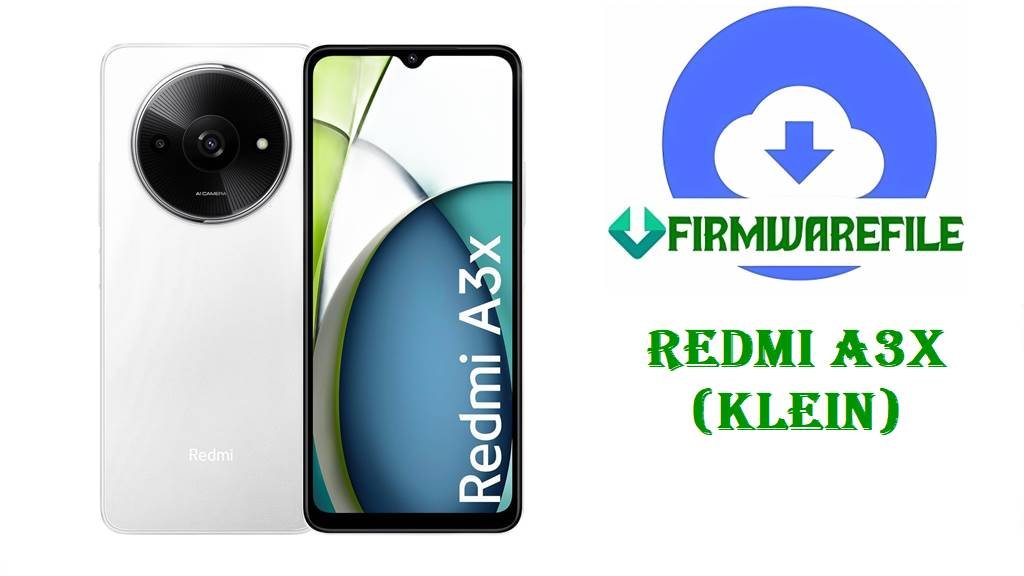
Redmi A3x (klein) Android 16 / 15 V816 Fastboot ROM Download
The Redmi A3x, codename klein, is Xiaomi’s ultra‑budget phone with a 6.71‑inch 90 Hz HD+ display, Unisoc T603 chipset, up to 4 GB RAM, eMMC 5.1 storage and a 5000 mAh battery aimed at basic browsing, social apps and calls.
Owners frequently complain about heavy lag even in simple tasks, weak network performance and surprisingly fast battery drain for such a large cell, with some users calling out the T603 as “very weak” and only suitable for light use.
The official V816 Fastboot ROMs below bring Android 16 (WGSMIXM/WGSRUXM) and late‑cycle Android 15 (VGSINXM) to the Redmi A3x, giving users clean, region‑correct images to unbrick devices, fix bad OTAs and reset software problems that often cause lags, freezes and battery issues.
Download Official Firmware for Redmi A3x (klein)
Codename klein is officially assigned to the Redmi A3x 4G (models 24048RN6CG / 24048RN6CI), with separate firmware branches for Global, India and Russia; firmware trackers list these V816 builds as stable Fastboot packages on Android 16 (WGSMIXM/WGSRUXM) and Android 15 (VGSINXM).
The files below are full Fastboot ROMs hosted on Xiaomi’s bigota CDN and are designed for Mi Flash Tool or fastboot‑script flashing on an unlocked bootloader, allowing you to recover from bootloops, remove corrupted updates or perform a clean upgrade to the latest major Android version supported per region.
| Filename | Region / Target Variant | Build Version | Android Version | Build Date | File Size | Flashing Type | Notes | Download Link |
|---|---|---|---|---|---|---|---|---|
| klein_global_images_V816.0.1.0.WGSMIXM_20251105.0000.00_16.0_global_a4553a94bb.tgz | Global – Redmi A3x Global (WGSMIXM) | V816.0.1.0.WGSMIXM | Android 16 (HyperOS/MIUI V816, 16.0) | 2025‑11‑05 | 4.52 GB | Official Fastboot ROM (.tgz) | First Android 16 stable Fastboot build for Redmi A3x Global; ROM indexes show matching recovery and Fastboot packages under the same version for clean flashing and OTA follow‑ups. | Download V816.0.1.0 WGSMIXM Global (Xiaomi server) |
| klein_in_global_images_V816.0.8.0.VGSINXM_20251020.0000.00_15.0_in_580cba02c0.tgz | India – Redmi A3x India (VGSINXM) | V816.0.8.0.VGSINXM | Android 15 (HyperOS/MIUI V816, 15.0) | 2025‑10‑20 | 3.43 GB | Official Fastboot ROM (.tgz) | Late‑cycle Android 15 Fastboot ROM for Indian Redmi A3x; archive trackers show multiple earlier VGSINXM Android 15 builds, with 0.8.0 among the newer, more polished releases. | Download V816.0.8.0 VGSINXM India (Xiaomi server) |
| klein_ru_global_images_V816.0.1.0.WGSRUXM_20251119.0000.00_16.0_ru_935ee71fe6.tgz | Russia – Redmi A3x Russia (WGSRUXM) | V816.0.1.0.WGSRUXM | Android 16 (HyperOS/MIUI V816, 16.0) | 2025‑11‑19 | 4.31 GB | Official Fastboot ROM (.tgz) | First recorded Android 16 Fastboot build for Russian Redmi A3x; sits at the top of the WGSRUXM line in firmware archives, intended as a long‑term stable base. | Download V816.0.1.0 WGSRUXM Russia (Xiaomi server) |
Redmi A3x (klein) Firmware Details
| Device Name | Redmi A3x 4G (entry‑level smartphone). |
|---|---|
| Codename | klein – official internal codename for all Redmi A3x firmware, including the V816 builds above. |
| Model Identifiers | 24048RN6CG (Global) and 24048RN6CI (India), as listed in device and codename databases. |
| Chipset | Unisoc T603, an entry‑level octa‑core SoC (2×1.8 GHz + 6×1.2–1.6 GHz) with low‑end GPU, suitable mainly for light apps and basic tasks. |
| Display | 6.71‑inch IPS LCD, 720 × 1650 (HD+), 90 Hz refresh rate, Gorilla Glass 3 protection. |
| Battery & Charging | 5000 mAh battery with 10 W wired charging, giving good endurance on light use but drawing complaints of “very bad battery” from some users. |
| Memory & Storage | 3–4 GB RAM with 64–128 GB eMMC 5.1 storage plus microSD slot; low RAM and eMMC speed contribute to lag when many apps are installed. |
| Software Families | Ships with Android 14‑based MIUI/HyperOS; V816.0.x.x builds bring Android 15 (VGSINXM) and Android 16 (WGSMIXM/WGSRUXM) to supported markets. |
| Main User‑Reported Issues | Strong lag and stutters, poor network performance and rapid battery drain, especially once many apps are installed or background processes stack up. |
| Role of These ROMs | Provide clean Android 15/16 bases for unbricking, reversing bad OTAs and removing software clutter that often causes freezes and drain on this low‑end hardware. |
| File Type | Official Xiaomi Fastboot archives (.tgz) containing full partition images and Windows batch scripts. |
| Flashing Tool Required | Xiaomi Mi Flash Tool on Windows or fastboot scripts (for example flash_all.bat) executed from the extracted firmware folder. |
| Bootloader Status | An unlocked bootloader is mandatory for Fastboot flashing; OTA/recovery packages are designed for locked, unmodified systems. |
| Use Cases | Fix bootloops, restore a slow or corrupted system, move from unstable early builds to stable Android 15/16, and prepare the phone for future regional OTA updates. |
Before You Begin ⚙️
- 💾 Backup data: Fastboot flashing usually wipes apps, accounts and internal storage, so copy your photos and important files first.
- 🔋 Charge battery: Make sure your Redmi A3x has at least 50 % charge to avoid shutdowns and potential hard‑brick during flashing.
- 💻 Windows PC & drivers: You need a Windows PC, Xiaomi USB/ADB drivers and a reliable USB‑C cable for Mi Flash or fastboot commands.
- 🔓 Unlock the bootloader: Use Xiaomi’s official unlock tool and confirm the product/codename is klein before flashing any V816 Fastboot ROM.
📱 How to Flash the Firmware Flash File
Method 1: Xiaomi Mi Flash Tool (Fastboot ROM)
- Download & extract the ROM: Get the correct klein_*_images_V816.0.x.0.* .tgz for your region and extract it to a simple path such as C:\ROM\klein on your PC.
- Install Mi Flash & drivers: Install Xiaomi USB/ADB drivers and Mi Flash Tool on your Windows computer.
- Enter fastboot mode: Power off the phone, hold Volume Down + Power until fastboot appears, then connect the device to the PC via USB‑C.
- Flash the firmware: Open Mi Flash, click Select and point it to the extracted ROM folder, choose “clean all” (do not relock), then press Flash and wait while all partitions are written.
- Reboot and update: After Mi Flash finishes, let the phone reboot into Android 15/16, complete setup, and then check for further OTAs from Settings → About phone → System update.
For a complete Mi Flash walkthrough with screenshots and troubleshooting tips, see: Full Tutorial: Flash Xiaomi Firmware with Mi Flash Tool.
Method 2: Fastboot Script (flash_all.bat)
- Set up platform‑tools: Download Google’s Android platform‑tools and verify that fastboot runs from your terminal or Command Prompt.
- Fully extract the ROM: Unpack the Fastboot .tgz until you see partition images and scripts like flash_all.bat inside the ROM directory.
- Connect in fastboot: Boot the Redmi A3x into fastboot mode, connect it to your PC and check it appears in fastboot devices.
- Run the script: Execute the “flash all” script that keeps the bootloader unlocked, then wait while it flashes every required partition automatically.
- Finish setup & monitor: After reboot, complete Android setup and watch performance and battery over a few days while HyperOS/MIUI finishes background optimization.
For detailed explanations of flash_all.bat‑style scripts and extra safety advice, use: Full Tutorial: Flash Stock Firmware Using a Fastboot Script (flash_all.bat).
Frequently Asked Questions (FAQs)
What Redmi A3x problems can these V816 ROMs fix?
Flashing the correct regional Fastboot ROM can fix bootloops, random reboots, severe lag caused by corrupted system files and many battery or network glitches that appear after bad updates or aggressive app installs.
Are WGSMIXM, VGSINXM and WGSRUXM cross‑compatible?
All three are for the same Redmi A3x hardware, but they target different regions; cross‑flashing usually works on an unlocked bootloader but can break OTA updates and local features, so staying on your native code is safest.
Will Android 16 WGSMIXM/WGSRUXM make my phone faster?
Android 16 V816 builds provide a fresh, optimized base and can feel smoother than a cluttered or buggy Android 14/15 install, but the Unisoc T603 and limited RAM still mean you should keep apps light to avoid lag.
Do these updates fix Redmi A3x battery drain?
Clean‑flashing removes misconfigured apps and system bugs that can drain the battery, and V816 updates focus on stability, but long‑term endurance still depends heavily on brightness, background apps and network conditions.
How can I reduce lag on Redmi A3x after updating?
Even on fresh firmware, Xiaomi recommends limiting installed apps, closing background processes, disabling auto‑starts and keeping storage free to reduce lag on low‑end chips like T603.
Will Redmi A3x get more major Android upgrades after V816?
Spec sheets state Redmi A‑series phones are promised limited major upgrades; with Android 15 and 16 already covered on some branches, future changes are likely to be smaller HyperOS/MIUI refinements and security patches rather than big OS jumps.