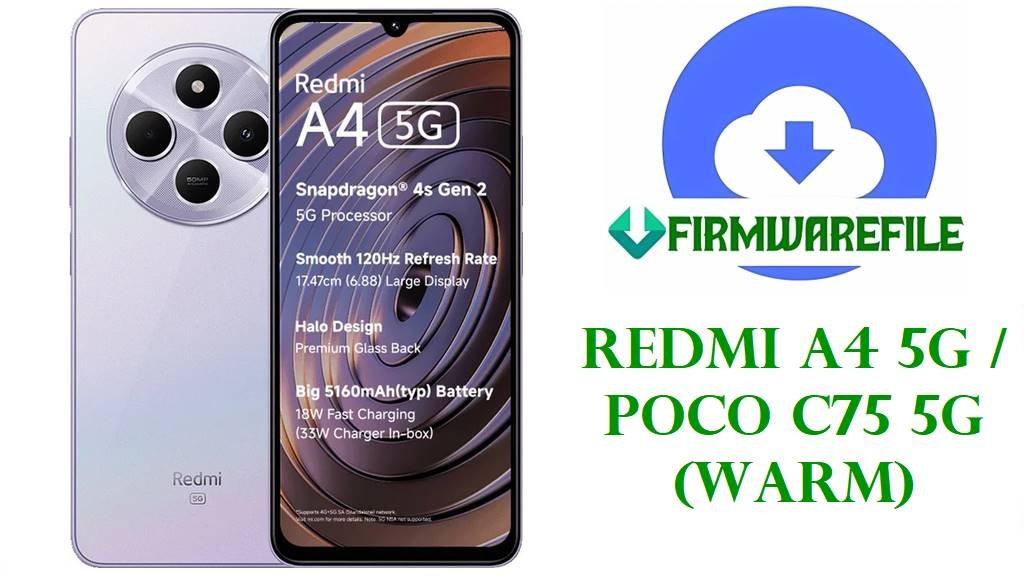
Redmi A4 5G / POCO C75 5G (warm) HyperOS OS2.0.203.0 India ROM
The Redmi A4 5G and POCO C75 5G share the codename “warm” and target India’s budget 5G segment with a large 6.9‑inch 120 Hz HD+ IPS display, Snapdragon 4s Gen 2 5G chipset, 4 GB RAM, and a 5160 mAh battery with 18 W fast charging. This combination offers smooth everyday performance and 5G connectivity for Jio’s SA network, while keeping the price aggressive for first‑time 5G buyers.
However, users have flagged several pain points: inconsistent 5G network registration on older HyperOS builds OS2.0.201.0.VGVINXM, weak mobile signal compared to costlier phones, occasional random reboots, and typical HyperOS 2 complaints like lag and higher battery drain than expected. Xiaomi has officially acknowledged a 5G connection bug affecting Redmi A4 5G and POCO C75 5G on OS2.0.201.0.VGVINXM, along with stability issues that later updates attempt to correct.
The new HyperOS OS2.0.203.0.VGVINXM firmware provided below (both Fastboot .tgz and full OTA .zip) is a stable Android 15 build for India that continues the bug‑fix and security patch line introduced in OS2.0.202.0, which improved system stability, fixed unexpected reboots, and enhanced UI behaviour on POCO C75 5G. Clean‑flashing or updating to OS2.0.203.0 can help resolve software‑side crashes, lingering 5G registration glitches from earlier VGVINXM builds, and general HyperOS 2 performance issues on the warm platform.
Download Official Firmware for Redmi A4 5G / POCO C75 5G (India)
These are official HyperOS ROMs for Redmi A4 5G / POCO C75 5G (codename warm) intended exclusively for the India (IN) region with VGVINXM builds. The Fastboot package is ideal for full clean installs and unbricking, while the full OTA zip suits in‑place upgrades from an earlier official India ROM.
| Filename | Region / Target Variant | Android / HyperOS | Build Date | File Size | Flashing Type | Notes | Download |
|---|---|---|---|---|---|---|---|
| warm_in_global_images_OS2.0.203.0.VGVINXM_20251021.0000.00_15.0_in_13654be440.tgz | India ROM – Redmi A4 5G / POCO C75 5G (warm) IN region | Android 15.0, HyperOS OS2.0.203.0.VGVINXM | 2025‑10‑21 | 5.52 GB | Fastboot ROM (Mi Flash Tool / fastboot script) | Use for clean installs, fixing bootloops, and fully refreshing partitions from PC; requires unlocked bootloader. | Download OS2.0.203.0 Fastboot (Xiaomi servers) |
| warm_in_global-ota_full-OS2.0.203.0.VGVINXM-user-15.0-75f5c1cd84.zip | India ROM – Redmi A4 5G / POCO C75 5G (warm) IN region | Android 15.0, HyperOS OS2.0.203.0.VGVINXM | 2025‑10‑21 | 3.86 GB | Recovery / Full OTA package (Updater / stock recovery) | Flash from the built‑in “System update” app or stock recovery to move from earlier India HyperOS builds without a PC. | Download OS2.0.203.0 Recovery/OTA (Xiaomi servers) |
Redmi A4 5G / POCO C75 5G Firmware Details
| Device Name | Redmi A4 5G / POCO C75 5G (India) |
|---|---|
| Codename | warm – shared by Redmi A4 5G and POCO C75 5G India variants. |
| Model Identifiers | 24116RNC1I, 24116PCC1I and related Indian SKUs. |
| Chipset | Qualcomm Snapdragon 4s Gen 2 (SM4635), octa‑core, 4 nm, Adreno 611 GPU. |
| Display | Approx. 6.9‑inch HD+ IPS LCD, 720×1640, 120 Hz refresh rate. |
| Battery & Charging | 5160 mAh Li‑Po battery with up to 18 W wired charging. |
| Android / HyperOS Versions | Ships with Android 14 + HyperOS 1, officially upgradable to Android 15 + HyperOS 2.0 VGVINXM builds including OS2.0.203.0. |
| Firmware Version Covered | OS2.0.203.0.VGVINXM India Stable (Fastboot & full OTA). |
| Main Issues Reported | 5G network registration failures on OS2.0.201.0, weaker signal vs higher‑end phones, random reboots, lag and battery drain on some HyperOS 2 devices. |
| What OS2.0.203.0 Aims to Improve | Builds on OS2.0.202.0’s fixes for unexpected reboots and UI glitches, while delivering newer security patches and continued stability and connectivity improvements. |
| 5G Compatibility Note | Hardware supports SA 5G; works well with Jio SA but cannot enable Airtel’s NSA 5G due to network architecture limits, regardless of firmware. |
| Flash Methods | Fastboot ROM via Mi Flash Tool (PC, unlocked bootloader) and Recovery/OTA zip via System Updater or stock recovery. |
| Bootloader Status | Fastboot flashing requires an officially unlocked bootloader; Recovery/OTA updates can usually be installed with locked bootloader. |
| Use Cases for These Files | Unbrick soft‑bricked phones, fix bootloops, recover from failed OTAs, update to latest India stable, and troubleshoot 5G and stability issues on warm. |
Flashing Requirements
- Back up your data: Fastboot “clean” flashes and some recovery updates can wipe apps and internal storage, so copy photos and files first.
- Battery above 50%: Ensure at least half charge to avoid shutdowns during flashing, which can brick the phone.
- Windows PC & USB cable (for Fastboot): Needed to run Mi Flash Tool or fastboot scripts for the .tgz package.
- Unlocked bootloader (Fastboot only): Official Xiaomi bootloader unlock is required before flashing the Fastboot ROM.
📱 Quick Flashing Guides
Method 1: Fastboot ROM with Xiaomi Mi Flash Tool
- Prepare tools and ROM: Install Xiaomi USB drivers and Mi Flash Tool on your Windows PC, then extract warm_in_global_images_OS2.0.203.0.VGVINXM_…tgz to a simple folder path.
- Unlock and enter Fastboot mode: After officially unlocking the bootloader, power off the phone and hold Volume Down + Power until the Fastboot logo appears, then connect it to the PC.
- Load the firmware in Mi Flash: Open Mi Flash Tool, click Select, and point to the extracted warm Fastboot ROM folder containing the images and scripts.
- Pick the flash option: Choose a mode such as “clean all” (recommended to fully clear old bugs and debris) and avoid options that relock the bootloader during cross‑testing.
- Start flashing and wait: Click Flash, let Mi Flash complete writing all partitions, and wait for the phone to reboot into HyperOS OS2.0.203.0; the first boot can take several minutes.
For an in‑depth Xiaomi Fastboot flashing tutorial with screenshots and troubleshooting tips, follow this full guide: Full Tutorial: Flash Xiaomi & POCO Firmware with Mi Flash Tool
Method 2: Recovery / Full OTA Update
- Download the OTA zip: Save warm_in_global-ota_full-OS2.0.203.0.VGVINXM-user-15.0-75f5c1cd84.zip to your phone’s internal storage (do not unzip it).
- Use the System Updater: Go to Settings > About phone > System update, tap the menu icon, and select “Choose update package” if the option is available.
- Select the file: Browse to the downloaded OTA zip and confirm; the device will verify the package and start updating to OS2.0.203.0.VGVINXM.
- Alternative: stock recovery: If needed, boot to recovery, choose “Apply update from SD card” or similar, and pick the same OTA zip for manual flashing.
- Reboot and optimize: After installation, the phone will reboot and optimize apps; expect slightly higher battery use for a short time while HyperOS settles.
For a more advanced, PC‑based sideload method that works across many Android phones, including Xiaomi, see this guide on using ADB sideload for stock firmware: How to Sideload Stock Firmware via ADB on Android
Frequently Asked Questions (FAQs)
What problems can OS2.0.203.0 fix on Redmi A4 5G / POCO C75 5G?
This new India HyperOS 2.0 build continues the stability work of OS2.0.202.0, which already reduced random reboots and UI glitches on POCO C75 5G, and it further updates security and core components that can help with crashes and 5G registration issues seen on OS2.0.201.0.VGVINXM.
Will this update enable Airtel 5G on Redmi A4 5G?
No, the device’s modem and band support focus on SA 5G, which works with Jio but not Airtel’s NSA 5G implementation, so no firmware (including OS2.0.203.0) can fully add Airtel 5G support.
What is the difference between the Fastboot .tgz and the OTA .zip?
The Fastboot .tgz is a full image set for Mi Flash Tool or fastboot scripts, ideal for clean installs and unbricking, while the OTA .zip is meant for in‑place updates via the System Updater or stock recovery from an existing official India ROM.
Do I need an unlocked bootloader to install OS2.0.203.0 on warm?
You must unlock the bootloader to flash the Fastboot ROM via Mi Flash, but you can usually apply the Recovery/OTA package on a locked, unmodified India device using the built‑in updater.
Can I downgrade from HyperOS 2.0.203.0 to an older version?
Earlier warm India builds like OS2.0.202.0 and OS2.0.201.0 exist, but downgrading can trigger anti‑rollback or new bugs, so it is generally safer to stay on the latest stable unless Xiaomi explicitly recommends a rollback path.
What if the phone still lags or drains battery after updating?
Some users report HyperOS 2 causing lag and higher battery use on low‑end and midrange devices, so after updating you should clear cache, review background apps, and consider a factory reset; if performance is still poor, wait for further patches or explore lighter ROM options.