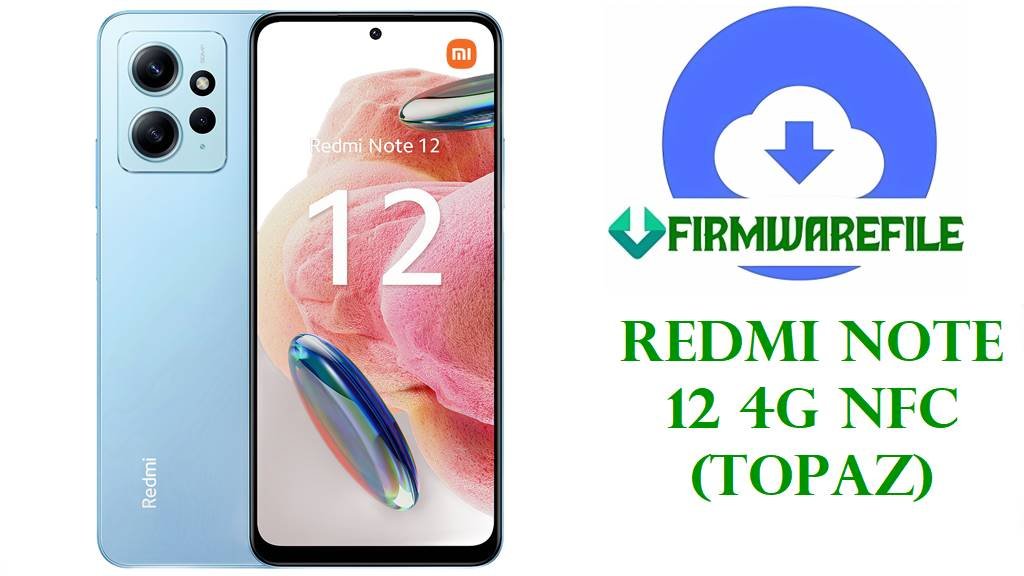
Redmi Note 12 4G NFC (topaz) HyperOS Fastboot ROM & Recovery Download Guide
The Xiaomi Redmi Note 12 4G NFC (codename topaz) is a Snapdragon 685-based mid-range phone with a 6.67-inch 120 Hz AMOLED display, triple camera system, NFC (region-dependent), and 5000 mAh battery, running Android 13 and officially updated to HyperOS and Android 15. This guide focuses on safely using official HyperOS fastboot images and a popular xiaomi.eu build for repair, unbricking, and controlled modifications on the NFC variant.
Owners typically flash stock firmware on this model to recover from bootloops, remove unstable custom ROMs, or restore system integrity after failed modifications. Advanced users may cross between Global, EEA, RU, and ID regional firmware to adjust modem behavior, regulatory settings, and pre-installed apps, but this carries risk and should be done only with a clear understanding of region differences and anti-rollback.
File Selection Guide
Before you flash anything, confirm that your device is the NFC variant with codename topaz, not the non-NFC Redmi Note 12 4G variant often labeled tapas, because their firmware is not interchangeable and wrong packages can break NFC and radio or cause boot failure. You can usually confirm the codename in recovery/fastboot-based tools or from firmware trackers that list topaz for the 4G NFC model.
- Match ROM region to your phone:
- VMGMIXM – Global fastboot ROM for the worldwide NFC model.
- VMGEUXM – EEA (EU) fastboot ROM tuned to EU regulations and apps.
- VMGRUXM – Russia fastboot ROM with RU localization and regulatory settings.
- VMGIDXM – Indonesia fastboot ROM adapted to local carriers and regulations.
- Use Xiaomi official fastboot ROMs (
.tgz) for:- Unbricking from bootloop or fastboot-only state.
- Going back to untouched stock HyperOS.
- Preparing to safely relock the bootloader on the original region firmware.
- Use the xiaomi.eu HyperOS ZIP only with an unlocked bootloader and with the understanding that it is a community custom ROM based on topaz VMGMIXM firmware, with different update cadence and extra modifications.
- Install the topaz-specific TWRP image if you need Nandroid backups, custom ROM installations, or root workflows; this requires an unlocked bootloader and may affect official OTA behavior.
Redmi Note 12 4G NFC (topaz) Firmware Download
| Device Model | Codename | Region | Build | Android Version | Release Date | Notes | Filename | Size | File Format | Flashing Method | Tool | Bootloader Required | Data Wipe | Downgrade Allowed | Tested | Known Issues | Download |
|---|---|---|---|---|---|---|---|---|---|---|---|---|---|---|---|---|---|
| Redmi Note 12 4G NFC Global | topaz | Global (MI) | OS2.0.202.0.VMGMIXM | Android 15 / HyperOS 2 | 2025-10-10 | Stable global fastboot package for the topaz NFC variant; suitable for full system restore and unbricking. | topaz_global_images_OS2.0.202.0.VMGMIXM_20251010.0000.00_15.0_global_f18895ec7c.tgz | 7.00 GB | .tgz (fastboot images) | Fastboot (Mi Flash) | Mi Flash Tool / Fastboot | Unlocked for cross-account flashing; relock only if using official, unmodified VMGMIXM build | Clean flash highly recommended when recovering from serious system errors | Downgrading below current security patch may be limited by anti-rollback rules | Listed by multiple firmware archives as a stable release for daily use. | No widespread critical bugs reported; expect normal mid-cycle HyperOS quirks | Download |
| Redmi Note 12 4G NFC EEA | topaz | EEA (EU) | OS2.0.205.0.VMGEUXM | Android 15 / HyperOS 2 | 2025-11-04 | EEA fastboot ROM tailored for EU region, with GDPR-oriented services and EU-specific apps and network settings. | topaz_eea_global_images_OS2.0.205.0.VMGEUXM_20251104.0000.00_15.0_eea_77efc38cc1.tgz | 6.63 GB | .tgz (fastboot images) | Fastboot (Mi Flash) | Mi Flash Tool / Fastboot | Unlocked for cross-region experiments; safe relock only when using native EEA firmware | Recommended full wipe when moving between EEA and non-EEA branches | Not advised to downgrade to older Android/security levels without explicit rollback instructions | Appears in EEA-specific firmware trackers as current stable release. | Some region-locked services and payment apps may behave differently outside EU | Download |
| Redmi Note 12 4G NFC Russia | topaz | Russia (RU) | OS2.0.202.0.VMGRUXM | Android 15 / HyperOS 2 | 2025-10-15 | Russian-market fastboot ROM with localized apps and regulatory compliance for RU carriers. | topaz_ru_global_images_OS2.0.202.0.VMGRUXM_20251015.0000.00_15.0_ru_eaabba767d.tgz | 7.04 GB | .tgz (fastboot images) | Fastboot (Mi Flash) | Mi Flash Tool / Fastboot | Unlocked bootloader recommended; relocking should be done only after confirming factory RU firmware | Strongly advised to wipe data when changing from RU to another region or vice versa | Anti-rollback may block rollback to much older releases | Included in firmware indexes for topaz as RU stable branch. | Certain local services or apps may not be useful outside Russia | Download |
| Redmi Note 12 4G NFC Indonesia | topaz | Indonesia (ID) | OS2.0.202.0.VMGIDXM | Android 15 / HyperOS 2 | 2025-10-15 | Indonesian fastboot ROM with regional localization and carrier tuning for ID networks. | topaz_id_global_images_OS2.0.202.0.VMGIDXM_20251015.0000.00_15.0_id_f70b9c471e.tgz | 6.43 GB | .tgz (fastboot images) | Fastboot (Mi Flash) | Mi Flash Tool / Fastboot | Unlocked bootloader recommended when experimenting with non-native regions | Clean flash is recommended when switching in or out of this ID-build | Downgrade without official instructions may trigger anti-rollback protections | Documented by HyperOS update aggregators as ID variant stable. | VoLTE/VoWiFi support can vary between carriers and customizations | Download |
| Redmi Note 12 4G NFC (Custom) | topaz | xiaomi.eu (Community) | OS2.0.202.0.VMGMIXM (xiaomi.eu build) | Android 15 / HyperOS 2 (mod) | Base ROM date 2025-10 (VMGMIXM) | Community ROM based on HyperOS OS2.0.202.0.VMGMIXM for Redmi Note 12 topaz/tapas, with added languages and removed regional restrictions. | xiaomi.eu_TOPAZ_OS2.0.202.0.VMGMIXM_15.zip | 4.84 GB | .zip (recovery/fastboot-script ROM) | Custom recovery or fastboot script | TWRP / Fastboot script | Unlocked bootloader only; never relock on xiaomi.eu | Typically requires data wipe when migrating from stock MIUI/HyperOS | Not recommended as downgrade path from newer official fastboot branches | Actively discussed by xiaomi.eu users for Redmi Note 12 series. | Banking/DRM apps may behave differently; updates depend on xiaomi.eu schedule | Download |
| Redmi Note 12 4G NFC Recovery | topaz | Universal | TWRP 3.7.1_12-0 | Android 12–15 compatible | Custom build date (TeamWin) | Custom recovery image built for topaz platform, used for Nandroid backups, Magisk installation, and ROM flashing. | twrp-3.7.1_12-0-topaz-TeamWin.img | 105 MB | .img (recovery image) | Fastboot boot/flash to recovery partition | Fastboot | Unlocked bootloader required | Recovery flash alone does not wipe data, but operations within recovery often will | Not for downgrading or upgrading OS; recovery environment only | Widely used by custom ROM communities targeting this hardware. | Official OTA updates may fail or refuse to install while custom recovery is present | Download |
Redmi Note 12 4G NFC & Firmware Summary
| Category | Detail |
|---|---|
| Device Name | Xiaomi Redmi Note 12 4G NFC (Standard Edition Global) |
| Codename | topaz |
| Chipset | Qualcomm Snapdragon 685 (6 nm), octa-core CPU and Adreno 610 GPU. |
| Display | 6.67-inch AMOLED, 120 Hz, 1080 × 2400 resolution with Gorilla Glass 3 protection. |
| RAM / Storage | Configurations up to 8 GB RAM and 256 GB UFS 2.2 storage, with dedicated microSD slot. |
| Battery & Charging | 5000 mAh Li-Po battery with 33 W wired charging support. |
| Cameras | 50 MP main + 8 MP ultrawide + 2 MP macro rear setup, 13 MP front camera, up to 1080p video recording. |
| Network & NFC | Dual SIM LTE with NFC support depending on market, plus Wi‑Fi ac, Bluetooth 5.0, GPS, and IR blaster. |
| Software Base | Shipped with Android 13 and updated to HyperOS with Android 14 and 15 for supported regions. |
| Stock ROM Types | Official HyperOS fastboot ROMs for Global (VMGMIXM), EEA (VMGEUXM), RU (VMGRUXM), and ID (VMGIDXM). |
| Custom ROM Layer | xiaomi.eu HyperOS builds based on topaz/tapas OS2.0.202.0.VMGMIXM. |
| Recovery Options | TWRP 3.7.1_12-0 topaz custom recovery image, with standard features for backup and flashing. |
| Recommended Flashing Tool | Mi Flash / fastboot for official .tgz; TWRP or fastboot script for xiaomi.eu ZIP. |
| Typical Use Cases | Unbricking, cleaning up persistent software issues, cross-region experiments, and installing community ROMs with unlocked bootloader. |
How to Flash Redmi Note 12 4G NFC (topaz) Firmware
Flashing system software always carries a risk of data loss and device malfunction; back up contacts, photos, and app data and ensure the battery is at least 60% before starting. Use a high-quality USB cable and avoid disconnecting the phone or shutting down the PC while flashing is in progress.
Method 1 – Flash Official HyperOS Fastboot ROM (.tgz) with Mi Flash / Fastboot
This method is appropriate for restoring full stock firmware or unbricking a Redmi Note 12 4G NFC topaz device using one of the official fastboot ROMs in .tgz format.
- Install Qualcomm USB drivers and Mi Flash Tool on a Windows PC, then download and extract the chosen topaz fastboot ROM (
.tgz) until you see theimagesfolder and flash scripts. For an overview of working with Qualcomm-based flash tools and concepts, see the QFIL stock ROM article at this reference. - On the phone, enable OEM unlocking and USB debugging if the system still boots, then power off and boot into fastboot mode by holding Volume Down + Power until the fastboot logo appears. The generic fastboot entry process and preparation are explained in similar fashion in the fastboot flashing tutorial at this guide.
- Connect the phone to the PC, launch Mi Flash, click “Select” and choose the ROM folder containing the extracted
imagesdirectory, then click “Refresh” to verify that the device is detected. - At the bottom of Mi Flash, choose the desired mode:
clean all– wipes user data and is recommended for fixing serious system problems.save user data– attempts to keep data but can leave issues untouched.clean all and lock– relocks bootloader; only use on official, region-correct ROM for your device.
- Press “Flash” and wait until Mi Flash shows success; the first boot into HyperOS may take several minutes, so do not interrupt the process. Concepts about OEM flash tools and risks are also discussed for other brands in references like the Xiaomi Mi Flash-focused explanation on FlashGuideHub at this page.
Method 2 – Install xiaomi.eu HyperOS ZIP via TWRP
This procedure is intended for users who want the xiaomi.eu ROM based on OS2.0.202.0.VMGMIXM for topaz/tapas, with an unlocked bootloader and custom recovery already in use or planned.
- Unlock the bootloader officially with the Mi Unlock tool and download both the xiaomi.eu_TOPAZ_OS2.0.202.0.VMGMIXM_15.zip and the TWRP 3.7.1_12-0 topaz image to your PC or phone. As with any non-stock firmware, ensure you understand manual installation concepts similar to OTA and sideload methods described at this reference.
- Boot the device into fastboot mode and either temporarily boot TWRP using
fastboot boot twrp-3.7.1_12-0-topaz-TeamWin.imgor flash it permanently withfastboot flash recovery twrp-3.7.1_12-0-topaz-TeamWin.imgfrom a PC with fastboot tools installed. General fastboot handling is similar to that presented in fastboot-based stock flashing guides such as this article. - In TWRP, create a full Nandroid backup (boot, system, vendor, and data if supported) to external storage or a PC so that you can revert if the new ROM behaves unexpectedly.
- Use the Wipe menu to clear
data,cache, anddalvik/art cache, then from the Install menu select the xiaomi.eu ZIP and swipe to flash, waiting until the installation completes without errors. - Reboot to system from TWRP and allow a longer first boot; if you face bootloops or severe instability, return to recovery, wipe again, restore your backup, or flash back an official fastboot ROM.
Method 3 – Flash TWRP Recovery (twrp-3.7.1_12-0-topaz)
Installing TWRP on the Redmi Note 12 4G NFC enables advanced maintenance such as full image backups, Magisk root, and third-party ROM installations, but it changes how OTA updates work and should be done only on an unlocked device.
- After unlocking the bootloader, install platform-tools (ADB and fastboot) on your PC and copy
twrp-3.7.1_12-0-topaz-TeamWin.imginto the same folder asfastbootbinaries. This is the same preparation used for fastboot-based flashing of stock firmware as described at this reference. - Boot the phone into fastboot mode (Power + Volume Down) and connect via USB, then confirm detection with
fastboot devicesfrom a terminal or command prompt. - To test recovery without permanently flashing it, run
fastboot boot twrp-3.7.1_12-0-topaz-TeamWin.img; to install it, usefastboot flash recovery twrp-3.7.1_12-0-topaz-TeamWin.imgand then boot straight into recovery to prevent the system from restoring stock recovery on reboot. - Once inside TWRP, set any necessary settings (e.g., decryption support, language) and consider taking a backup of critical partitions before performing modifications.
- After installing custom recovery, avoid installing official OTAs directly; instead, update through custom ROM packages or restore stock firmware and recovery if you need full official update support.
Frequently Asked Questions
Is the topaz ROM compatible with the non-NFC Redmi Note 12 4G (tapas)?
No, the NFC variant topaz and the non-NFC Redmi Note 12 4G tapas use different firmware branches, and cross-flashing is not supported for normal users. Using a topaz ROM on a tapas device, or vice versa, can result in loss of NFC features, radio issues, or a non-booting phone, so always choose packages that explicitly list your codename.
Which regional build is best for battery life and signal quality on this model?
Battery life and signal quality depend mostly on local network conditions and app usage, so there is no universally “best” region, but using the native region firmware for your retail unit usually provides the most consistent modem and regulatory behavior. Cross-region flashing (for example, from Global VMGMIXM to EEA VMGEUXM) can change pre-installed apps and band priorities, yet any improvement is situational and not guaranteed.
Can I relock the bootloader on my topaz after flashing one of these HyperOS fastboot ROMs?
Relocking is generally safe only if the device is running a completely official, unmodified ROM that matches the original region and device variant, such as a factory Global or EEA build for your unit. Relocking with xiaomi.eu, mixed regions, or modified partitions can cause the phone to fail verified boot and become difficult to recover, so leave the bootloader unlocked in those scenarios.
Does the xiaomi.eu_TOPAZ_OS2.0.202.0.VMGMIXM_15 ROM reduce bloatware compared to stock HyperOS?
The xiaomi.eu build for Redmi Note 12 based on OS2.0.202.0.VMGMIXM usually removes some region-specific applications and introduces additional language support while retaining the core HyperOS experience. This can make the interface feel lighter for some users, but background services and overall resource usage still reflect the underlying HyperOS and hardware limits.
What should I do if Mi Flash fails partway through flashing a topaz ROM?
If Mi Flash stops with an error, note the error message, close the tool, disconnect the phone, and then reconnect in fastboot mode to attempt flashing again after checking USB cable and port. If failures persist, try a different PC or USB port and verify that the ROM archive is not corrupted by re-downloading it, similar to general troubleshooting steps used for other OEM flash tools.
Does installing TWRP on the Redmi Note 12 4G NFC affect banking or DRM-protected apps?
Installing TWRP often goes hand in hand with unlocking the bootloader, and many banking or streaming apps treat an unlocked or modified environment as less trusted, which can limit functionality. Keeping the phone on fully stock firmware and recovery is usually better for maximum compatibility with such services, while custom recovery is more appropriate for users prioritizing modifications.
Is this phone still a reliable daily driver after several fastboot flashes and ROM changes?
The hardware itself does not wear out from software flashing, but frequent region changes, partial flashes, or mixing custom and stock ROMs increase the risk of configuration issues that may show up as random bugs, connectivity quirks, or reduced stability. Using fastboot ROMs primarily as a recovery tool and keeping one stable configuration for daily use is a safer long-term approach.