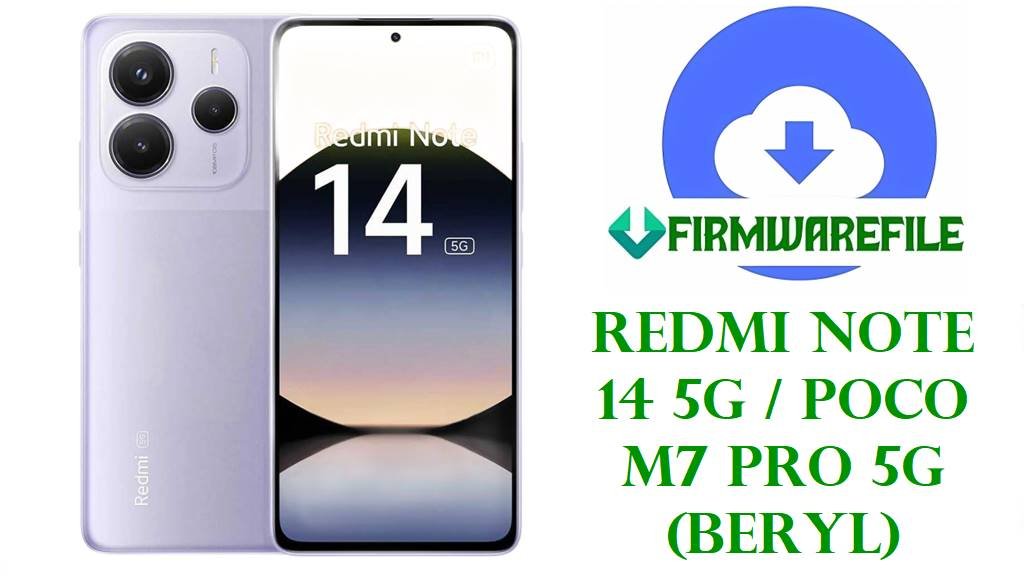
Redmi Note 14 5G / POCO M7 Pro 5G (beryl) HyperOS 2 Fastboot ROM Download
The Redmi Note 14 5G and POCO M7 Pro 5G are mid‑range 5G phones built around a 6.67‑inch 120 Hz display, a MediaTek 6‑nm 5G chipset, up to 8 GB RAM and a 108 MP main camera, giving users smooth everyday performance with strong battery life and fast charging. Xiaomi’s firmware ecosystem confirms that codename beryl is shared by Redmi Note 14 5G, Redmi Note 14 SE and POCO M7 Pro 5G, and all the HyperOS 2 packages in this guide are compiled specifically for that platform.
Owners frequently report heat build‑up up to about 41 °C during charging or gaming, faster battery drain after HyperOS 2 updates, random lags, network instability and occasional bugs or failed OTAs. Many of these problems are linked to software factors such as background optimization, modem configuration, fast‑charging behaviour and early HyperOS 2 builds rather than hardware defects, which is why a clean install of the latest regional Fastboot ROM often brings noticeable improvements.
The official Android 15 HyperOS 2.0.x Fastboot ROMs below cover China, Global, EEA, India, Indonesia, Russia, Taiwan, Turkey and a special “dc” channel, and several late‑2025 releases include newer security patches and system‑security enhancements over the first VOQMIDC / VOQMIXM builds. Using these images with Mi Flash Tool or fastboot scripts lets users unbrick bootlooping phones, repair broken system partitions, and move onto stable firmware that better manages thermals, battery life and general stability on beryl devices.
Download Official Firmware for Redmi Note 14 5G / POCO M7 Pro 5G (beryl)
The following Android 15 HyperOS 2.0.x files are full Fastboot ROMs hosted on Xiaomi’s bigota/hugeota update servers and are meant to be flashed via Mi Flash Tool or fastboot scripts on an unlocked bootloader. Each package targets a specific region or channel, so matching the VOQ* code in the filename with your phone’s software region is essential for working OTA updates and proper network support.
| Filename | Region / Target Variant | Android / HyperOS | Build Date | File Size | Flashing Type | Notes | Download Link |
|---|---|---|---|---|---|---|---|
| beryl_images_OS2.0.210.0.VOQCNXM_20251105.0000.00_15.0_cn_c95e69fa69.tgz | China ROM – Redmi Note 14 5G / Redmi Note 14 SE / POCO M7 Pro 5G China (VOQCNXM) | Android 15, HyperOS 2.0.210.0.VOQCNXM | 2025‑11‑05 | 7.05 GB | Official Fastboot ROM (Mi Flash / fastboot) | Latest China stable beryl Fastboot image tracked by HyperOS update sites; ideal for unbricking and clean‑installing Chinese units. | Download OS2.0.210.0.VOQCNXM (Xiaomi server) |
| beryl_global_images_OS2.0.208.0.VOQMIXM_20251114.0000.00_15.0_global_a6af186b64.tgz | Global ROM – Redmi Note 14 5G / POCO M7 Pro 5G Global (VOQMIXM) | Android 15, HyperOS 2.0.208.0.VOQMIXM | 2025‑11‑14 | 8.03 GB | Official Fastboot ROM (Mi Flash / fastboot) | Newer global build whose firmware trackers link with late‑2025 security patches and higher system security over OS2.0.1.0.VOQMIXM. | Download OS2.0.208.0.VOQMIXM (Xiaomi server) |
| beryl_in_global_images_OS2.0.207.0.VOQINXM_20251112.0000.00_15.0_in_81ab0e3e1b.tgz | India ROM – Redmi Note 14 5G / POCO M7 Pro 5G India (VOQINXM) | Android 15, HyperOS 2.0.207.0.VOQINXM | 2025‑11‑12 | 6.32 GB | Official Fastboot ROM (Mi Flash / fastboot) | Late‑2025 Indian beryl firmware; OTA changelog for this line mentions updated security patches and improved system security. | Download OS2.0.207.0.VOQINXM (Xiaomi server) |
| beryl_eea_global_images_OS2.0.206.0.VOQEUXM_20251115.0000.00_15.0_eea_2af41361a1.tgz | EEA ROM – Redmi Note 14 5G / POCO M7 Pro 5G Europe (VOQEUXM) | Android 15, HyperOS 2.0.206.0.VOQEUXM | 2025‑11‑15 | 7.22 GB | Official Fastboot ROM (Mi Flash / fastboot) | EEA Fastboot package that succeeds early VOQEUXM builds; firmware trackers list it with newer security patch dates and EU‑compliant optimizations. | Download OS2.0.206.0.VOQEUXM (Xiaomi server) |
| beryl_tw_global_images_OS2.0.204.0.VOQTWXM_20251119.0000.00_15.0_tw_2093aaf3c3.tgz | Taiwan ROM – Redmi Note 14 5G / POCO M7 Pro 5G Taiwan (VOQTWXM) | Android 15, HyperOS 2.0.204.0.VOQTWXM | 2025‑11‑19 | 5.70 GB | Official Fastboot ROM (Mi Flash / fastboot) | Regional firmware tuned for Taiwan carriers and regulations; recommended base to fix OTA failures and soft bricks on TWXM devices. | Download OS2.0.204.0.VOQTWXM (Xiaomi server) |
| beryl_dc_global_images_OS2.0.1.0.VOQMIDC_20250422.0000.00_15.0_global_dc_fef1cc26e2.tgz | Global “dc” channel – Redmi Note 14 5G / POCO M7 Pro 5G (VOQMIDC) | Android 15, HyperOS 2.0.1.0.VOQMIDC | 2025‑04‑22 | 5.18 GB | Official Fastboot ROM (Mi Flash / fastboot) | Early HyperOS 2 build for a dedicated distribution channel; mainly useful as an emergency unbrick or downgrade starting point. | Download OS2.0.1.0.VOQMIDC (Xiaomi server) |
| beryl_id_global_images_OS2.0.204.0.VOQIDXM_20251112.0000.00_15.0_id_e4c1c5625b.tgz | Indonesia ROM – Redmi Note 14 5G / POCO M7 Pro 5G Indonesia (VOQIDXM) | Android 15, HyperOS 2.0.204.0.VOQIDXM | 2025‑11‑12 | 7.18 GB | Official Fastboot ROM (Mi Flash / fastboot) | Indonesian stable; recovery changelog for this branch mentions a November 2025 security patch and raised system security level. | Download OS2.0.204.0.VOQIDXM (Xiaomi server) |
| beryl_tr_global_images_OS2.0.204.0.VOQTRXM_20251119.0000.00_15.0_tr_1da5caddd9.tgz | Turkey ROM – Redmi Note 14 5G / POCO M7 Pro 5G Turkey (VOQTRXM) | Android 15, HyperOS 2.0.204.0.VOQTRXM | 2025‑11‑19 | 6.73 GB | Official Fastboot ROM (Mi Flash / fastboot) | Turkey‑region Fastboot ROM; keeps TRXM units on a clean regional update path and is well suited for fixing bootloops and software corruption. | Download OS2.0.204.0.VOQTRXM (Xiaomi server) |
| beryl_ru_global_images_OS2.0.205.0.VOQRUXM_20251120.0000.00_15.0_ru_93519eae77.tgz | Russia ROM – Redmi Note 14 5G / POCO M7 Pro 5G Russia (VOQRUXM) | Android 15, HyperOS 2.0.205.0.VOQRUXM | 2025‑11‑20 | 7.83 GB | Official Fastboot ROM (Mi Flash / fastboot) | Russian beryl firmware; late‑2025 VOQRUXM builds pick up the same round of security and stability updates as other regions. | Download OS2.0.205.0.VOQRUXM (Xiaomi server) |
Redmi Note 14 5G / POCO M7 Pro 5G Firmware Details
| Device Name | Redmi Note 14 5G / Redmi Note 14 SE / POCO M7 Pro 5G |
|---|---|
| Codename | beryl – shared platform codename used across all listed firmware builds. |
| Model Identifiers | Includes 24094RAD4C / 24094RAD4G / regional Note 14 5G and POCO M7 Pro 5G variants tracked in certification databases. |
| Chipset | MediaTek 5G SoC in the Dimensity 700‑series class (6 nm, octa‑core) with Mali GPU, tuned for mid‑range 5G performance. |
| Display | 6.67‑inch display with around 1080p‑class resolution, 120 Hz refresh rate and modern slim bezels. |
| Battery & Charging | Approx. 5000–5110 mAh battery with about 45 W wired fast charging, optimized for full‑day use. |
| Software Families | Android 15 with HyperOS 2.0.x (VOQ* lines), including VOQCNXM, VOQMIXM, VOQEUXM, VOQINXM, VOQIDXM, VOQRUXM, VOQTWXM, VOQTRXM, VOQMIDC. |
| Main Issues Reported | Overheating around 40–41 °C while charging or gaming, faster battery drain after HyperOS 2 updates, lag, notification glitches and occasional failed or stuck OTAs. |
| What New Builds Improve | Late‑2025 VOQMIXM/VOQIDXM and related builds add newer security patches and system‑security hardening, and aim to improve stability over early 2.0.1.0 firmware. |
| File Type | Official Xiaomi Fastboot ROM archives (.tgz) containing complete partition images and flashing scripts. |
| Required Flashing Tool | Xiaomi Mi Flash Tool on Windows or fastboot command‑line scripts such as flash_all.bat. |
| Bootloader Status | Bootloader unlock is required for all Fastboot ROM flashes; OTA updates via Settings usually work with a locked, unmodified system. |
| Use Cases for These Files | Unbrick soft‑bricked phones, recover from bootloops, repair corrupted system partitions, move to a stable regional build and undo problematic root or custom recoveries. |
Flashing Requirements
- 💾 Backup everything: Fastboot flashing usually wipes apps, settings and internal storage, so save photos and files first.
- 🔋 Charge above 50%: Keep the battery at least half full to avoid shutdowns during flashing, which can brick the device.
- 💻 Use a Windows PC: You need a Windows computer, a good USB‑A/USB‑C cable and installed Xiaomi USB drivers.
- 🔓 Unlock the bootloader: Complete Xiaomi’s official unlock process before using Mi Flash Tool or fastboot scripts.
How to Flash the Firmware
Method 1: Xiaomi Mi Flash Tool (Fastboot ROM)
- Prepare tools and files: Install Xiaomi USB drivers and Mi Flash Tool on your PC, then extract the chosen beryl_*_images_OS*.tgz into a simple folder path.
- Enter fastboot mode: Power off the phone, hold Volume Down + Power to enter fastboot, and connect it to the PC via USB‑C once the bootloader is unlocked.
- Load the firmware: Open Mi Flash Tool, click Select and point it to the extracted beryl ROM folder containing the images and scripts.
- Choose “clean all”: In Mi Flash options, select a mode like “clean all” to refresh partitions while keeping the bootloader unlocked, then click Flash.
- Wait and reboot: Allow the tool to finish and the phone to reboot; the first HyperOS 2 boot can take several minutes while the system optimizes apps in the background.
For a complete, screenshot‑rich Mi Flash walkthrough (including driver installation and error troubleshooting), see this dedicated guide: Full Tutorial: Flash Xiaomi Firmware with Mi Flash Tool.
Method 2: Fastboot Script (de>flash_all.bat-Style)
- Install platform‑tools: Set up Google’s Android platform‑tools so that fastboot runs correctly from your command prompt or terminal.
- Extract the ROM fully: Unpack the de>.tgz file until you see partition images and Windows batch scripts such as flash_all.bat.
- Connect in fastboot: Boot beryl into fastboot mode (Volume Down + Power) with an unlocked bootloader and verify detection using fastboot devices.
- Run the correct script: Execute the “flash all” script that does not relock the bootloader, then wait while it writes all partitions.
- First boot and checks: After reboot, finish setup, then monitor heat, battery life and network behaviour for a few days as HyperOS completes background indexing.
For more explanation of fastboot script options, safety tips and generic usage, refer to this guide: How to Flash Stock Firmware Using a Fastboot Script (flash_all.bat).
Frequently Asked Questions (FAQs)
What problems can these beryl firmware files fix?
Clean‑flashing the right regional Fastboot ROM can solve issues like bootloops after OTA updates, severe lag, random reboots, missing system apps and software‑driven overheating or fast battery drain.
How do I choose the correct firmware for my Redmi Note 14 5G or POCO M7 Pro 5G?
Check Settings → About phone → Version and match the region code (VOQCNXM, VOQMIXM, VOQEUXM, VOQINXM, VOQIDXM, VOQRUXM, VOQTWXM, VOQTRXM, VOQMIDC) with the ROM filename before flashing.
Will flashing these Fastboot ROMs erase my data?
Yes, using Mi Flash or flash_all.bat with “clean all” typically wipes apps, accounts and internal storage, so a full backup of photos and files is strongly recommended.
Do these updates fix overheating on Redmi Note 14 5G?
Newer HyperOS 2.0.x builds include security and stability fixes, and many users see more consistent thermals after a clean flash, but heavy gaming, charging habits and environment still affect temperature.
Can I install a VOQCNXM (China) ROM on a global VOQMIXM device?
Cross‑flashing different regions is technically possible on an unlocked bootloader but risks network issues, broken OTA updates and bricks if the bootloader is later relocked, so it is not recommended.
What happens if I flash the wrong beryl firmware?
Flashing firmware for a different codename or mismatched region can prevent the phone from booting, break radio functions or cause endless bootloops, sometimes requiring professional repair.
Why does my phone still drain quickly after updating to the latest build?
After major updates HyperOS runs indexing and optimization that temporarily increases drain, and users are advised to let a few charge cycles pass, review background apps and then reassess battery life.