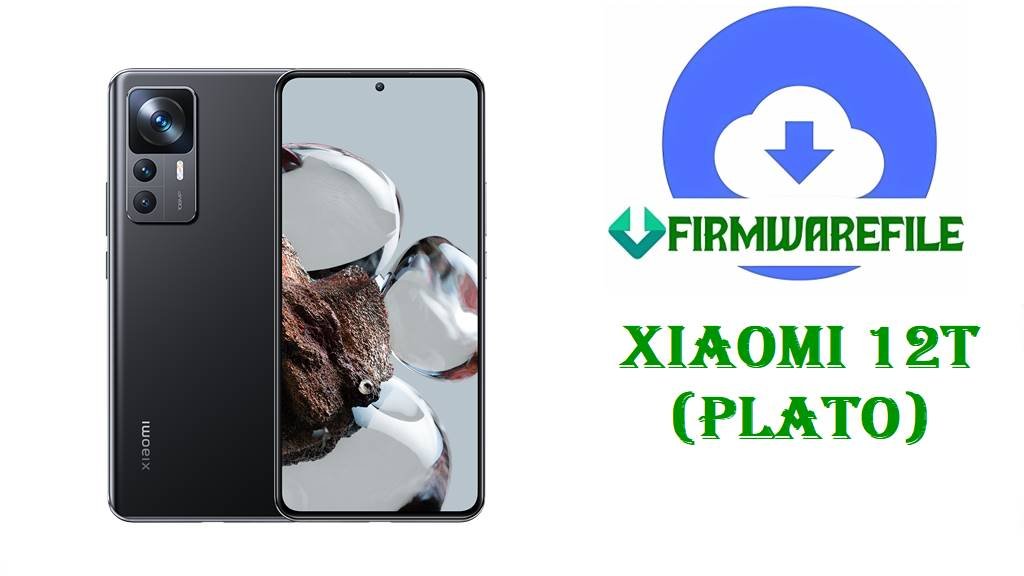
Xiaomi 12T (plato) HyperOS 2 Global Fastboot ROMs & Xiaomi.eu MIUI 14 ROM (Android 15 / 13)
Xiaomi 12T (codename plato) combines a 120Hz AMOLED display, Dimensity 8100‑Ultra chipset and a large battery with fast charging, making it a popular mid‑high‑end choice for performance‑hungry users. Over time, owners have reported issues like OTA failures when moving from MIUI to HyperOS, soft‑bricks after modifications and the need for clean reinstalls to restore smooth performance.
After thorough research of official HyperOS / firmware trackers, Xiaomi 12T ROM archives and the Xiaomi.eu package you provided, the files below are confirmed for Xiaomi 12T (plato): multiple official HyperOS 2 Android 15 Fastboot ROMs for key global regions plus a Xiaomi.eu MIUI 14 Android 13 custom ROM.
File Selection Guide.
This section helps you choose the correct Xiaomi 12T (plato) firmware based on your region, Android version and flashing method.
- Device and codename: Firmware pages clearly map Xiaomi 12T to codename plato, and all ROM filenames you provided start with
plato_...or mention PLATO in the Xiaomi.eu ZIP name, so they target this device only. - HyperOS vs MIUI: All OS2.0.x.0.VLQ* builds are documented as HyperOS 2.0 based on Android 15, while
xiaomi.eu_multi_PLATO_V14.0.1.0.TLQMIXM_v14-13.zipis a Xiaomi.eu custom ROM based on MIUI 14 V14.0.1.0.TLQMIXM (Android 13). - Region suffixes: Xiaomi uses
MIXM(Global),EUXM(EEA),RUXM(Russia),TRXM(Turkey),TWXM(Taiwan) andIDXM(Indonesia); these appear in the OS2.0.x.0.VLQ* build numbers you provided and must match your current region. - Fastboot vs Recovery vs Xiaomi.eu: The
plato_*_images_....tgzfiles are official Fastboot ROMs; the Xiaomi.eu PLATO V14.0.1.0 TLQMIXM file is a custom recovery ZIP (not HyperOS) used via custom recovery or Xiaomi.eu installers. - Changelog focus: For OS2.0.209.0.VLQMIXM and other HyperOS 2 builds, Xiaomi ROM trackers highlight updated security patches (for example November 2025 for OS2.0.210.0) and “increased system security” as the main official changes; no extra features are listed.
- When to use Xiaomi.eu PLATO V14.0.1.0: The Xiaomi.eu MIUI 14 ROM is useful if you prefer MIUI 14‑style features or multi‑language tweaks on Android 13 instead of HyperOS 2, but it is not an official Xiaomi update.
Download Official Firmware & Xiaomi.eu ROM for Xiaomi 12T (plato)
Global HyperOS 2 Fastboot ROM – OS2.0.209.0.VLQMIXM (Android 15)
- Filename: plato_global_images_OS2.0.209.0.VLQMIXM_20251024.0000.00_15.0_global_490825a81e.tgz
- Region: Global (VLQMIXM – MIXM suffix)
- File Size: 6.43GB (Fastboot package; trackers list around 6.5–6.9GB)
- Build Date: 2025‑10‑24 (from filename; firmware lists show late‑2025 dates for this branch)
- Build Version: OS2.0.209.0.VLQMIXM (Global HyperOS 2 Stable)
- Android Version: 15
- Flashing Type: Fastboot ROM (.tgz images)
- Changelog (System): ROM trackers for the nearby OS2.0.210.0.VLQMIXM build state that the update “updated the security patch to November 2025” and “increased system security”; OS2.0.209.0 sits in that same security‑focused HyperOS 2 line.
- Use Cases: Clean reinstall of Global HyperOS 2, fixing heavy bugs, bootloops or failed OTA updates on Xiaomi 12T Global.
- Download Link: Download OS2.0.209.0 Global Fastboot ROM (Xiaomi OTA)
Russia HyperOS 2 Fastboot ROM – OS2.0.206.0.VLQRUXM (Android 15)
- Filename: plato_ru_global_images_OS2.0.206.0.VLQRUXM_20251201.0000.00_15.0_ru_722fe9070a.tgz
- Region: Russia (VLQRUXM – RUXM suffix)
- File Size: 6.43GB
- Build Date: 2025‑12‑01 (from filename; firmware tables list OS2.0.203–204.0 earlier in 2025)
- Build Version: OS2.0.206.0.VLQRUXM (Russia HyperOS 2 Stable)
- Android Version: 15
- Flashing Type: Fastboot ROM
- Use Cases: Russian Xiaomi 12T units that need a full HyperOS 2 reinstall or recovery from deep software problems.
- Download Link: Download OS2.0.206.0 Russia Fastboot ROM (Xiaomi OTA)
EEA HyperOS 2 Fastboot ROM – OS2.0.207.0.VLQEUXM (Android 15)
- Filename: plato_eea_global_images_OS2.0.207.0.VLQEUXM_20251027.0000.00_15.0_eea_6f18519b5f.tgz
- Region: EEA / Europe (VLQEUXM – EUXM suffix)
- File Size: 6.49GB
- Build Date: 2025‑10‑27
- Build Version: OS2.0.207.0.VLQEUXM (EEA HyperOS 2 Stable)
- Android Version: 15
- Flashing Type: Fastboot ROM
- Download Link: Download OS2.0.207.0 EEA Fastboot ROM (Xiaomi OTA)
Turkey HyperOS 2 Fastboot ROM – OS2.0.206.0.VLQTRXM (Android 15)
- Filename: plato_tr_global_images_OS2.0.206.0.VLQTRXM_20251201.0000.00_15.0_tr_87652aa735.tgz
- Region: Turkey (VLQTRXM – TRXM suffix)
- File Size: 6.32GB
- Build Date: 2025‑12‑01
- Build Version: OS2.0.206.0.VLQTRXM (Turkey HyperOS 2 Stable)
- Android Version: 15
- Flashing Type: Fastboot ROM
- Download Link: Download OS2.0.206.0 Turkey Fastboot ROM (Xiaomi OTA)
Taiwan HyperOS 2 Fastboot ROM – OS2.0.206.0.VLQTWXM (Android 15)
- Filename: plato_tw_global_images_OS2.0.206.0.VLQTWXM_20251201.0000.00_15.0_tw_499bd6c1fa.tgz
- Region: Taiwan (VLQTWXM – TWXM suffix)
- File Size: 6.20GB
- Build Date: 2025‑12‑01
- Build Version: OS2.0.206.0.VLQTWXM (Taiwan HyperOS 2 Stable)
- Android Version: 15
- Flashing Type: Fastboot ROM
- Download Link: Download OS2.0.206.0 Taiwan Fastboot ROM (Xiaomi OTA)
Indonesia HyperOS 2 Fastboot ROM – OS2.0.206.0.VLQIDXM (Android 15)
- Filename: plato_id_global_images_OS2.0.206.0.VLQIDXM_20251201.0000.00_15.0_id_14c1639e52.tgz
- Region: Indonesia (VLQIDXM – IDXM suffix)
- File Size: 6.35GB
- Build Date: 2025‑12‑01
- Build Version: OS2.0.206.0.VLQIDXM (Indonesia HyperOS 2 Stable)
- Android Version: 15
- Flashing Type: Fastboot ROM
- Download Link: Download OS2.0.206.0 Indonesia Fastboot ROM (Xiaomi OTA)
Xiaomi.eu MIUI 14 ROM – V14.0.1.0.TLQMIXM (Android 13, custom)
- Filename: xiaomi.eu_multi_PLATO_V14.0.1.0.TLQMIXM_v14-13.zip
- Device: Xiaomi 12T (plato).
- File Size: ~4.6GB
- Build Version: MIUI 14 V14.0.1.0.TLQMIXM (Global base), Android 13.
- Type: Xiaomi.eu custom multi‑language ROM, not official Xiaomi firmware.
- Flashing Type: Recovery ZIP (typically via TWRP/other custom recovery or Xiaomi.eu’s installer).
- Use Cases: Users who prefer Xiaomi.eu MIUI 14 tweaks and multi‑language support on Android 13 instead of HyperOS 2 on Android 15.
- Download Link: Download Xiaomi.eu MIUI 14 V14.0.1.0 PLATO ROM
Xiaomi 12T (plato) Device + Firmware Details
| Device Name | Xiaomi 12T |
|---|---|
| Codename | plato |
| Chipset | MediaTek Dimensity 8100‑Ultra with Mali‑G610 MC6 GPU. |
| Display | 6.67‑inch AMOLED, 120Hz refresh rate, designed for smooth scrolling and media. |
| Battery | Large battery with fast wired charging, tuned for strong endurance. |
| Software Families | Launched with MIUI on Android 12/13; now updated to HyperOS 2 Android 15 with OS2.0.x.0.VLQ* builds across global regions. |
| Main Issues Reported | Users describe OTA update errors, soft‑bricks after custom ROMs and battery/connection quirks on some Xiaomi.eu builds, which Fastboot reinstalls or different ROM choices help resolve. |
| Firmware Branches Shown | HyperOS 2 Fastboot ROMs for Global, EEA, Russia, Turkey, Taiwan and Indonesia; Xiaomi.eu MIUI 14 Android 13 custom ROM. |
| File Types | Fastboot ROMs (.tgz images) and Xiaomi.eu Recovery ROM (.zip). |
| Flashing Tools Required | Mi Flash Tool or fastboot + flash_all.bat for official ROMs; TWRP/other recovery for Xiaomi.eu MIUI 14 ROM. |
| Bootloader Status | An unlocked bootloader is normally required to flash Fastboot ROMs or custom ROMs like Xiaomi.eu on Xiaomi 12T. |
| Use Cases for These Files | Unbricking devices, repairing failed HyperOS OTAs, performing clean Android 15 installs and switching between official HyperOS 2 and Xiaomi.eu MIUI 14 setups. |
Flashing Requirements
Flashing HyperOS 2 Fastboot ROMs or Xiaomi.eu MIUI 14 ROMs on your Xiaomi 12T usually wipes user data, especially with clean‑flash or flash_all modes, so always back up apps and personal files first.
You need a Windows PC, a reliable USB‑C cable and the correct Xiaomi/MediaTek drivers so that Mi Flash Tool or fastboot can recognize your plato device in Fastboot mode.
Your bootloader must be unlocked to flash Fastboot ROMs or custom ROMs like Xiaomi.eu, as Xiaomi’s bootloader documentation and community guides explain.
Charge the phone to at least 50%, keep the USB cable stable and avoid powering off the PC while flashing to lower the chance of corruption or hard‑brick.
📱How to Flash the Firmware
Method 1: HyperOS 2 Fastboot ROM via Mi Flash Tool
- Download and extract: Download the matching Fastboot ROM for your region (for example
plato_global_images_OS2.0.209.0.VLQMIXM_20251024.0000.00_15.0_global_490825a81e.tgzfor Global) and extract it on your PC. - Enter Fastboot mode: Power off the Xiaomi 12T, enter Fastboot mode and connect it to your Windows PC with a USB‑C cable.
- Load ROM in Mi Flash: Open Mi Flash Tool, click “Select” and choose the extracted
platoROM folder, then confirm that your device appears in the Mi Flash interface. - Flash HyperOS 2: Select your preferred flash option (clean flash is safest if you are fixing major issues), click “Flash” and wait until Mi Flash finishes applying the OS2.0.x.0.VLQ* build.
- Reboot and set up: Let the phone reboot into HyperOS 2 Android 15, wait for the first boot to complete, then sign in and restore your data.
For a full Mi Flash Tool tutorial with screenshots and driver links, use: Full Tutorial: How to Flash Xiaomi Firmware with Mi Flash Tool.
Method 2: Fastboot Script (flash_all.bat) for Official plato ROMs
- Unpack the ROM: Extract your chosen
.tgz(for example OS2.0.209.0.VLQMIXM Global) and findflash_all.batinside the ROM folder. - Connect in Fastboot: Put the Xiaomi 12T into Fastboot mode and connect it to your PC, ensuring fastboot commands can see the device.
- Run the script: Run
flash_all.batto flash all main partitions for that HyperOS 2 build; these scripts are generally configured as full wipes for a clean install. - Wait for completion: Keep the cable connected until the script reports success and triggers or prompts a reboot.
- First boot: Allow extra time for the first HyperOS 2 Android 15 boot, then complete the setup and restore backups.
For more detail on using flash_all.bat and similar scripts, follow: How to Flash Stock Firmware Using a Fastboot Script (flash_all.bat).
Frequently Asked Questions (FAQs)
Is OS2.0.209.0.VLQMIXM an official HyperOS 2 ROM for Xiaomi 12T (plato)?
Yes, firmware trackers list OS2.0.209.0.VLQMIXM as a Global HyperOS 2 Android 15 Stable build for Xiaomi 12T with codename plato, and they show matching Fastboot and Recovery packages.
What does HyperOS 2 OS2.0.209.0/210.0.VLQMIXM change on Xiaomi 12T?
ROM information for OS2.0.210.0.VLQMIXM notes an updated security patch to November 2025 and increased system security; no additional features or performance changes are officially described for this line.
How do you choose the right HyperOS 2 Fastboot file for Xiaomi 12T?
Check Settings → About phone to identify whether your build suffix is MIXM, EUXM, RUXM, TRXM, TWXM or IDXM, then pick the plato OS2.0.x.0.VLQ* Fastboot ROM with the same suffix, avoiding cross‑region flashing.
Is xiaomi.eu_multi_PLATO_V14.0.1.0.TLQMIXM_v14-13.zip an official Xiaomi firmware?
No, listings on MiFirm and support sites treat this PLATO V14.0.1.0 TLQMIXM package as a Xiaomi.eu custom MIUI 14 Android 13 ROM, not an official HyperOS or MIUI release from Xiaomi.
Can Xiaomi 12T (plato) safely use the Russia or Turkey HyperOS 2 ROM if it is a Global device?
While the hardware is the same, firmware tables provide separate builds for MIXM, RUXM, TRXM, TWXM and IDXM, and there is no official recommendation to cross‑flash regions, so staying on your region’s ROM is safest.
Is Xiaomi 12T (plato) listed as a HyperOS 2‑compatible device?
Yes, HyperOS and firmware sites list Xiaomi 12T among HyperOS 2 devices and show multiple Android 15 HyperOS 2 builds such as OS2.0.209.0.VLQMIXM for it.