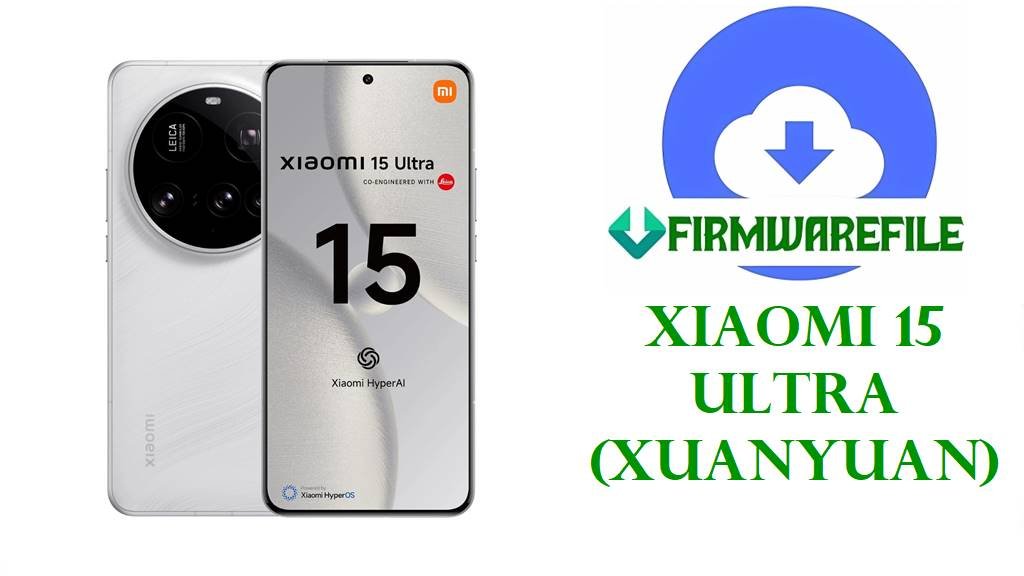
Xiaomi 15 Ultra (xuanyuan) HyperOS 3 & HyperOS 2 Fastboot ROMs + xiaomi.eu Build
The Xiaomi 15 Ultra (codename xuanyuan) is a top‑tier flagship with a 6.73‑inch 2K‑class AMOLED LTPO display, Snapdragon 8 Elite 3 nm chipset, up to 16 GB RAM, 1 TB UFS 4.0 storage and a massive multi‑sensor Leica camera system with several 50 MP modules and a long‑range periscope lens. A 6,000 mAh battery with ~90 W wired charging plus rich satellite‑navigation support makes it one of Xiaomi’s most capable all‑round devices for photography, gaming and travel.
Like any complex flagship, the 15 Ultra can suffer from software bugs, post‑update instability or boot problems, which these official HyperOS 3/2 fastboot ROMs—and the community xiaomi.eu build—are designed to fix by reinstalling a clean, optimized system.
Xiaomi 15 Ultra Firmware Details
| Device Name | Xiaomi 15 Ultra (China & Global variants) |
|---|---|
| Codename | xuanyuan – internal codename for Xiaomi 15 Ultra across China and global firmware branches. |
| Model Numbers | China: 25010PN30C; Global: 25010PN30G; India: 25010PN30I and related SKUs. |
| Chipset | Qualcomm Snapdragon 8 Elite (SM8750‑AB “Sun”) 3 nm octa‑core SoC with Adreno 830‑class GPU, up to 16 GB RAM and 512 GB–1 TB UFS 4.0 storage. |
| Display | ≈6.7–6.73″ 1440 × 3200 AMOLED LTPO panel at 120 Hz with high brightness and advanced HDR support. |
| Battery & Charging | About 6,000 mAh battery with around 90 W wired fast charging (and fast wireless charging on many variants). |
| Cameras | Leica‑tuned system with multiple ≈50 MP sensors plus a high‑resolution periscope (~100 mm/200 MP‑class) and 32 MP selfie camera targeted at serious photographers. |
| Satellite & Navigation | Extensive GNSS (GPS, GLONASS, Galileo, BeiDou) support and Tiantong satellite voice/SMS services on supported China models. |
| Software Families | HyperOS 2.0 on Android 15 for global/China; HyperOS 3.0.6.0.WOACNXM moves the China branch to Android 16. |
| China ROM in This List | HyperOS 3.0.6.0.WOACNXM Android 16 fastboot ROM: xuanyuan_images_OS3.0.6.0.WOACNXM_20251031.0000.00_16.0_cn_3ef9480c84.tgz (≈11.3–12.2 GB). |
| Global/Regional ROMs in This List | HyperOS 2.0.x Android 15 fastboot ROMs for Global (MIXM), India (INXM), Russia (RUXM), EEA (EUXM), Indonesia (IDXM), Taiwan (TWXM) and Turkey (TRXM). |
| Custom Community Build | xiaomi.eu XUANYUAN_OS3.0.6.0.WOACNXM_16.zip based on China HyperOS 3.0.6.0, repacked with Google services and multi‑language support for advanced users (unofficial). |
| Update Focus | HyperOS 2/3 builds for xuanyuan emphasize newer Android security patches, system stability, and feature updates for Xiaomi 15 Ultra. |
| Flash Methods | Official fastboot ROMs: Xiaomi Mi Flash Tool or fastboot scripts on Windows; xiaomi.eu zip: custom recovery/ADB sideload or fastboot depending on installer. |
Download Official Firmware for Xiaomi 15 Ultra (xuanyuan)
This table lists all provided HyperOS fastboot ROMs and the community xiaomi.eu build for Xiaomi 15 Ultra (xuanyuan), including region, Android/HyperOS version and typical use cases.
| Filename | Region / Variant | Android / HyperOS | Build Version | Type | Size | Build Date | Recommended Use | Download |
|---|---|---|---|---|---|---|---|---|
| xuanyuan_images_OS3.0.6.0.WOACNXM_20251031.0000.00_16.0_cn_3ef9480c84.tgz | Xiaomi 15 Ultra China (WOACNXM). | Android 16 / HyperOS 3.0.6.0. | OS3.0.6.0.WOACNXM (China Stable Fastboot). | Official fastboot ROM (.tgz). | ≈11.3–12.2 GB compressed. | 2025‑10‑31 internal build; rollout logged mid‑November 2025. | Major upgrade from HyperOS 2/Android 15 to HyperOS 3/Android 16 for China units; best for clean OS jumps and fixing deep software problems. | Download OS3.0.6.0.WOACNXM (Xiaomi BigOTA) |
| xuanyuan_global_images_OS2.0.206.0.VOAMIXM_20251021.0000.00_15.0_global_e8d8fc79a8.tgz | Global Xiaomi 15 Ultra (VOAMIXM). | Android 15 / HyperOS 2.0.206.0. | OS2.0.206.0.VOAMIXM (Global Stable Fastboot). | Official fastboot ROM (.tgz). | ≈10.3–11.0 GB compressed. | 2025‑10‑21 internal build; part of late‑2025 global rollout. | For global 15 Ultra units needing the latest Android 15 HyperOS 2 build to fix lag, OTA issues or firmware corruption. | Download OS2.0.206.0.VOAMIXM (Xiaomi BigOTA) |
| xuanyuan_ru_global_images_OS2.0.207.0.VOARUXM_20251106.0000.00_15.0_ru_ed0ff7b051.tgz | Russia Xiaomi 15 Ultra (VOARUXM). | Android 15 / HyperOS 2.0.207.0. | OS2.0.207.0.VOARUXM (Russia Stable Fastboot). | Official fastboot ROM (.tgz). | ≈10.1–10.8 GB compressed. | 2025‑11‑06 internal build; Russian update wave in late 2025. | Used to repair or refresh Russia‑region units while keeping the correct regional configuration and services. | Download OS2.0.207.0.VOARUXM (Xiaomi BigOTA) |
| xuanyuan_id_global_images_OS2.0.208.0.VOAIDXM_20251106.0000.00_15.0_id_39fef0de95.tgz | Indonesia Xiaomi 15 Ultra (VOAIDXM). | Android 15 / HyperOS 2.0.208.0. | OS2.0.208.0.VOAIDXM (Indonesia Stable Fastboot). | Official fastboot ROM (.tgz). | ≈9.7–10.3 GB compressed. | 2025‑11‑06 internal build; Indonesia fastboot release around Q4 2025. | For Indonesian 15 Ultra units to solve bootloops, heavy lag or failed OTA problems while staying on IDXM. | Download OS2.0.208.0.VOAIDXM (Xiaomi BigOTA) |
| xuanyuan_eea_global_images_OS2.0.207.0.VOAEUXM_20251013.0000.00_15.0_eea_a02d823ecb.tgz | EEA / Europe Xiaomi 15 Ultra (VOAEUXM). | Android 15 / HyperOS 2.0.207.0. | OS2.0.207.0.VOAEUXM (EEA Stable Fastboot). | Official fastboot ROM (.tgz). | ≈9.6–10.3 GB compressed. | 2025‑10‑13 internal build; EEA updates listed from August–October 2025. | Recommended for European devices when a full system refresh or unbrick is needed with correct EEA settings. | Download OS2.0.207.0.VOAEUXM (Xiaomi BigOTA) |
| xuanyuan_tw_global_images_OS2.0.207.0.VOATWXM_20251106.0000.00_15.0_tw_168057627d.tgz | Taiwan Xiaomi 15 Ultra (VOATWXM). | Android 15 / HyperOS 2.0.207.0. | OS2.0.207.0.VOATWXM (Taiwan Stable Fastboot). | Official fastboot ROM (.tgz). | ≈10.7 GB compressed. | 2025‑11‑06 internal build; Taiwan rollout logged in HyperOS download lists. | Used for Taiwan units that have serious firmware issues or when moving to a fresh, up‑to‑date HyperOS 2 build. | Download OS2.0.207.0.VOATWXM (Xiaomi BigOTA) |
| xuanyuan_tr_global_images_OS2.0.2.0.VOATRXM_20250116.0000.00_15.0_tr_9cd5bbab6f.tgz | Turkey Xiaomi 15 Ultra (VOATRXM). | Android 15 / HyperOS 2.0.2.0. | OS2.0.2.0.VOATRXM (Turkey Stable Fastboot). | Official fastboot ROM (.tgz). | ≈9.1–9.9 GB compressed. | 2025‑01‑16 internal build; early HyperOS 2 fastboot release for Turkey. | For Turkish devices, mainly to repair soft bricks or revert intense modifications back to official stock. | Download OS2.0.2.0.VOATRXM (Xiaomi BigOTA) |
| xuanyuan_in_global_images_OS2.0.206.0.VOAINXM_20251011.0000.00_15.0_in_2a466515d9.tgz | India Xiaomi 15 Ultra (VOAINXM). | Android 15 / HyperOS 2.0.206.0. | OS2.0.206.0.VOAINXM (India Stable Fastboot). | Official fastboot ROM (.tgz). | ≈8.5–9.0 GB compressed. | 2025‑10‑11 internal build; India fastboot release series in late 2025. | For Indian units needing manual update, unbrick or full clean reinstall while staying on INXM. | Download OS2.0.206.0.VOAINXM (Xiaomi BigOTA) |
| xiaomi.eu_XUANYUAN_OS3.0.6.0.WOACNXM_16.zip | xiaomi.eu custom ROM for Xiaomi 15 Ultra (multi‑region, based on China WOACNXM). | Android 16 / HyperOS 3.0.6.0 (modded with Google apps & multi‑language). | Xiaomi.eu HyperOS 3.0 stable (community build). | Recovery/ADB sideload zip (unofficial, requires unlocked bootloader and custom recovery or specific flasher). | ≈8.7 GB. | Built shortly after official OS3.0.6.0 China release in November 2025. | Suitable for advanced users who want China HyperOS 3 features with full Google services and EU‑style optimizations; not an official Xiaomi ROM. | Download xiaomi.eu XUANYUAN HyperOS 3.0.6.0 (SourceForge) |
Flashing Requirements
- Backup your data: Fastboot and custom ROM flashing usually wipe apps, internal storage and settings, so back up everything important to a PC or cloud service first.
- Charge the 15 Ultra: Ensure at least 50–60 % battery to avoid shutdown during flashing.
- Windows PC & drivers: Use a reliable Windows PC with up‑to‑date Xiaomi/Qualcomm USB drivers and a high‑quality USB‑C cable.
- Confirm codename & region: In Settings → About phone or via fastboot getvar product, confirm codename xuanyuan and match the region suffix (CNXM/MIXM/EUXM/INXM/RUXM/IDXM/TWXM/TRXM) to the ROM you choose.
- Unlock bootloader: Both official fastboot ROMs and xiaomi.eu zips require an officially unlocked bootloader; otherwise use OTA/Recovery updates instead.
How to Flash the Firmware
Method 1: Xiaomi Mi Flash Tool (Official Fastboot ROMs)
- Prepare tools & ROM: Install Xiaomi USB drivers and Xiaomi Mi Flash Tool on your Windows PC, then download and extract the correct xuanyuan_*_images_OS2.0/OS3.0… .tgz fastboot ROM for your region.
- Load firmware in Mi Flash: Open Mi Flash, select the extracted ROM folder so all partitions are loaded automatically.
- Enter fastboot mode: Power off the Xiaomi 15 Ultra, hold Volume‑Down + Power to enter fastboot mode, then connect the phone to your PC with a USB‑C cable.
- Flash the ROM: Ensure Mi Flash detects the device, choose a safe option such as “clean all”, and start flashing; wait until Mi Flash shows success without disconnecting the cable.
- First boot: Reboot the phone; the first boot into a new HyperOS build (especially Android 16 China) can take several minutes while the system optimizes apps.
For step‑by‑step screenshots and troubleshooting using Mi Flash, see this full guide: Full Tutorial: How to Flash Xiaomi Firmware with Mi Flash Tool.
Method 2: Fastboot Script or Custom Recovery (xiaomi.eu / advanced)
- Install platform tools or recovery: Set up Android platform‑tools on your PC and/or install a custom recovery (such as TWRP) compatible with Xiaomi 15 Ultra (xuanyuan).
- Copy the ROM: Download xiaomi.eu_XUANYUAN_OS3.0.6.0.WOACNXM_16.zip and place it either on the phone’s storage (for recovery flash) or in your platform‑tools folder (for ADB sideload).
- Boot recovery or sideload mode: From fastboot, boot into custom recovery, then select Apply update / Install, or use adb sideload from your PC depending on your setup.
- Flash the zip: In recovery, choose the xiaomi.eu zip and confirm flashing (wiping data if required), then wait until the process finishes without interruption.
- Reboot & test: Reboot into system, go through setup, and verify that Google apps, languages and features work as expected.
For more detail on scripted fastboot flashing and best practices (useful for both stock and some custom packages), follow this guide: How to Flash Stock Firmware Using a Fastboot Script (flash_all.bat).
Frequently Asked Questions (FAQs)
What Xiaomi 15 Ultra problems can these ROMs help fix?
Flashing the correct xuanyuan fastboot ROM can recover phones stuck on the HyperOS logo after a failed OTA, fix instability from corrupted system files, and resolve many random bug and performance issues by reinstalling a clean HyperOS build. For advanced users, the xiaomi.eu ROM can also solve limitations of the China ROM such as lack of Google services or restricted language options, though it is not officially supported by Xiaomi.
What’s the difference between China HyperOS 3.0.6.0 and global HyperOS 2.0.x?
The China OS3.0.6.0.WOACNXM ROM upgrades Xiaomi 15 Ultra to HyperOS 3 on Android 16, giving the newest system features first but focusing on Chinese services and shipping without Google apps. Global HyperOS 2.0.x ROMs stay on Android 15 but include Google services and region‑specific customizations for markets like Europe, India, Russia, Indonesia, Taiwan and Turkey.
Is xiaomi.eu HyperOS 3.0.6.0 safe to use?
xiaomi.eu builds are popular community ROMs based on official China firmware, repacked with multi‑language support and Google services for European/global users, but they are not made or supported by Xiaomi. Installing them requires an unlocked bootloader and custom recovery or special flasher, and carries extra risk compared with official ROMs, so they are recommended only for experienced users comfortable with third‑party firmware.
How do I pick the right file for my Xiaomi 15 Ultra?
Check codename xuanyuan and then match the region suffix: WOACNXM (China), VOAMIXM (Global), VOAEUXM (EEA), VOAINXM (India), VOARUXM (Russia), VOAIDXM (Indonesia), VOATWXM (Taiwan) or VOATRXM (Turkey). Only flash the ROM whose codename and region both match your device; otherwise you risk serious network, camera or boot issues.
Can these ROMs unbrick a soft‑bricked Xiaomi 15 Ultra?
If the phone still enters fastboot mode and the bootloader is unlocked, flashing the proper xuanyuan fastboot ROM often recovers devices stuck on the boot logo or in a crash loop after a bad update. Dead devices with no fastboot access generally require professional EDL/service‑center repair instead of user‑level flashing.